Why Facebook Ad Campaigns Are Essential for Multi-Location Growth
Facebook ad campaigns are structured advertising efforts within Meta Ads Manager that allow businesses to promote products, services, or content across Facebook, Instagram, Messenger, WhatsApp, and the Audience Network. With over 5 million ads running on Facebook every day, understanding how to create effective campaigns is critical for standing out and driving measurable results.
Here’s what you need to know about Facebook ad campaigns:
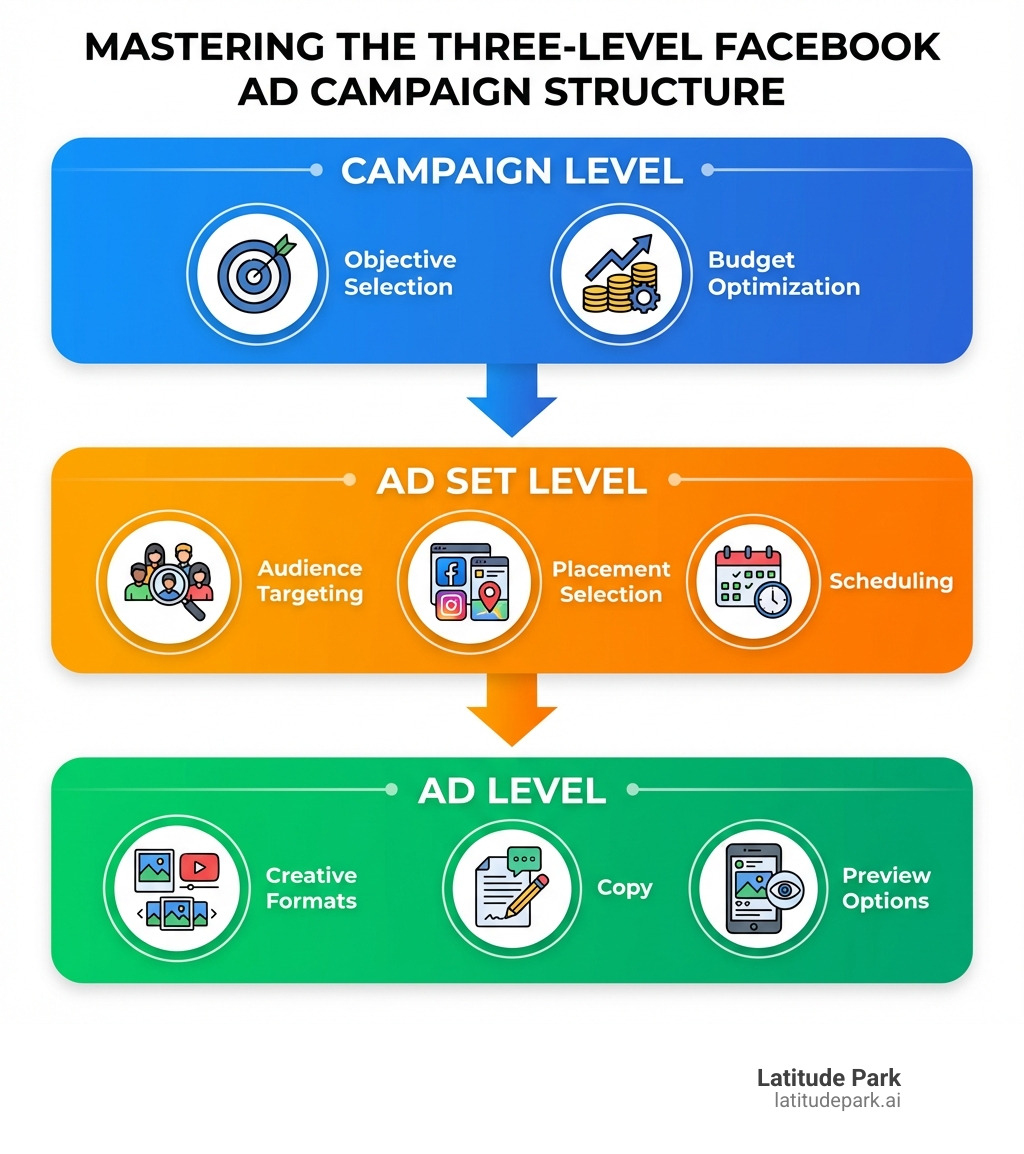
- Three-Level Structure – Every campaign is built on three distinct levels: Campaign (your objective), Ad Set (your audience, budget, and placements), and Ad (your creative content)
- Campaign Level – Choose your advertising objective, set your overall budget, and determine whether you’ll use auction or reservation buying
- Ad Set Level – Define your target audience, select where your ads appear, and set your budget and schedule
- Ad Level – Design your ad creative, write compelling copy, choose your format (image, video, carousel, or collection), and preview before publishing
- Launch Process – Go to Meta Ads Manager, click “+ Create,” and follow the guided setup through all three levels before publishing
The challenge for franchise marketers and multi-location businesses isn’t just creating a single campaign. It’s building scalable, consistent campaigns that work across different markets while maintaining brand integrity and maximizing budget efficiency.
I’m Rusty Rich, President and founder of Latitude Park, where I’ve spent over 15 years helping businesses build performance-focused digital advertising strategies, including managing successful Facebook ad campaigns for franchises and small businesses across multiple channels. Through this guide, I’ll walk you through the exact process we use to create campaigns that drive real results.
Before You Launch: Setting the Stage for Success
Before we dive into the nitty-gritty of building your first Facebook ad campaigns, it’s crucial to lay a solid foundation. Think of it like preparing for a big road trip – you wouldn’t just jump in the car and hope for the best, right? We need to ensure our Meta Business Suite is set up correctly, payment methods are squared away, and we understand Meta’s rules of the road. This preparation is especially vital for multi-location businesses, where consistency and compliance across all locations are paramount.
Understanding the Three-Level Ad Structure
At the heart of Meta Ads Manager is its three-level structure: Campaign, Ad Set, and Ad. This hierarchy is designed for organization, optimization, and precise measurement, making it easier to manage even the most complex Facebook ad campaigns.
- Campaign Level: This is the highest level, where we define the overall goal or objective of our advertising effort. Are we aiming for brand awareness, leads, or sales? We also set our campaign budget here if we opt for Advantage+ Campaign Budget (formerly Campaign Budget Optimization).
- Ad Set Level: Below the campaign, the ad set is where we get specific about who we want to reach, where our ads will appear, how much we’re willing to spend, and when our ads will run. This is where audience targeting, placements, budget, and schedule are defined.
- Ad Level: This is the creative layer, where we design the actual ads people see. Here, we choose our ad format (image, video, carousel), write our compelling ad copy, and select our call-to-action.
This structured approach allows us to test different audiences (via multiple ad sets) or different creatives (via multiple ads within an ad set) while keeping them all aligned with a single campaign objective. It’s a powerful way to organize and optimize our Facebook ad campaigns.
Essential Account Prerequisites
To ensure a smooth launch for your Facebook ad campaigns, a few essential items need to be in place. Don’t skip these steps – they’re the bedrock of successful advertising on Meta platforms.
First, you’ll need a Meta Business Account and a Facebook Page that represents your business. For multi-location franchises, this often means setting up a main business account with individual pages for each location, or managing multiple pages under one umbrella.
Next, we must configure a valid payment method. Whether it’s a credit card or PayPal, ensuring your payment information is up-to-date and correctly linked is crucial. You can add or change your payment method within your Meta Ads Manager account settings. Without it, your ads won’t run, and that would be a marketing disaster!
Ad account permissions are another key consideration. Ensure that everyone on your team who needs to manage Facebook ad campaigns has the appropriate access levels.
Finally, and perhaps most importantly, we must always adhere to Meta Advertising Standards. These standards outline what is and isn’t allowed in ads, covering everything from prohibited content to brand safety. Failing to comply can lead to rejected ads, account restrictions, or even permanent bans. Meta’s ad review process checks every ad against these standards before it goes live. Familiarize yourself with them to avoid unnecessary delays.
A critical aspect of compliance is identifying if your ad falls under a “Special Ad Category.” If your Facebook ad campaigns relate to housing, employment, financial products and services, social issues, elections, or politics, you must declare it as a special ad category. This ensures transparency and compliance with specific regulations for these sensitive topics.
Step-by-Step: Building Your First Facebook Ad Campaigns
Now that our foundation is solid, let’s roll up our sleeves and build our first Facebook ad campaigns! The Meta Ads Manager is our command center for this process. We’ll walk through each level, ensuring every detail is perfectly aligned with our business goals.

Level 1: The Campaign – Defining Your Objective
Our journey begins at the campaign level, where we define the overarching purpose of our Facebook ad campaigns. This is arguably the most critical decision, as it tells Meta’s delivery system what kind of results to optimize for.
When you click “+ Create” in Ads Manager, you’ll first choose a buying type:
- Auction: This is the most common buying type. We compete with other advertisers in an auction to show our ads to our target audience. Meta’s system automatically optimizes for the best results given our budget and bid strategy. This is ideal for most performance marketing goals.
- Reservation: This buying type allows us to reserve ad space at a fixed price, ensuring a predictable reach and frequency for our ads. It’s often used for large-scale brand awareness campaigns where guaranteed impressions are key.
Next, we select our campaign objective. Meta offers several objectives, each designed to optimize for a specific outcome:
- Awareness: To reach as many people as possible and increase brand recall.
- Traffic: To drive people to a website, app, or Messenger conversation.
- Engagement: To get more post engagements, Page likes, event responses, or video views.
- Leads: To generate leads through forms, calls, Messenger, or conversions on our website.
- App Promotion: To get more app installs or purchases within our app.
- Sales: To encourage purchases on our website, in our app, via Messenger, or through WhatsApp.
Choosing the right objective is paramount. For instance, if we want to drive online sales, selecting “Sales” will prompt Meta to show our ads to people most likely to make a purchase. If we’re a multi-location franchise trying to build local recognition, “Awareness” or “Traffic” might be more suitable.
At this level, we also have the option to toggle on an A/B test for our campaign. This allows us to test different strategies against each other, like comparing two different campaign objectives or budget allocations, to see which performs better. We’ll dig deeper into A/B testing later.
Finally, we consider Advantage+ campaign budget. This feature allows us to set an overall budget for the entire campaign, and Meta’s system automatically distributes that budget across our ad sets to get the most results. This can be a powerful tool for maximizing performance, especially for franchises running multiple ad sets for different locations or audience segments.
Level 2: The Ad Set – Targeting, Budget, and Placement
With our campaign objective set, we move to the ad set level, where we define the specifics of how our ads will reach our audience. This is where the magic of precise targeting and smart budgeting happens.
Defining our target audience is a critical step. Meta provides powerful tools for this:
- Core Audiences: We can define our audience based on demographics (age, gender, location), interests (hobbies, activities), and behaviors (purchase history, device usage). For franchises, location targeting is key, allowing us to reach potential customers within specific service areas.
- Custom Audiences: These allow us to reach people who have already interacted with our business. This could be customers from our contact lists, visitors to our website (via the Meta Pixel), or people who have engaged with our Facebook Page or Instagram profile.
- Lookalike Audiences: Once we have a Custom Audience, we can create Lookalike Audiences. These are people who share similar characteristics with our existing customers or engaged users, allowing us to expand our reach to new, relevant prospects.
Meta also offers Advantage+ audience, an AI-powered tool that automatically finds the best audience for our ads. We can provide suggestions, and Meta’s system will explore beyond them to find high-performing audiences. This is a great option for simplifying targeting, especially for businesses with limited time or expertise.
Next, we select our placements – where our ads will appear across Meta’s network. These include Facebook News Feed, Facebook Stories, Instagram feed, Instagram Stories, Messenger, and the Audience Network (which extends our reach to thousands of high-quality apps and websites outside of Meta).
We highly recommend using Advantage+ placements. This allows Meta’s delivery system to automatically place our ads where they are most likely to perform well, optimizing our budget across all available placements. While manual placements offer granular control, Advantage+ placements often yield better results by leveraging Meta’s powerful AI. However, note that ads about social issues, elections, or politics are not eligible for Audience Network placements.
Budgeting is another key decision here. We can choose between:
- Daily Budget: A fixed amount we’re willing to spend per day.
- Lifetime Budget: An amount we’re willing to spend over the entire duration of our ad set.
The choice often depends on our campaign goals and how flexible we need to be. For ongoing campaigns, a daily budget provides consistent spending, while a lifetime budget is great for fixed-duration promotions.
Finally, we set our schedule, defining the start and end dates for our ad set. We can also use ad scheduling to specify certain hours or days of the week when our ads should run, which can be useful if we know our audience is most active or receptive during specific times.
Level 3: The Ad – Crafting Your Creative
We’ve set our objective and defined our audience and budget. Now it’s time for the fun part: crafting the actual ad that will capture attention and drive action! This is where we bring our brand’s message to life.
Meta Ads Manager offers several ad setup options:
- Create ad: This is where we build a brand new ad from scratch, uploading our media and writing our copy.
- Use existing post: We can promote an organic post from our Facebook Page or Instagram profile. This is great for leveraging content that has already performed well organically and benefits from existing social proof.
- Use Creative Hub mockup: For more advanced users, we can import mockups created in Meta’s Creative Hub.
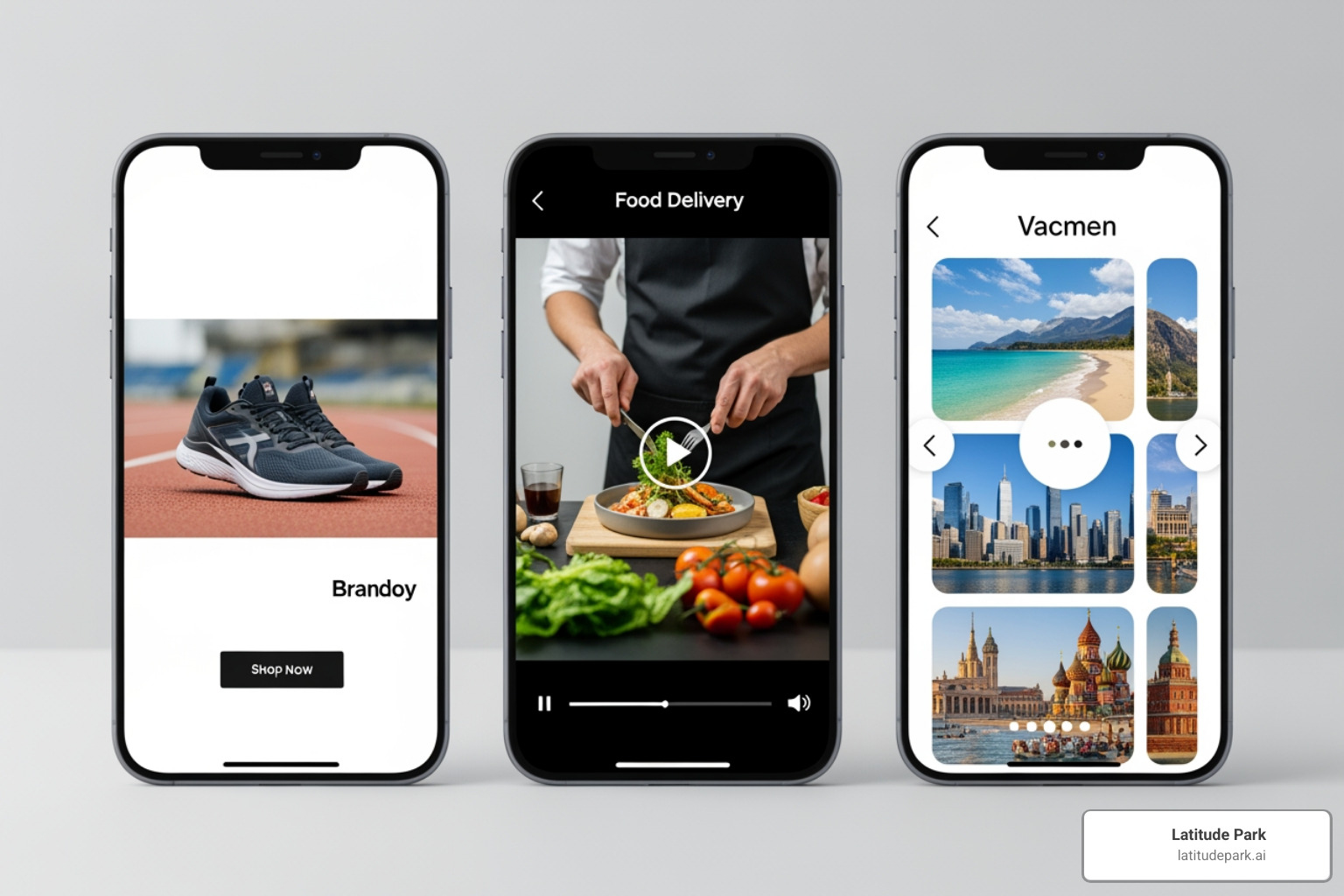
When creating an ad, we choose from various ad formats:
- Single image/video: The most common formats, featuring one compelling image or video.
- Carousel: Allows us to showcase up to 10 images or videos within a single ad, each with its own link. This is fantastic for telling a story or highlighting multiple products.
- Collection: A mobile-first format that presents a primary video or image with several smaller product images below it. Clicking on the ad opens an Instant Experience – a full-screen, fast-loading landing page within Facebook.
For our ad creative, we’ll need to craft engaging primary text, a catchy headline, and a clear Call-to-Action (CTA) button (e.g., “Shop Now,” “Learn More,” “Sign Up”). The goal is to stop the scroll!
Meta is constantly innovating with tools like Advantage+ creative improvements and generative AI features. Advantage+ creative can automatically optimize elements like image brightness, aspect ratios, and text variations to improve performance. Generative AI takes this a step further, offering tools like image generation, text generation, and background generation to help us create fresh, impactful visuals and copy. While powerful, we always preview and approve any AI-generated content to ensure it aligns perfectly with our brand.
Before publishing, always use the ad preview tool. This allows us to see exactly how our ad will look across different placements (News Feed, Stories, Messenger, etc.) and devices. It’s our last chance to catch any typos or design glitches before our ad goes live. Once everything looks perfect, we hit “Publish,” and our Facebook ad campaigns are officially launched!
Crafting Compelling Creatives That Convert
Even the most perfectly targeted and budgeted Facebook ad campaigns will fall flat without compelling creatives. In a crowded digital landscape, our ads need to be scroll-stopping and instantly communicate value. This section is all about turning heads and encouraging action.
Writing Ad Copy That Connects and Sells
Ad copy is more than just words; it’s a conversation with our potential customers. Effective copy for Facebook ad campaigns needs to be:
- Conversational Tone: Speak directly to your audience, using “you” and “your.” Make it feel like a friendly chat, not a sales pitch.
- Emojis for emotional communications: Emojis are processed as non-verbal communication, adding emotional nuance and enhancing the message. Use them to break up text and convey personality, but don’t overdo it.
- Clear Call-to-Action (CTA): Our CTA button (e.g., “Shop Now,” “Learn More”) is crucial, but our copy should also guide users. Michael Aagaard, an A/B testing expert, developed two simple questions for CTA copy: “What am I getting?” and “How is it going to benefit me?” Answer these clearly.
- Readability: Use short sentences, bullet points, and paragraph breaks. People scroll quickly, and if your ad is a wall of text, they’ll keep scrolling.
- Highlighting Benefits, Not Just Features: Instead of saying “Our software has X feature,” explain “Our software helps you save Y hours a week, giving you more time for Z.” Focus on the problem you solve and the positive outcome.
- Leverage User-Generated Content (UGC): Incorporating real customer testimonials or reviews into your ad copy can be incredibly powerful.
- B2B and Service-Focused Copy: For B2B or service-based businesses, focus on solving pain points. Highlight efficiency, cost savings, or expert support. Use numbers and statistics to lend authority to your claims. For example, “Reduce payroll time by 50% with our automated system.”
Mastering Ad Formats for Maximum Impact
The visual elements of our Facebook ad campaigns are what truly stop the scroll. With so many ads running, we need to choose the right format to make our message pop.
- Static Images vs. Dynamic Formats (Video, GIF): While static images can be effective, dynamic formats often outperform them. Shoppers that watch videos are 1.81 times more likely to make a purchase. In fact, video ads can bring in 270% more leads than images. Video ads also increase view time by an average of 12%.
- Video Ad Best Practices:
- Captions are essential: 41% of videos were almost meaningless without sound. Since videos in the Facebook News Feed play silently by default, captions are non-negotiable. They ensure your message is understood even without audio.
- Compelling Thumbnails: Your thumbnail is the first impression. Make it engaging and representative of your video’s content.
- Keep it short and sweet: Especially for awareness or traffic campaigns, aim for concise videos that deliver the core message quickly.
- Optimize for mobile: Most users are on mobile, so ensure your videos are shot and edited for vertical or square formats.
- Carousel Ads for Storytelling: Carousels are excellent for showcasing multiple products, highlighting different features of a single product, or telling a sequential story. Each card can have a unique image/video, headline, description, and URL.
- Collection Ads for E-commerce: This mobile-first format is a dream for e-commerce brands. It combines a hero video/image with a grid of products, allowing users to browse and shop directly within the Facebook environment.
- Lifestyle vs. Product-Focused Ads:
- Lifestyle Ads: Show your product in use, demonstrating the benefits and how it integrates into a customer’s life. These are great for building emotional connection. Lifestyle video ads, in particular, can be very effective in conveying aspiration and utility.
- Product-Focused Ads: Clearly highlight your product with crisp, high-quality images or videos. Use these to emphasize features, pricing, or specific offers.
Colors alone can influence up to 90% of an initial impression. Use engaging visuals and consistent branding across all your ad formats.
Leveraging Social Proof and Urgency
People trust people. Leveraging social proof and creating a sense of urgency can significantly boost the performance of our Facebook ad campaigns.
- Testimonials and Customer Reviews: This is gold. 83% of people trust reviews over ads. Incorporate direct quotes, star ratings, or even screenshots of positive reviews into your ad creatives and copy. Using a real person associated with your product instead of a stock photo can increase conversion by 35%.
- Influencer Mentions: If an influencer has praised your brand, showcasing that can create a powerful “halo effect,” associating your brand with their fame and credibility.
- Case Studies: For B2B or complex services, a mini case study within your ad, or linked from it, can demonstrate tangible results and build trust.
- Promotional Offers: Everyone loves a good deal! Clearly communicate discounts, BOGO offers, or free shipping. For example, when one online store introduced free shipping for orders over $100, their conversions went up 50%.
- Limited-Time Deals & Scarcity Tactics: Phrases like “Limited Stock,” “Offer Ends Soon,” or “Only X Left” create urgency and encourage immediate action. Words like “Now,” “Today,” or “Right Away” contribute to this sense of urgency, which can significantly increase sales.
Optimizing and Measuring Your Facebook Ad Campaigns
Launching your Facebook ad campaigns is just the beginning. The real work—and the real fun—comes in optimizing and measuring their performance. This iterative process is how we ensure our advertising budget is working as hard as possible to achieve our goals.
Key Metrics and Tools for Performance Tracking
Meta Ads Manager provides a wealth of data to help us understand how our Facebook ad campaigns are performing. We need to identify and track the Key Performance Indicators (KPIs) that align with our campaign objectives:
- Cost per Result: This is a crucial metric, showing how much we’re paying for each desired action (e.g., cost per lead, cost per purchase).
- Conversion Rate: The percentage of people who complete our desired action after seeing our ad.
- Return on Ad Spend (ROAS): For sales campaigns, ROAS tells us how much revenue we’re generating for every dollar spent on ads.
- Reach and Frequency: How many unique people saw our ads (reach) and how many times they saw them (frequency).
- Click-Through Rate (CTR): The percentage of people who clicked on our ad after seeing it.
Beyond these core metrics, Meta Ads Manager also offers powerful tools:
- Opportunity Score: When eligible, this feature provides experimentally proven recommendations to help improve our ad account performance. It’s like having a helpful assistant pointing out areas for optimization. You can find it in your Account Overview.
- Attribution Settings: This allows us to define how Meta credits conversions to our ads. Understanding different attribution models (e.g., 7-day click, 1-day view) helps us accurately measure the impact of our campaigns.
Regularly reviewing these metrics and leveraging these tools allows us to make data-driven decisions and continuously refine our Facebook ad campaigns.
The Power of A/B Testing Your Facebook Ad Campaigns
A/B testing, also known as split testing, is a scientific method for comparing two versions of an ad or campaign element to see which one performs better. It’s how we move beyond guesswork and make informed decisions. We can A/B test almost anything in our Facebook ad campaigns:
- Creative Elements: Test different images, videos, or ad formats. Does a lifestyle video outperform a product-focused image?
- Ad Copy: Experiment with different headlines, primary text, or descriptions. Does a benefit-driven headline work better than a curiosity-driven one?
- Audience Segments: Compare two slightly different target audiences to see which is more receptive to our message.
- Placements: While Advantage+ placements are often recommended, we might A/B test specific manual placements if we have a strong hypothesis.
- Call-to-Action Buttons: Even small changes to CTA text can have a big impact. Remember Michael Aagaard’s two simple questions for CTA copy: “What am I getting?” and “How is it going to benefit me?”
To run an A/B test, we create two versions (A and B) that are identical except for the single variable we want to test. Meta then splits our audience and budget between the two versions and tells us which one performed better based on our chosen metric. This continuous learning process is essential for long-term success with Facebook ad campaigns.
Conclusion: Take Your Campaigns to the Next Level
Mastering Facebook ad campaigns is an ongoing journey of learning, testing, and optimizing. From understanding the three-level structure to crafting compelling creatives and carefully measuring performance, every step contributes to greater success. For multi-location franchises, this strategic approach to digital advertising is not just an option but a necessity for scalable growth and market penetration.
We’ve explored the essential prerequisites, walked through the step-by-step process of building campaigns, dug into the art of creating scroll-stopping ads, and highlighted the importance of continuous optimization. While there are over 5 million ads running on Facebook every day, 99% of those ads are unenthusiastically average. Our goal is to ensure your ads are in that top 1% that truly stand out and deliver exceptional results.
By applying the insights and best practices outlined in this guide, you’re well on your way to launching effective Facebook ad campaigns that connect with your target audience, drive conversions, and contribute to your long-term growth.
If you’re a franchise looking to lift your digital marketing efforts and steer the complexities of multi-location advertising, we’re here to help. Get expert help with your digital marketing services and let us put our expertise to work for your brand.