Why Local Inventory Ads Matter for Multi-Location Retailers
Local Inventory Ads are a powerful advertising format that showcases your products and store information to nearby shoppers searching on Google. Here’s what you need to know:
- What they are: Ads that display real-time inventory from your physical stores to local searchers
- Where they appear: Google Search results with an “In-store” label, showing product availability, price, and store details
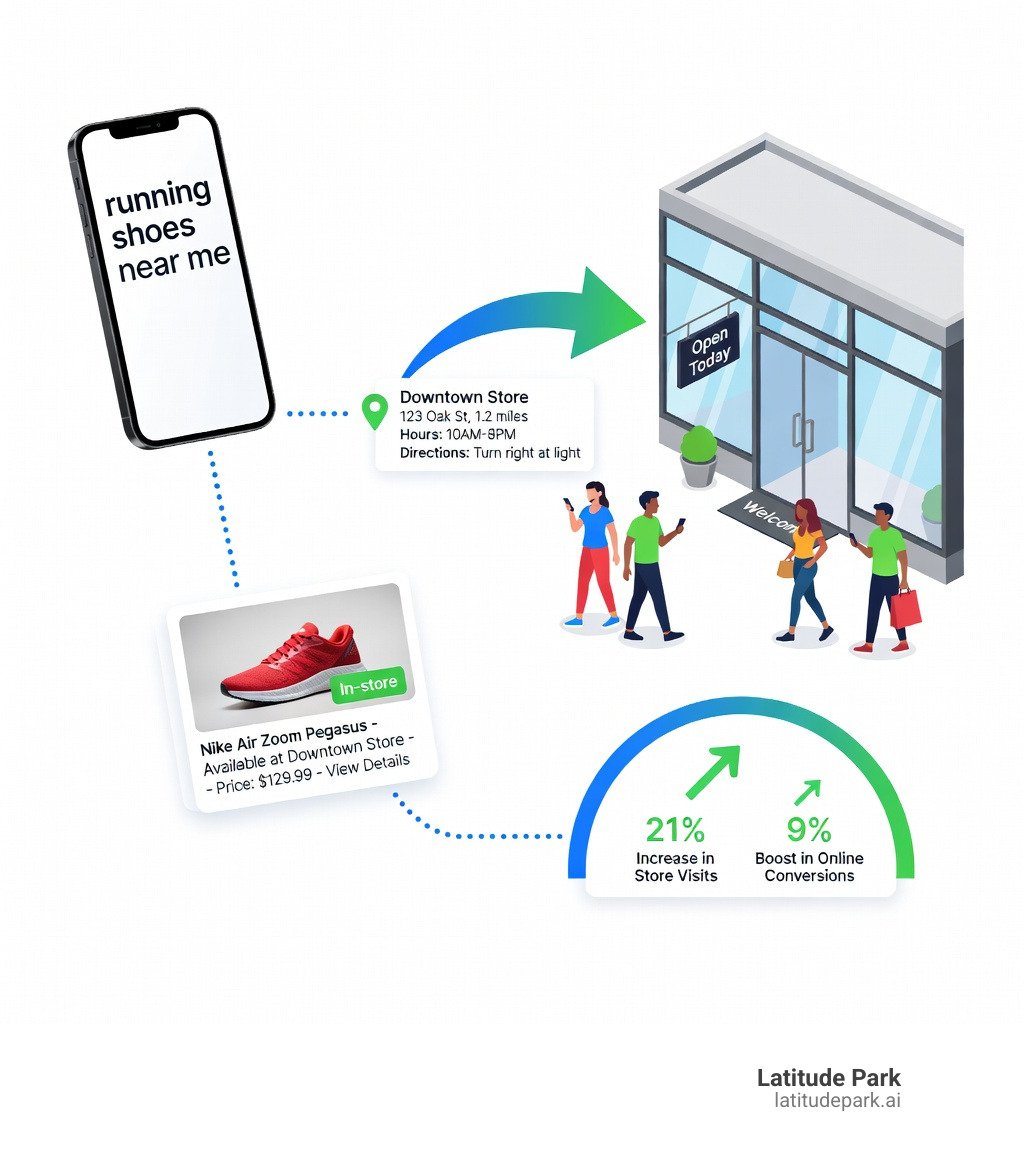
- Key benefit: Bridge online searches to in-store visits—retailers see a 21% increase in store visits and 9% boost in online conversions
- Requirements: Physical storefront, Google Business Profile, Google Merchant Center account, and accurate inventory feeds
- Availability: 35+ countries including the US, Canada, UK, Australia, and Brazil
Thanks to digital, people can shop whenever they want, wherever they want. When someone searches “running shoes near me” on their phone, Local Inventory Ads connect that search to your actual store inventory—showing them you have their size in stock, your store hours, and directions to get there. This omnichannel approach mirrors how customers actually shop today: researching online, then visiting stores to see products in person, try them on, or pick them up immediately.
For franchise marketing managers overseeing multiple locations, Local Inventory Ads solve a critical challenge: how do you drive foot traffic to each store while maintaining consistent brand messaging and accurate, location-specific inventory data across all your markets?
I’m Rusty Rich, and since founding Latitude Park in 2009, I’ve helped franchise businesses and multi-location retailers build scalable digital advertising strategies, including implementing Local Inventory Ads to drive measurable in-store traffic. Over the past 15 years, I’ve seen how Local Inventory Ads transform local search visibility for businesses with physical storefronts.
Terms related to local inventory ads:
Understanding Local Inventory Ads and How They Work
If you’ve ever searched for a specific kitchen gadget or a pair of boots and seen a little “In-store” tag next to a product image on Google, you’ve met local inventory ads (LIAs). These ads are essentially the digital version of a store window—but better, because they show the shopper exactly what is inside the store before they even leave their couch.
At their core, LIAs bridge the gap between the online research phase and the offline purchase. We live in an “I need it now” world. While two-day shipping is great, “picking it up in twenty minutes” is often better. These ads serve that immediate need by highlighting that a product is available just a few miles away.
Interestingly, Google isn’t the only player in this game. Microsoft Advertising also offers local inventory ads on Bing.com. This integration allows nearby shoppers to see retail store information within Microsoft Shopping campaigns. Whether your customers are Googling on their iPhones or using Bing on their work computers, you can reach them with real-time stock data.
To help you visualize the difference, we’ve put together a quick comparison:
| Feature | Standard Shopping Ads | Local Inventory Ads |
|---|---|---|
| Primary Goal | Online sales/e-commerce | In-store foot traffic |
| Landing Page | Your website’s product page | Local storefront (Google or Merchant hosted) |
| Key Info Displayed | Price, shipping, website name | Distance to store, in-store price, stock status |
| Availability | Global | 35+ supported countries |
| Purchase Location | Online | In-person at a physical store |
How local inventory ads Differ from Standard Shopping Ads
The biggest difference lies in the “where” and the “how.” Standard Shopping Ads are built for the e-commerce world. They care about shipping speeds, online checkout flows, and national reach. Local inventory ads, on the other hand, are hyper-local. They prioritize the store’s distance from the user, opening hours, and whether the item is actually on the shelf right now.
According to Google support on LIA basics, LIAs can show essential info like store distance, directions, and even reviews. This makes them much more useful for a local business than a standard ad that might point to a warehouse halfway across the country. If you want to dive deeper into how this fits into your broader strategy, check out our more info about local business Google Ads.
Key Benefits for Brick-and-Mortar Retailers
Why should you go through the effort of setting these up? The numbers speak for themselves. Retailers using local inventory ads alongside standard Shopping ads notice a 21% increase in store visits and a 9% increase in online conversions for products available in-store.
We’ve seen cases where independent retailers, like an outdoor clothing store in the UK, used LIAs to increase in-store revenue by 30% year-on-year during their quietest months. It levels the playing field, allowing smaller or mid-sized multi-location brands to compete with the giants by showing they have the goods ready for immediate pickup.
Plus, you can enhance these ads with features like curbside pickup badges. This is a huge win for customer experience—nothing says “convenience” like a shopper knowing they can grab their item without even unbuckling their seatbelt.
Eligibility, Policies, and Global Availability
Before you get too excited and start uploading your entire warehouse list, we need to talk about the rules. Google is pretty strict about who can play in the LIA sandbox.
First and foremost, you must have a physical brick-and-mortar location that is open to the public. If you operate out of a private warehouse or a home office where customers can’t just walk in and browse, LIAs aren’t for you. You also need to be in a supported country. Currently, local inventory ads support 35+ countries, including the US, Canada, UK, Australia, Brazil, and many across Europe and Asia.
Requirements for Participation
There are some specific “no-nos” in the shopping ads policies. For example:
- Membership Restrictions: You can’t use LIAs if your store requires a membership for any purchase (like a wholesale club). However, if you allow non-members to buy products at a different price, you can participate as long as you show the non-member price.
- Personally Identifiable Information (PII): Never, ever include customer names, emails, or phone numbers in your product feeds.
- Inventory Verification: Google may occasionally ask you to verify your inventory. This might involve a store visit or a request for a photo of a specific product on your shelf to ensure your digital data matches reality.
Maintaining a verified Google Business Profile is also a non-negotiable prerequisite. Think of your Business Profile as the foundation—without it, Google has no way of knowing where your stores are or when they are open.
Free Local Listings vs. Paid Ads
One of the best “secrets” in the local marketing world is that you don’t always have to pay to show your inventory. Google offers free local listings (also known as local surfaces across Google). This allows your in-store products to appear across Google Search, Google Images, and Google Maps at no cost.
While paid local inventory ads give you more control, better placement, and more data, free listings are a fantastic way to start. If you’re in the UK, IE, US, or CA, you can even get started with free local listings using the local inventory app to automatically sync your products.
Step-by-Step Setup: Feeds and Landing Pages
Setting up local inventory ads is a bit like building a LEGO set. You have several different pieces that must click together perfectly for the whole thing to work. You’ll need to link three main accounts:
- Google Business Profile: Where your store locations live.
- Google Merchant Center: Where your product data lives.
- Google Ads: Where your money and campaigns live.
For a comprehensive look at the ecosystem, our guide to Google Ads for local businesses is a great companion read.
Setting Up Your local inventory ads Step-by-Step
Here is the high-level roadmap to getting live:
- Link Your Accounts: Connect your Business Profile to your Merchant Center. This tells Google which products belong to which physical address.
- Verify Your Business: Follow the steps to verify your business so Google knows you’re a real entity.
- Assign Store Codes: This is a crucial technical step. You must set up your Business Profile store codes so they match the codes in your product feeds. If Store A is “ST-001” in Google Business Profile, it must be “ST-001” in your inventory feed.
- Enable the LIA Program: In Merchant Center, go to “Growth” and then “Manage programs” to enable Local Inventory Ads.
Managing Primary and Local Inventory Feeds
This is where most people get a little confused. You actually need two different feeds for LIAs:
- The Primary Feed: This lists all your products and their general details (title, description, image URL, brand).
- The Local Inventory Feed: This is a separate file that tells Google the specific price and quantity of those products at each of your store locations.
For example, if you have 10 stores, your datafeeds will show that “Product X” is $20 in Store A but maybe $22 in Store B. Keeping this data accurate is vital. If a customer drives 10 miles because your ad said an item was in stock, and they find an empty shelf, you’ve lost a customer for life.
Landing Page Experience Options
When someone clicks your LIA, where do they go? You have three choices:
- Google-Hosted Local Storefront: Google creates a page for you. This is perfect if your own website isn’t great at showing local stock.
- Merchant-Hosted Local Storefront (Basic): The user goes to your website, but Google adds a little “top bar” with store info.
- Merchant-Hosted Local Storefront (Full): The user lands directly on your website’s product page, which must dynamically show the price and availability for the specific store the user was looking at.
Each has its pros and cons, which you can explore in the local inventory ads and free local listings overview.
Optimizing local inventory ads for Maximum Performance
Setting up the ads is just the beginning. To really see that 21% lift in store visits, you need to optimize. We recommend focusing on three main areas: geographic targeting, device bidding, and timing.
Since LIAs are meant for people nearby, you should increase your bids for shoppers within a 25–35 mile radius of your stores. You can also be smarter with your timing—boost your bids during store operating hours. There’s no point in paying a premium for a “near me” click at 3:00 AM if your doors don’t open until 9:00 AM. For more tactical tips, check out our strategies for local search ad campaigns.
Advanced Features: Pickup Today and Curbside
To really stand out, use “add-ons.” You can add a “Pickup Today” label if you can guarantee that an item ordered online will be ready for pickup within the same day. There is also “On display to order,” which is great for showrooms (like furniture stores) where you have the item for people to see, but you ship the actual purchase from a warehouse.
Google provides a detailed guide on pickup attributes that explains how to add these to your feed. These small labels can significantly increase your click-through rate because they solve the customer’s problem of “how fast can I get this?”
Best Practices for Data and Bidding
We always tell our franchise clients to treat their product data like a high-priority asset.
- Product Titles: Put the most important info first (Brand + Model + Color + Size).
- Images: Use high-quality, clear images.
- Smart Bidding: Use Google’s automated smart bidding. It uses machine learning to adjust your bids in real-time based on the likelihood of a store visit.
- Custom Labels: Use these to segment your best-sellers or high-margin items so you can bid more aggressively on them.
For a deeper dive into these tactics, our google-ads-local-business-guide covers everything from A to Z.
Measuring Success and Overcoming Common Challenges
You can’t manage what you don’t measure. In Google Ads, you can segment your data by “Click type.” This shows you exactly how many people clicked for “Get directions,” “Store hours,” or “Product details.”
Monitoring Performance and Store Visits
Store visit measurement is the holy grail of LIA reporting. Google uses anonymized location data from users who have opted-in to “Location History” to estimate how many people actually walked into your store after clicking an ad. This allows you to calculate a true “Offline ROI.”
If you want to run a specific promotion, you can even create an in-store sale in your feed to see how a temporary price drop affects foot traffic.
Common Cons and How to Overcome Them
We won’t sugarcoat it: local inventory ads can be technically challenging.
- Feed Complexity: Managing inventory for 50 stores is hard. We suggest using a feed management platform to automate the syncing process.
- Inventory Accuracy: If your POS system doesn’t talk to your Merchant Center frequently, your data will get stale. Try to sync your inventory at least once a day (or more for high-volume stores).
- Technical Setup: Linking accounts and setting store codes can be a headache. If you get stuck, refer back to the local inventory ads and free local product listings policies to ensure you aren’t missing a compliance step.
Frequently Asked Questions about Local Inventory Ads
What countries support local inventory ads?
Currently, LIAs are available in over 35 countries, including the US, Canada, UK, Australia, Brazil, France, Germany, Japan, and India. The list is constantly expanding, so check the Google Merchant Center help page for the latest additions.
Can I use LIAs if I don’t have a website?
Yes! This is one of the coolest features. You can use a “Google-hosted local storefront.” When someone clicks your ad, Google sends them to a page they host that displays your store’s info, stock levels, and directions. You don’t need a fancy e-commerce site to win at the local game.
How do I track if someone visited my store after seeing an ad?
Google uses “Store Visit” conversions. By looking at phone location data (anonymously), Google can tell if a user who interacted with your ad later visited your physical store. You can see these metrics directly in your Google Ads dashboard under the “Conversions” column.
Conclusion
The “deal” with local inventory ads is simple: they are the ultimate tool for the modern, omnichannel retailer. By showing shoppers exactly what you have in stock at the very moment they are looking for it, you remove the friction of “maybe they have it” and replace it with “I’m going there now.”
For multi-location franchises, this isn’t just a “nice-to-have”—it’s a competitive necessity. At Latitude Park, we specialize in navigating these complex campaign structures, ensuring that every one of your locations gets the visibility it deserves while maintaining the technical precision required for high-performance inventory ads.
Ready to turn those “near me” searches into actual customers walking through your doors? It’s time to unlock local growth with Google Ads and start bridging the gap between digital discovery and physical sales. We’re here to help you scale your franchise marketing and dominate your local markets.