Why Bother? The Strategic Value of Google Ads Competitive Analysis
Google Ads competitive analysis is the process of evaluating your competitors’ advertising campaigns to learn from their tactics and find opportunities for your own. It’s a crucial strategy for staying ahead, allowing you to uncover:
- Keywords your competitors are bidding on that you’re missing.
- Ad copy and messaging that resonates with your shared audience.
- How much competitors are likely spending on their campaigns.
- Market gaps where you can gain an edge.
- Industry trends that signal where the market is heading.
For franchise marketing managers, this intelligence is invaluable. Success isn’t just about spending more—it’s about spending smarter. Analyzing competitor campaigns helps you boost performance by finding untapped keywords, learning from successful ad copy, understanding budget benchmarks, and avoiding costly mistakes.
Think of it this way: your competitors are already running market experiments. By analyzing their results, you gain insights without matching their ad spend. A 1-2 point Quality Score improvement can match a 20-30% bid increase, which means a smarter strategy often beats a bigger budget.
While Google has limited access to exact competitor data for privacy reasons, competitive analysis remains essential. We must focus on the signals that are available and use them strategically. For a comprehensive approach, it’s also helpful to understand how paid efforts fit into the broader digital ecosystem. More info about how SEO and PPC work together can provide a holistic view.
I’m Rusty Rich, founder and President of Latitude Park. For over 15 years, I’ve helped franchises build winning digital advertising strategies through systematic competitive analysis. This guide will show you how to turn competitor intelligence into campaigns that drive measurable growth.
A Step-by-Step Guide to Effective Google Ads Analysis
Ready to dive into the data? Here’s a proven, step-by-step approach to conducting a thorough Google Ads competitive analysis and finding opportunities your competitors are missing.
Step 1: Identify Relevant Market Players and Keyword Landscape
First, you need to know who you’re up against. Start with manual Google searches using your primary keywords. Search at different times and on various devices to see which advertisers consistently appear. Identify both direct competitors (offering similar products/services) and indirect competitors (offering alternative solutions or competing for the same ad space).
Analyze the keyword overlap to find gaps—keywords your competitors bid on that you don’t. These represent untapped opportunities. Also, examine the entire Search Engine Results Page (SERP) to understand user intent based on the presence of organic listings, local packs, or shopping results.
Use the Google Ads Auction Insights report. This native tool shows how your ads perform against other advertisers in the same auctions, providing metrics like impression share, overlap rate, and outranking share. It’s a direct look at the competitive landscape. Learn more about the Auction Insights Report to get the full picture.
Step 2: Find High-Performing Keywords and Ad Messaging
Now, dig into what your rivals are doing. Keyword gap analysis tools can show you which keywords competitors are bidding on that you aren’t, revealing immediate opportunities to expand your reach.
Analyzing ad headlines and copy provides a window into your competitors’ messaging strategies. Note the benefits they highlight, the problems they solve, and their unique selling propositions (USPs). This isn’t about copying—it’s about understanding what resonates with your shared audience so you can refine your own messaging.
Pay close attention to their calls-to-action (CTAs). A strong CTA can make or break an ad. Industry data shows that customized CTAs can convert over 40% more visitors than generic ones. Also, look at their ad extensions (sitelinks, callouts, etc.). They maximize ad real estate and provide extra information, and you should too. For more on this, check out our tips for using Google Ad extensions for local businesses.
Step 3: Evaluate Performance with Key Metrics
Next, interpret the data to see how well competitor strategies are working. Impression share shows how often their ads appeared versus how often they could have. A high impression share indicates dominance for specific keywords. The overlap rate shows how often your ads and a competitor’s appeared in the same auction, while outranking share reveals how often your ad ranked higher.
While you can’t see exact competitor click-through rates (CTRs), you can make educated guesses based on their ad copy’s quality. Similarly, cost per click (CPC) estimates from tools help benchmark your own costs. However, with CPCs always rising, it’s more effective to focus on what you can control: conversion rates and Quality Score.
A 1-2 point Quality Score improvement can match a 20-30% bid increase. This demonstrates the power of relevancy. Use ad spend estimates from third-party tools as directional guides, not gospel truth. Privacy changes mean exact numbers are unavailable, but you can still make smart decisions with the data you have.
Step 4: Analyze the Post-Click Experience (Landing Pages)
An amazing ad is only half the battle. Analyzing competitor landing pages is a critical part of Google Ads competitive analysis. Evaluate their landing page design and user experience (UX). Is the page clean and easy to steer? A cluttered or confusing page can undermine even the most compelling ad.
Look for conversion rate optimization (CRO) elements like clear CTAs, simple forms, and social proof (testimonials, reviews, trust badges). These build credibility and encourage conversions.
Page speed is a major factor for both UX and Quality Score. A fast-loading landing page can improve your ad rank. Finally, check for message match: does the promise in the ad align with the content on the landing page? A strong message match reduces bounce rates and improves conversions because users find exactly what they expected.
The Ultimate Google Ads Competitive Analysis Toolkit
To conduct a thorough Google Ads competitive analysis, you need the right tools. The good news is you have access to both powerful, free native Google tools and robust third-party platforms for deeper insights.

Leveraging Google’s Free Native Tools
Start with what Google gives you for free. These native tools are powerful and the best place to begin your analysis.
- Google Ads Auction Insights: This report shows how you perform relative to other advertisers in the same auctions. It reveals competitor domains and key metrics like impression share, overlap rate, and outranking share.
- Google Ads Keyword Planner: Beyond research, this tool helps you understand the competitive landscape by providing estimated search volumes and bid ranges for keywords, gauging how competitive specific terms are.
- Google Ads Transparency Center: A game-changer since its 2023 launch. You can search for any advertiser and view the actual ads they’re currently running. It’s invaluable for reviewing competitor ad creatives and messaging trends.
- Google Merchant Center: For e-commerce, the PLA Research feature offers a look at competitors’ Google Shopping campaigns. The Price Competitiveness report shows how your product prices compare, revealing what’s resonating with customers.
Using Third-Party Platforms for Deeper Insights
While Google’s tools are great, third-party platforms offer capabilities that go beyond what’s available natively, such as historical data and broader market views.
These platforms provide market analysis, keyword research, and ad tracking features. You can monitor competitors’ ad positions, find their paid keywords, and review ad copy all in one place. A key feature is historical data, which allows you to track how competitor strategies have evolved, revealing seasonal trends and long-term messaging shifts.
Many third-party tools also estimate competitor ad spend. However, these are estimates, not exact figures. Use them as directional guides in combination with native Google tools. Never base your entire strategy on estimated data alone.
Here’s how Google’s native tools stack up against typical third-party platform capabilities:
| Feature/Metric | Google’s Native Tools | Third-Party Tool Capabilities |
|---|---|---|
| Identifies Competitors | Auction Insights (domains only) | Comprehensive competitor finding |
| Paid Keywords | Keyword Planner (estimates) | Detailed lists of competitor paid keywords |
| Ad Copy/Creatives | Ads Transparency Center (live ads) | Historical ad copy, display ads, video ads |
| Estimated Ad Spend | Keyword Planner (bid ranges) | Estimated monthly ad spend, CPC, traffic |
| Historical Data | Limited (Auction Insights for 90 days) | Often extensive (years of data) |
| Landing Page Analysis | Manual review | Direct links to competitor landing pages |
| Google Shopping Ads | Google Merchant Center | Insights into competitor PLAs and pricing |
| Keyword Gap Analysis | Manual comparison | Automated tools to find keyword gaps |
| Quality Score Insights | Direct in Google Ads (for your account) | Indirect inferences based on ad position |
| SERP Tracking | Manual observation | Automated SERP tracking and history |
| Alerts/Monitoring | No direct competitor alerts | Automated alerts for competitor changes |
The bottom line: start with Google’s free tools, then consider third-party platforms for deeper historical insights or streamlined monitoring.
Turning Intelligence into Action: Improving Your Own Campaigns
Data sitting in a spreadsheet doesn’t win auctions. The real magic happens when we transform intelligence into concrete improvements for our own campaigns. Think of it like scouting an opposing team—you win by adjusting your playbook based on what you learned.
Refining Your Keyword Strategy and Bidding
Competitor insights can transform your keyword strategy. The keyword gaps you identified represent opportunities where competitors are capturing traffic you’re missing. Add these keywords to your campaigns strategically to expand your reach into proven territory.
Prioritize bidding on high-intent keywords where competitors consistently appear with compelling offers, as these are likely driving real business results. Just as important are negative keywords. If you notice competitors appearing for irrelevant terms, add those terms to your negative lists to prevent wasted ad spend.
Use your Auction Insights report to guide bid adjustments. If a key competitor consistently outranks you, you can either increase your bids or, more efficiently, focus on improving your Quality Score. A 1-2 point Quality Score improvement can match a 20-30% bid increase. If you notice your Google Ads performance is dropping, competitor analysis can often point to the cause.
Crafting Superior Ad Copy and Offers
Competitor ad copy is an incredible source of inspiration. Use their messaging to inform your A/B testing. If a rival consistently uses a particular benefit or call-to-action, test a similar approach in your own campaigns to see if it works for your audience.
By understanding what competitors emphasize, you can highlight your unique value. If they focus on price, you can emphasize service. If they tout features, you can solve a specific pain point better. Make your competitive edge crystal clear in your ads.
Analyze competitor offers—discounts, free trials, guarantees—to ensure yours are compelling. Customized CTAs convert significantly more visitors, so pay attention to how competitors structure theirs. Also, use ad extensions to make your ads more prominent. Our Tips for using Google Ad extensions for local businesses can guide you, especially for franchise locations.
Optimizing for Different Campaign Types
Google Ads competitive analysis isn’t a one-size-fits-all approach. Different campaign types require custom strategies.
- Search Campaigns: Use keyword insights to refine keyword lists, adjust match types, and craft ad copy that speaks to high-intent queries.
- Shopping Campaigns: Analyze competitor product titles, images, and prices from Google Merchant Center to make your own Shopping ads more competitive.
- Display Campaigns: Examine competitor display ad creatives and messaging to design more effective visuals and target relevant audiences.
Tailoring your analysis for different ad formats ensures you apply the right insights to the right campaigns. For franchise marketing managers, a comprehensive guide to Google Ads for local businesses can help apply these insights effectively across all markets.
Best Practices for Ongoing Success
Google Ads competitive analysis isn’t a one-time task. The most successful campaigns integrate it into the regular rhythm of campaign management.
Establishing an Ongoing Monitoring Process
Think of competitive analysis as your campaign’s early warning system. The digital ad landscape shifts constantly. We recommend a tiered approach to monitoring:
- Daily Checks (5 minutes): Glance at your Auction Insights report for any sudden, dramatic changes in competitor impression share. This could signal a new promotion or budget increase.
- Weekly Reviews: Use the Google Ads Transparency Center to see if rivals have launched new ads or offers. This helps keep your messaging fresh and competitive.
- Quarterly Deep-Dives: This is when you use third-party tools to identify new keywords, evaluate estimated spend shifts, and analyze landing page updates. These reviews inform your broader strategic direction and budget allocation.
Many third-party tools offer alerts that notify you of competitor moves, keeping you informed without constant manual checks. Beyond direct competitors, track broader market shifts, like new entrants or seasonal search trends. This is especially crucial for complex accounts like those managed by franchise marketing specialists at Latitude Park, where local trends can vary dramatically.
Navigating the Challenges and Ethical Lines of Google Ads Competitive Analysis
Competitive analysis has become more challenging, and there are important ethical lines to respect.
Data privacy changes by Google mean the days of seeing exact competitor spending are over. We now rely more on inference, trends, and relative metrics like impression share rather than absolute numbers. Data from third-party tools are estimates, not exact figures. Use them as directional guides, not definitive truths. Blindly copying an estimated budget could lead to wasted spend.
Your focus should shift from exact numbers to identifying broader trends and patterns. Is a competitor consistently increasing their impression share? Are they testing new ad copy themes? These trends tell you more about market direction than any single data point.
Finally, let’s talk ethics. The goal is to gain insights, not to engage in unfair practices. Avoid direct copying of ad copy or landing page designs. It’s unethical and rarely works, as your unique value proposition is what sets you apart. Instead, use the data for inspiration. The insights help you ask better questions: “Why is this messaging working for them?” and “How can we communicate our unique advantages more clearly?”
Think of it as studying great artists before painting your own masterpiece. You learn techniques and see what’s possible, but you still create something uniquely yours. That’s how competitive analysis delivers a real, sustainable advantage.
Frequently Asked Questions about Google Ads Competitive Analysis
Here are answers to the most common questions about Google Ads competitive analysis.
How can I see ads running in my industry on Google?
There are two simple ways. First, perform manual Google searches for your target keywords to see which ads appear. Do this at different times and on different devices for a complete picture.
Second, use the Google Ads Transparency Center. This tool lets you search for a specific advertiser and view all the ads they are currently running across Google’s network. It’s an invaluable resource for understanding competitor creative strategies.
Is it possible to see exactly how much others are bidding or spending?
No, it is not possible to see exact bid amounts or total ad spend. Google keeps this financial data private. Third-party tools provide spending estimates, but these are educated guesses, not precise figures. Google’s Auction Insights report shows relative performance metrics, which tell you how you stack up against competitors without revealing their budgets.
Focus on trends and patterns rather than obsessing over exact numbers. A competitor’s rising impression share is more meaningful than their estimated monthly spend.
How often should I conduct a Google Ads analysis?
I recommend a tiered approach. A light review should be done weekly or bi-weekly to catch major shifts, like checking your Auction Insights report. For strategic planning, a deep-dive analysis is recommended quarterly. This is when you conduct a thorough examination of competitor keywords, ad copy, landing pages, and spend trends to inform your strategy and budget for the next three months.
If you’re in a highly competitive space, monthly deep-dives might be more appropriate. The goal is to stay informed without getting distracted from your own campaign performance.
Outsmart the Competition and Win the Auction
We’ve covered the essential steps of Google Ads competitive analysis, from identifying competitors to turning intelligence into action. The goal isn’t to copy what others are doing, but to learn from the market, find opportunities, and build campaigns that highlight your unique value. The businesses that succeed in Google Ads aren’t always the ones with the biggest budgets—they’re the ones with the smartest strategies.
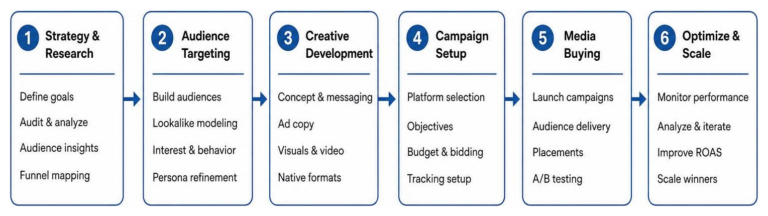
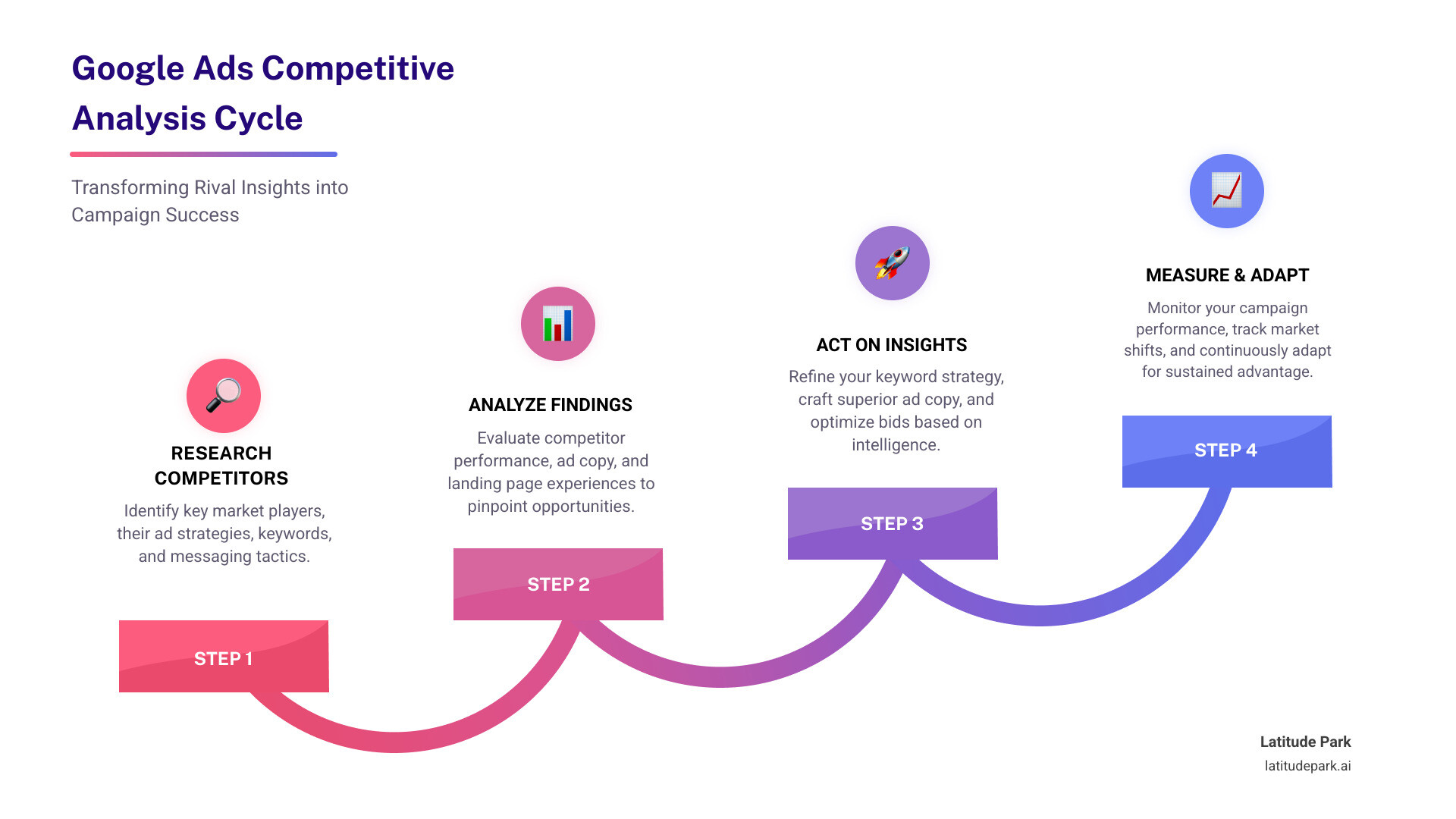
The cycle of research, analyze, act, and measure creates a feedback loop that continuously refines your approach. You research the landscape, analyze tactics, act on insights by improving your campaigns, and measure the results to start the cycle again.
This is not a one-time project. The digital advertising landscape is always changing. By establishing an ongoing monitoring process and staying ethically grounded, you can adapt quickly and maintain a competitive edge.
The goal is to gain a sustainable advantage by combining competitive insights with your own unique understanding of your customers and brand. When you do this well, you don’t just win individual auctions—you build campaigns that consistently deliver measurable growth.
For franchise marketers and local businesses, this systematic approach is critical. The complexity of managing multiple locations requires both strategic thinking and tactical execution. If you need expert help structuring your campaigns to win in your local markets, our Google Ads Local Business Guide provides the roadmap you need.
Now it’s time to put what you’ve learned into action. Start with an audit of your top competitors, identify a quick win, and test it in your campaigns. The insights are there, waiting to be found. Let’s turn that competitive intelligence into real results for your business.