Why AI Tools to Automate Your Business Tasks Are Changing Modern Business
AI tools to automate your business tasks are no longer optional—they’re essential for staying competitive in 2025 and beyond. Here’s what you need to know:
Top AI Automation Tool Categories:
- Project Management & Collaboration – Automate task creation, meeting notes, and project planning
- Sales & Marketing – Generate leads, personalize campaigns, and analyze customer data
- Customer Support – Deploy 24/7 chatbots and automated ticket resolution
- Workflow Integration – Connect apps and orchestrate multi-step processes without coding
Key Benefits:
- Free up employees from repetitive tasks to focus on strategic work
- Achieve 24/7 operations with AI agents that never sleep
- Reduce human error while scaling operations efficiently
- Make faster decisions with automated data collection and reporting
Between meetings, deadlines, reports, and your actual work, it can seem like there’s never enough time in a workday. That’s the reality for most business leaders today. But here’s the shift happening right now: AI isn’t just automating simple tasks anymore—it’s executing complete business processes, from lead qualification to customer support to financial reporting.
The race to adopt AI has real stakes. Early adopters are seeing significant saved hours and profits, while those who wait risk falling behind competitors who’ve already integrated AI into their daily operations. The difference between AI tools that impress in demos and those that actually transform your business comes down to one thing: practical implementation in real workflows.
The challenge many businesses face isn’t finding AI tools—it’s finding the right ones that integrate seamlessly with existing systems, require minimal technical expertise, and deliver measurable results. According to industry research, 78% of enterprises struggle to integrate AI with their current tech stacks. Even more telling: desk workers at companies with clear AI guidelines are nearly six times more likely to experiment with AI tools than those at companies offering no guidance.
The good news? You don’t need to be an AI engineer to harness these tools. Modern AI platforms are designed for business users, not developers. They feature drag-and-drop interfaces, natural language commands, and pre-built templates that let you automate workflows in minutes, not months.
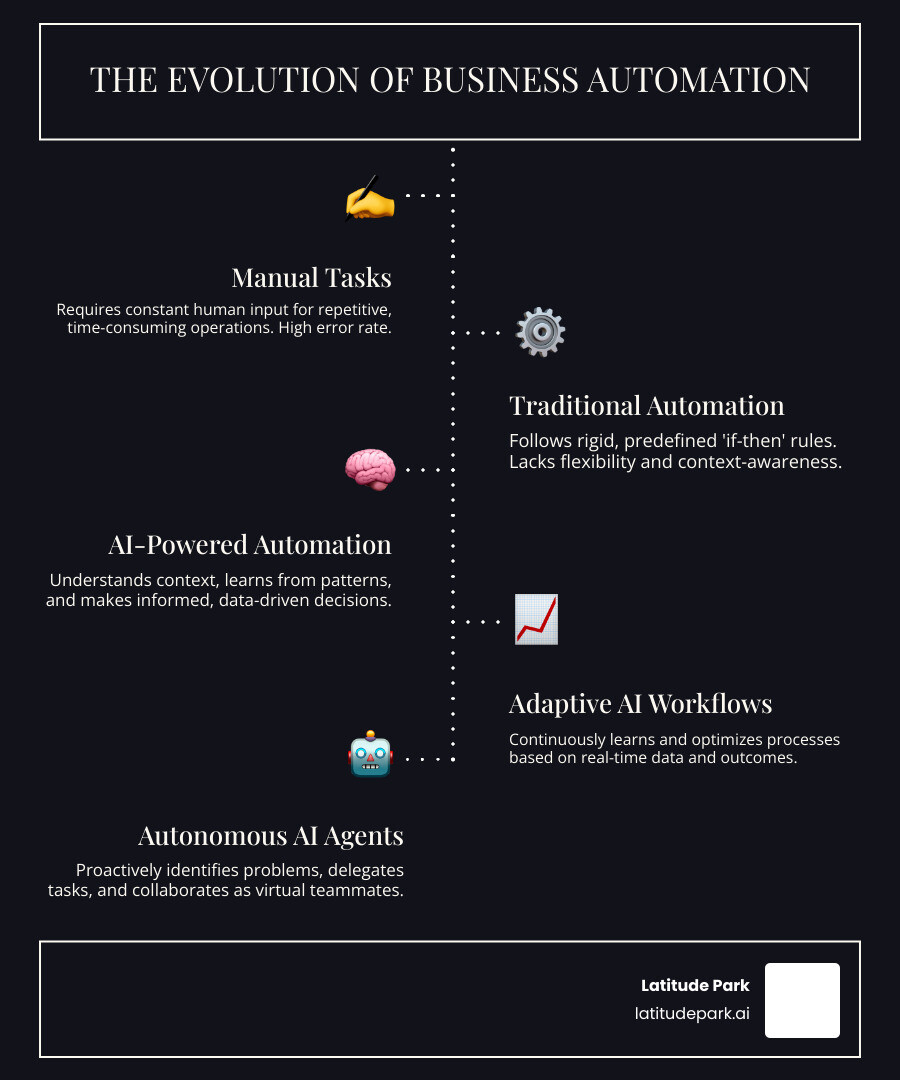
What makes AI automation different from traditional automation? Traditional automation follows rigid, predefined rules—if this happens, then do that. AI automation understands context, learns from patterns, and makes decisions. It can analyze sentiment in customer emails, extract key information from unstructured documents, and even predict which leads are most likely to convert. This context-aware intelligence is what transforms AI from a simple task executor into a strategic business asset.
The opportunity is massive across every department. Marketing teams are using AI to generate personalized email campaigns and analyze customer data at scale. Sales teams deploy AI agents that research leads, qualify prospects, and schedule meetings around the clock. Customer service teams leverage conversational AI to handle inquiries 24/7 while maintaining brand voice and accuracy. Finance teams automate data entry and reconciliation, cutting manual admin time by hours each week.
But here’s what matters most: AI automation isn’t about replacing people—it’s about amplifying what they can do. When you automate repetitive communications, data entry, and routine decision-making, you free your team to focus on creative problem-solving, strategic planning, and building customer relationships. The businesses thriving with AI aren’t necessarily the biggest—they’re the ones that identified specific pain points and matched them with the right tools.
As Rusty Rich, I’ve spent over 15 years helping businesses—from small startups to growing franchises—build strong digital presences and drive measurable growth, and I’ve seen how AI tools to automate your business tasks can transform operations when implemented strategically. At Latitude Park, we’ve guided clients through digital change, and the companies seeing the biggest wins are those that start with clear goals, get team buy-in, and iterate based on real results.
In this guide, we’ll cut through the hype and show you exactly which AI tools deliver practical value, how to implement them without disrupting your operations, and what to watch for as AI continues to evolve. Whether you’re managing multiple franchise locations or running a lean startup, you’ll find actionable strategies to automate your workflows and scale your business.
Find more about ai tools to automate your business tasks:
What is AI Workflow Automation and Why Does Your Business Need It?
AI workflow automation refers to the use of artificial intelligence technologies to automate tasks, analyze data, and improve decision-making within business processes. Unlike traditional automation, which typically follows rigid, rule-based instructions (think of a simple “if X, then Y” sequence), AI workflow automation leverages machine learning (ML) and Natural Language Processing (NLP) to understand context, learn from patterns, and make intelligent decisions. This makes it a much more dynamic and powerful solution for complex business operations.
While traditional automation might handle a fixed sequence of data entry, AI automation can analyze the content of an email, extract relevant information, classify it, and then route it to the appropriate department, even drafting a personalized response. This context-aware capability dramatically improves productivity and efficiency. By automating routine tasks, businesses free up human employees to focus on more complex and high-value interactions. This not only improves operational efficiency but also ensures a better overall experience for customers and employees alike.
The benefits extend beyond just speed. AI automation leads to significant cost savings by reducing the need for manual labor in repetitive tasks, and it empowers employees by allowing them to focus on strategic work that truly moves the business forward. For remote and hybrid teams, AI tools can streamline communication, project management, and information sharing, ensuring everyone stays aligned and productive, regardless of their physical location. For a deeper dive into how these systems revolutionize operations, explore our Business Automation Workflow Knowledge Center.
The Core Benefits of AI Automation
Implementing AI tools to automate your business tasks brings a cascade of benefits that can fundamentally transform your operations. First and foremost is vastly improved efficiency. AI systems can process information and execute tasks at speeds far beyond human capabilities, leading to quicker turnaround times and optimized resource allocation. This also significantly reduces human error, as AI carefully follows programmed logic and learns to identify anomalies, leading to more accurate data and fewer mistakes.
With AI, operations can become truly 24/7. AI agents and chatbots don’t need sleep, coffee breaks, or holidays, providing continuous support and task execution. This always-on capability is crucial for global businesses or those with customers in different time zones. Furthermore, AI offers incredible scalability. Whether you’re handling a sudden surge in customer inquiries or expanding your product lines, AI can scale up or down with your needs without the overhead of hiring and training additional staff.
These benefits translate into better customer satisfaction. Faster responses, personalized interactions, and fewer errors make for happier customers. On the business side, AI provides unparalleled data-driven insights. By automatically collecting, processing, and analyzing vast amounts of data, AI helps us understand trends, predict outcomes, and make more informed strategic decisions.
AI’s Impact on the Modern Workforce
The narrative around AI often sparks concerns about job displacement, but the reality is far more nuanced and, frankly, exciting. Our experience shows that AI workflow automation doesn’t replace employees; it frees them up from the mundane, repetitive tasks that consume so much of their day. Imagine the joy of never having to manually categorize another expense report or sift through hundreds of emails for a single piece of information!
This liberation allows our teams to focus on strategic, creative, and complex tasks that genuinely require human intelligence, empathy, and innovation. This shift leads to a natural evolution of roles, where employees become more involved in problem-solving, strategic planning, and customer relationship building. The result? Improved creativity, as minds are no longer bogged down by tedious work, and a significant boost in job satisfaction. When employees feel their work is impactful and valued, everyone wins. It’s about augmenting human potential, not diminishing it.
The Top Categories of AI Tools to Automate Your Business Tasks
To truly harness the power of AI, it helps to understand the different categories of AI tools to automate your business tasks and how they can be applied across various business functions. These tools work together, often integrating seamlessly, to create a smarter, more efficient operational ecosystem.
From streamlining internal workflows to enhancing external customer interactions, these AI-powered solutions are designed to tackle specific challenges and open up new levels of productivity and insight. We’ll explore how they integrate into project management, sales, marketing, customer service, and overall workflow orchestration.
AI for Project Management and Collaboration
Project management can often feel like a juggling act, but AI is here to lend a hand (or several!). AI tools to automate your business tasks in project management are designed to streamline workflows, prioritize tasks, summarize notes, and even draft correspondence, turning chaos into calm. Tools like Trello, Asana, Notion, and ClickUp have integrated AI capabilities that act as virtual project assistants. For example, Trello features an AI analyst agent that examines existing boards for trends and insights, helping teams with workflow management. Asana allows users to design AI agents using a no-code builder to share work with purpose-built agents. Notion embeds AI agents, task automation, and intelligent enterprise search into daily workflows, allowing users to interact with an AI assistant to get relevant information quickly. ClickUp offers custom AI agents that can answer questions and perform simple tasks, along with autonomous project management features.
These tools also excel in collaborative workspaces and digital note-taking. AI meeting assistants like Nyota and Spinach AI can join virtual calls, transcribe discussions in over 90 languages, and even summarize agendas and action items automatically, freeing up team members from tedious note-taking. Nyota can even flag potential blockers in real-time and add them to Slack for follow-up. This automation ensures that insights from meetings are captured, organized, and made actionable, significantly improving overall project efficiency and team alignment.
AI Tools to Automate Your Business Tasks in Sales and Marketing
For sales and marketing, AI isn’t just a buzzword; it’s a game-changer. AI tools to automate your business tasks in these areas are revolutionizing how we generate leads, personalize campaigns, and analyze customer data. HubSpot, a full CRM platform, includes several AI features to help automate marketing tasks, such as creating social media posts, drafting prospect emails, and implementing customer agent chatbots. Mailchimp, an email marketing platform, uses Intuit Assist to help draft emails, manage customer mailing lists, and target customers with personalized content. Adobe Sensei, an AI and machine learning platform, offers generative AI content creation and management, automated performance marketing analysis, and an AI assistant for enterprise data analysis.
These tools also provide powerful capabilities for lead generation and predictive analytics. Platforms like Clay can enrich basic company lists with founder bios, job titles, verified emails, hiring trends, tech stacks, and funding headlines in minutes, turning raw data into actionable insights for sales and growth teams. Reply.io’s AI Sales Email Assistant automates email responses and helps build cold email drip campaigns, boosting conversion rates. Albert.ai personalizes and optimizes ad content at scale across social media and paid search platforms, using “data-powered creativity” to drive significant traffic and lead increases. For more on this, check out our insights on AI Digital Marketing Opportunities Challenges and Revolutionizing Lead Generation: The AI Advantage for Mid-Market Companies.
AI for Customer Support and Engagement
Customer support and engagement are areas where AI tools to automate your business tasks shine, changing how businesses interact with their clientele. Conversational AI and chatbots are at the forefront, offering 24/7 support and instant responses to customer inquiries. This significantly reduces wait times and improves customer satisfaction. Tools like Zendesk, a ticketing platform, use AI agents to speed up workflows and provide accurate information quickly. Its AI copilot can be trained on your entire organization’s knowledge base, giving human reps complete context and suggesting replies.
Other solutions like Tidio AI offer AI chatbots that can resolve a significant percentage of queries, often up to 70%, by leveraging natural language processing and live context. Anthropic’s Claude is another powerful AI assistant that combines conversational strengths with extra safety and control features, making it suitable for businesses seeking engaging yet responsible AI solutions. These systems not only handle routine questions but also free up human agents to tackle more complex or sensitive issues, ensuring that every customer interaction is handled efficiently and effectively.
AI Tools to Automate Your Business Tasks Using Integration Platforms
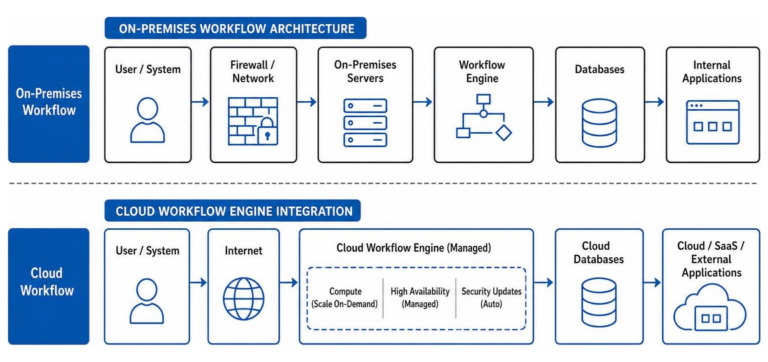
The true magic of AI tools to automate your business tasks often lies in their ability to integrate and orchestrate workflows across various applications. This is where integration platforms come into play, serving as the connective tissue that eliminates data silos and creates seamless, automated processes. Zapier is a prime example, a popular workflow automation tool that connects with more than 7,000 apps. Users can automate workflows involving multiple software tools—including Salesforce, Slack, Mailchimp, HubSpot, and many more—all in one place. Zapier AI even offers an AI-powered Zap Builder that allows users to describe desired workflows in plain language, which Zapier then drafts, lowering the barrier for non-technical users.
Opus, an enterprise standard for agentic automation, focuses on rewiring workflows into AI-native, human-supervised processes. It aims to bridge the gap between impressive AI demos and production-ready automation in complex, regulated sectors, promising 10x productivity with full compliance. These platforms allow businesses to leverage trigger-action logic, where an event in one app (the trigger) automatically initiates an action in another app. This no-code automation approach means you don’t need to be a developer to build sophisticated, multi-step workflows, connecting your AI tools to thousands of apps and truly orchestrating your business operations.
A Practical Guide to Implementing AI Automation
Implementing AI tools to automate your business tasks isn’t just about picking the coolest new tech; it’s about strategic planning, thoughtful execution, and continuous optimization. A successful rollout requires a clear implementation strategy, careful consideration of team adoption, robust security protocols, and consistent performance measurement. It’s about building a future-proof foundation for your business.

How to Choose the Right AI Tool
Selecting the perfect AI tools to automate your business tasks can feel like finding a needle in a haystack, but a structured approach makes it much easier. We recommend starting with a thorough workflow analysis to identify your specific pain points and bottlenecks. Where are your teams spending too much time on repetitive manual tasks? What processes are prone to human error? Auditing departments and asking employees about productivity blockers can provide invaluable insights.
Next, consider your team’s technical skills. Look for tools that are user-friendly and can be learned quickly, ideally with no-code or low-code interfaces. Evaluate multiple AI tools’ capabilities by comparing their features against your specific needs and don’t hesitate to request demos. Crucially, ensure the AI solution has the right integration capabilities with your existing software stack. A tool that doesn’t play well with your current systems will create more problems than it solves. Finally, assess the vendor’s security standards; for any tool handling sensitive data, look for enterprise-grade features like encryption, audit logs, access control, and compliance with standards like SOC 2 or GDPR. For more detailed guidance, consult our Business Automation Tools Ultimate Guide.
Best Practices for a Successful Rollout
A successful rollout of AI tools to automate your business tasks hinges on thoughtful planning and active engagement. First, start small. Don’t try to automate everything at once. Pick one or two clear pain points, define measurable goals, and run a pilot program. This allows you to learn and adapt before a wider deployment.
Getting team buy-in is paramount. Many employees might have concerns about AI, so address these head-on. Educate them on the benefits of AI, showing how it will free them for more engaging work. A Salesforce survey found that 67 percent of CIOs are taking a more cautious approach to AI compared to other technologies, highlighting the importance of careful communication. Provide comprehensive training and establish clear AI usage guidelines. Desk workers at companies that issue guidelines for AI use are nearly six times more likely to experiment with AI tools than those at companies that offer no guidance. Encourage experimentation and knowledge sharing, fostering a culture where AI is seen as a helpful assistant, not a threat.
Navigating Challenges and Concerns
While the promise of AI tools to automate your business tasks is immense, steer the potential challenges and concerns with open eyes. Data security and privacy considerations are at the top of the list. When integrating AI, you’re often feeding it sensitive business and customer data. We must ensure that chosen tools adhere to the highest security standards, including robust encryption, access controls, and compliance with regulations like GDPR. A Salesforce survey of IT security leaders found that 70 percent are concerned about the accuracy of AI outputs, which brings us to the next point: AI accuracy and reliability. While AI is powerful, it’s not infallible. It can sometimes “hallucinate” or provide inaccurate information. Establishing human-in-the-loop processes and verification steps is crucial to maintain quality and trust.
Overcoming integration problems is another hurdle. As mentioned, many enterprises struggle with integrating AI into their existing tech stacks. Prioritize tools with strong API capabilities or pre-built connectors. Finally, managing employee concerns is essential. Clear communication, transparent policies, and demonstrating how AI improves their roles rather than replaces them can help mitigate anxiety and foster a positive adoption environment.
The Future of Work: AI Agents, Analytics, and Beyond
The journey with AI tools to automate your business tasks is just beginning. The future promises an even more integrated and intelligent landscape, where AI agents become indispensable virtual teammates, and advanced analytics drive unprecedented insights. We’re moving towards a world of hyper-automation, where AI isn’t just a tool but a fundamental layer of business operations.
The Rise of AI Agents as Virtual Teammates
Imagine a world where your “teammates” never get tired, work 24/7, and learn continuously. That’s the promise of AI agents. These aren’t just sophisticated chatbots; they are AI systems capable of autonomous tasks, thinking, reasoning, remembering, and even knowing when to ask for human help. They function as virtual teammates, proactively solving problems and delegating complex workflows. Microsoft, for instance, highlights how AI agents are changing the way we work, capable of executing business processes from simple prompt-and-response to advanced, fully autonomous workflows.
These agentic AI systems can act as Sales Development Agents, researching, qualifying, and engaging leads around the clock. They can be Researcher Agents, tackling complex, multi-step research across work data and the web to uncover insights. Or Analyst Agents, changing raw data into insights in minutes. This means delegating not just tasks, but entire complex workflows, allowing human employees to focus on strategic oversight, innovation, and human-centric interactions.
AI’s Role in Data, Reporting, and Predictive Analytics
Data is the lifeblood of modern business, and AI tools to automate your business tasks are changing how we collect, analyze, and leverage it. AI excels at automated data collection, sifting through vast datasets from various sources and organizing it efficiently. This feeds into real-time reporting, providing up-to-the-minute insights into key performance indicators.
Beyond reporting, AI is a master of trend identification and predictive analytics. It can analyze historical data to spot emerging patterns, forecast sales, identify potential risks, and even discern buyer intent. This capability is invaluable for making proactive, data-driven decisions that can significantly impact revenue and growth. For instance, AI can help in automating repetitive communications and generating insights from complex data, freeing up our human employees for more complex tasks. This analytical power is at the heart of The Future of Digital Marketing: Emerging Technologies and Trends to Embrace, enabling businesses to stay ahead of the curve.
Frequently Asked Questions about AI Business Automation
Can AI automation replace human decision-making?
No, AI automation cannot replace human decision-making; instead, it dramatically improves it. AI handles the heavy lifting of data analysis, quickly collecting information, summarizing documents, and analyzing trends. This provides humans with an unprecedented amount of accurate, timely information. However, human decision-making adds the crucial elements of context, emotional intelligence, ethical consideration, and strategic oversight. AI presents the facts and insights, but humans make the final call, blending data with intuition and experience to guide the business forward.
How much technical skill is needed to use these AI tools?
The good news is that for many AI tools to automate your business tasks, not much technical skill is needed. A significant number of modern AI tools are designed with non-technical users in mind, featuring intuitive drag-and-drop interfaces, pre-built templates, and natural language commands. Platforms like Zapier AI allow you to describe desired workflows in plain English, and the AI drafts the automation for you. While some advanced tools might require a basic understanding of logic or data structures, the focus is generally on understanding your business process and what you want to achieve, rather than writing complex code.
Are AI workflow automation tools secure?
The security of AI workflow automation tools varies significantly depending on the specific product and vendor. Many top-tier AI tools, especially those designed for enterprise use, prioritize security with features like encryption, audit logs, access control, SSO (Single Sign-On), and role-based permissions. They also often comply with industry standards such as SOC 2 or GDPR. However, a Salesforce survey of IT security leaders found that 70 percent are concerned about the accuracy of AI outputs, which also ties into security. It’s crucial to thoroughly vet any vendor on their security protocols, understand how your data will be stored and processed, and implement strong internal access controls. Always choose solutions that offer enterprise-grade security if you’re handling sensitive customer or internal data.
Conclusion: Accept Automation and Release Your Team’s Potential
The landscape of business is rapidly evolving, and AI tools to automate your business tasks are at the heart of this change. We’ve seen how these intelligent solutions can move operations from mundane to magical, freeing up our teams from repetitive tasks and allowing them to focus on what truly matters: strategic growth, creativity, and meaningful human connection.
Embracing AI automation isn’t just about efficiency; it’s about gaining a competitive advantage, fostering innovation, and building a more resilient, scalable business. The future is now, and businesses that strategically integrate AI into their workflows are the ones ready for unparalleled success.
At Latitude Park, we believe in empowering businesses to thrive in this new era. To find the right automation solutions for your business, explore our guide on small business automation tools. Let’s open up your team’s full potential and build a more automated, intelligent, and prosperous future together.