Why Learning How to Manage Twitter Ads Can Make or Break Your Campaign Results
Knowing how to manage Twitter ads is the difference between burning through budget and actually growing your business on one of the most active real-time platforms in the world.
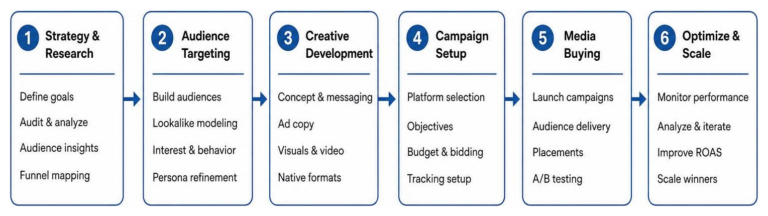
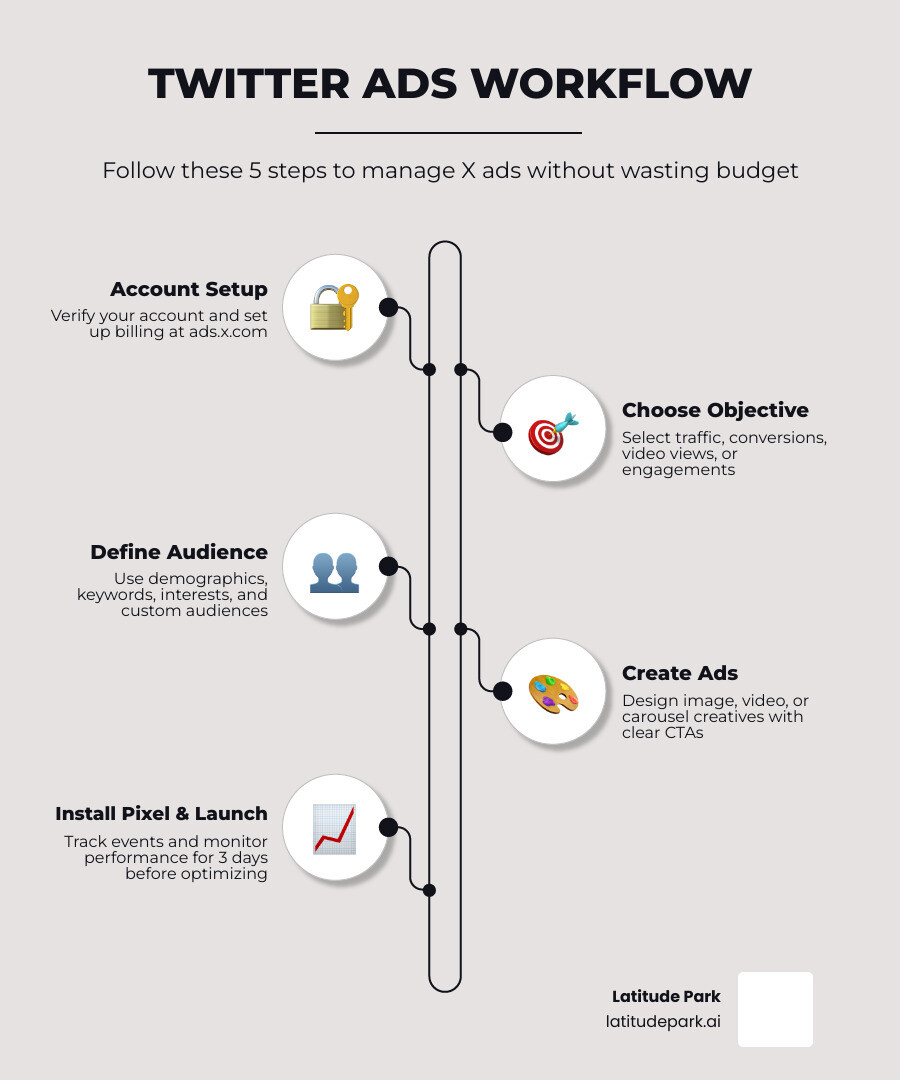
Here’s a quick overview of the core steps:
- Set up your X Ads account at ads.x.com and verify via X Premium
- Choose a campaign objective that matches your goal (traffic, conversions, video views, etc.)
- Define your audience using demographics, keywords, interests, or custom audiences
- Create your ads — image, video, carousel, or vertical video
- Install the X Pixel for conversion tracking before spending anything
- Launch and monitor performance in Ads Manager; wait 3 days before optimizing
- Scale winners, pause losers, and refresh creatives every two weeks
X (formerly Twitter) reaches 535 million monetizable monthly active users, with the average user spending nearly 31 minutes on the platform every day. It runs on a pay-for-performance model — you only pay when someone takes a specific action, like clicking, following, or converting. That makes it a powerful channel when managed correctly.
But most advertisers don’t manage it correctly. They pick the wrong objective, skip tracking setup, or start tweaking campaigns before the algorithm has enough data to optimize. The result? Wasted spend and misleading numbers.
This guide cuts through the guesswork.
I’m Rusty Rich, President of Latitude Park, a full-service digital advertising agency I founded in 2009 — and how to manage Twitter ads effectively is something I’ve helped small businesses and multi-location franchises get right across dozens of campaigns. Let’s walk through exactly what works.
How to manage twitter ads helpful reading:
How to Manage Twitter Ads Without Wasting Budget
Good Twitter ad management starts before the first impression. If the account is messy, the objective is wrong, or the budget controls are loose, the platform will happily spend your money while teaching you a very expensive lesson.
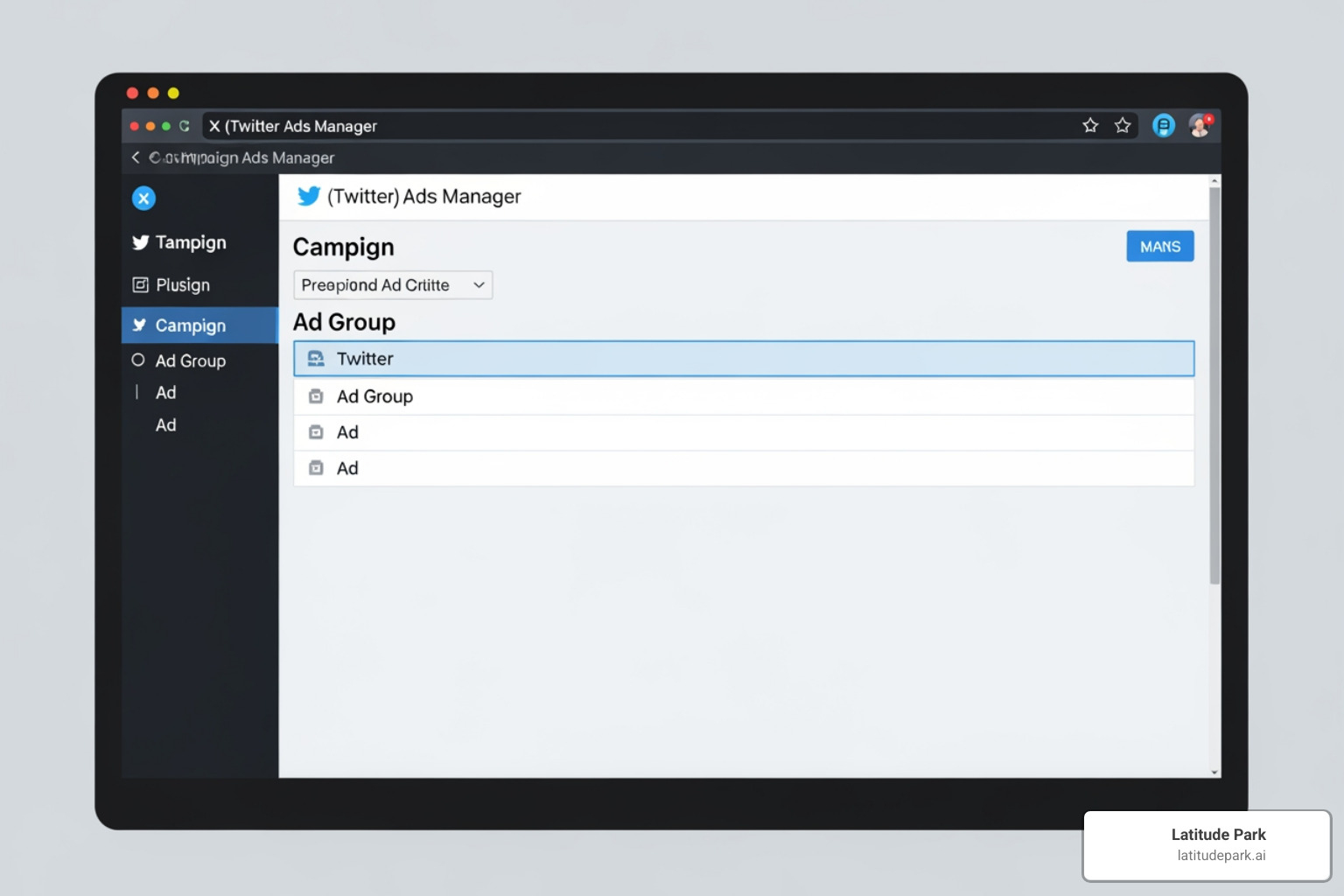
At a high level, X Ads Manager is built around a simple hierarchy:
- Campaign
- Ad group
- Ad
Your campaign holds the objective. Your ad groups control budget, dates, bids, and targeting. Your ads are the actual promoted posts or creatives.
You will also need the basics in place first:
- A verified account
- Billing setup
- A complete profile with photo, header, bio, and working URL
- Clear naming conventions
- Conversion tracking before launch
X also gives you useful budget controls, including:
- Daily budgets
- total budgets
- campaign spend caps
- campaign budget optimization in some setups
If you want the official step-by-step setup reference, this Twitter Ads getting started guide is worth bookmarking.
What Twitter (X) advertising is and how it works
Twitter advertising, now called X advertising, is a paid system that promotes your content to selected audiences across timelines, profiles, search results, media placements, and recommendation surfaces.
It works through an auction model. You choose:
- An objective
- A target audience
- A budget
- A bid strategy
- One or more creatives
Then X decides when to show your ad based on expected performance and competition in the auction.
Most campaigns are billed on a specific action, such as:
- CPC for clicks
- CPM for impressions
- CPE for engagements
- CPF for followers
- CPV for video views
The key thing to understand is that optimization depends on the action you ask the system to find. If you choose engagement, X will find people likely to like, reply, or repost. If you choose website traffic or conversions, it will look for people more likely to click or complete your selected action.
That is why objective selection matters so much. The platform is not mind-reading. It is following instructions.
Choose the right objective before you launch
A lot of wasted spend comes from this exact mistake: advertisers want leads or sales, but choose engagement because the numbers look cheaper.
Cheap likes are not the same thing as business results.
Match the objective to the funnel stage:
- Reach for awareness and broad visibility
- Engagements for social proof or conversation
- Website traffic for clicks to landing pages
- Video views for content consumption and awareness
- App installs for mobile app growth
- Pre-roll views for video distribution
- Conversions for leads, signups, or purchases when tracking is installed
A simple rule we use:
- Top of funnel: reach or video views
- Middle of funnel: website traffic or engagements
- Bottom of funnel: conversions or retargeting traffic campaigns
If your goal is lead generation, choose the closest action to lead generation, not the one with the prettiest vanity metrics.
Build a clean account and campaign structure
A clean structure makes management faster and reporting less painful.
We recommend organizing campaigns by:
- Objective
- Audience type
- Offer or theme
- Geography if needed
- Funnel stage
A practical naming structure might look like this:
- TOF – Video Views – Product Demo – Broad Interest
- MOF – Website Traffic – Case Study – Keyword Audience
- BOF – Conversions – Free Trial – Retargeting 30D
Keep ad groups separated by meaningful variables, such as:
- Audience segment
- Device type
- Geography
- Creative theme
- Bid strategy
Inside each ad group, group similar creatives together. This helps X optimize to the best-performing ad inside that group without mixing completely different messages.
Best practices from platform guidance and campaign experience:
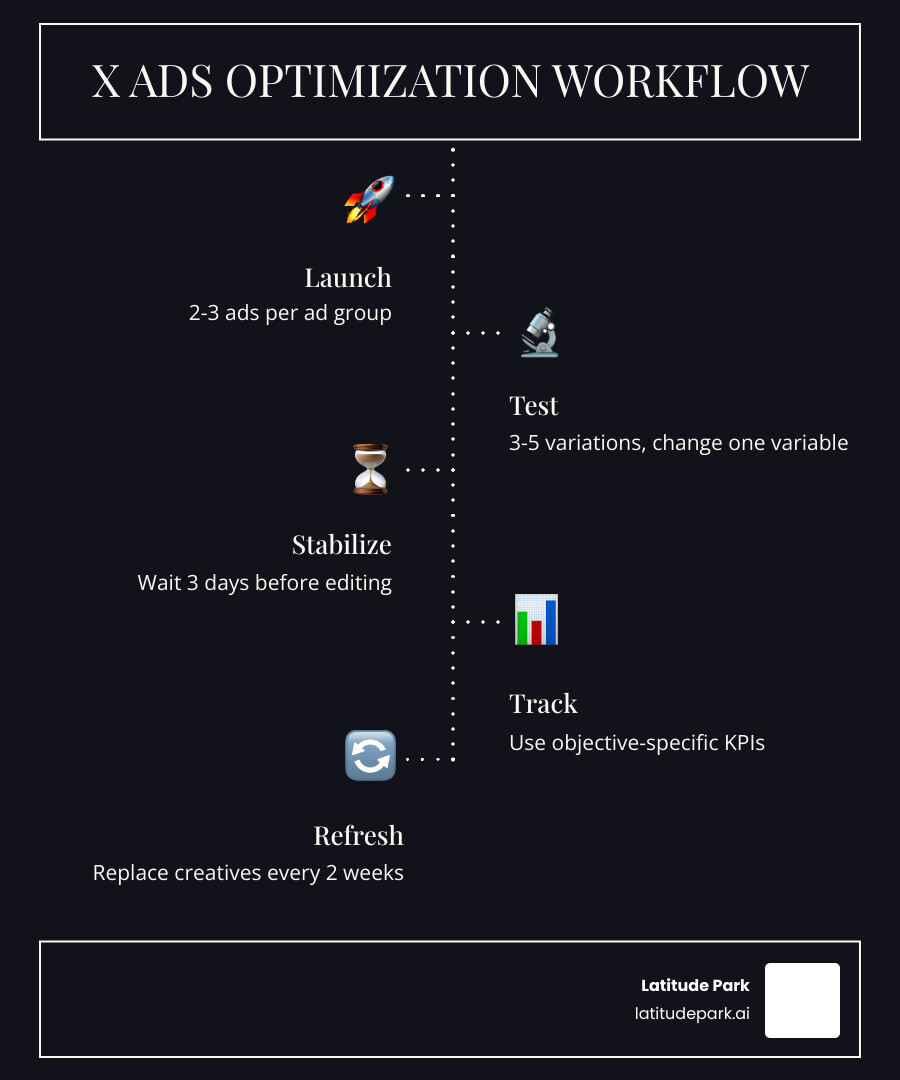
- Start with 2 to 3 ads per ad group
- Run campaigns for at least 2 weeks when possible
- Wait about 3 days before making major changes
- Refresh copy or creative every 2 weeks on longer campaigns
- Use campaign spend caps if you need hard budget protection
Promoted-only posts are also useful. These are ads that do not appear on your public profile, which is helpful when testing offers or audience-specific messaging.
Set Up Targeting, Audiences, and Tracking the Right Way
Targeting is where X can become either brilliant or chaotic.
The platform supports a strong mix of standard and advanced options, including:
- Demographics
- Language
- Device
- Location
- Interests
- Behaviors
- Keywords
- Conversation targeting
- Follower lookalikes
- Tailored audiences
- Audience exclusions
One of X’s biggest strengths is real-time intent. Unlike platforms that mostly infer what people may like, X can target around what users recently discussed, searched, or engaged with. That makes it especially strong for event-driven campaigns, thought leadership, and categories where conversations happen in public.

How to manage Twitter ads targeting for better lead quality
Lead quality improves when targeting reflects actual buying signals, not just broad interest labels.
Start with a few core targeting methods:
- Keyword targeting for recent topic interest
- Follower lookalikes based on relevant public accounts
- Website retargeting for warm audiences
- Customer exclusions to avoid paying for people who already converted
Keyword targeting is especially valuable on X because it captures conversation intent. You can reach people who recently posted about or engaged with relevant topics. This is very different from generic interest buckets.
A few practical tips:
- Start broad enough to get delivery
- Narrow later based on real data
- Avoid stacking too many filters at launch
- Exclude existing customers from acquisition campaigns
- Watch for overlap between similar ad groups
Retargeting windows matter too:
- 7 to 30 days often works well for high-intent website visitors
- 30 to 90 days can work for longer sales cycles or upsell campaigns
For a deeper breakdown, see our guide on Twitter Ads target audience.
Custom audiences and advanced targeting options that matter
Custom audiences are where campaigns usually get smarter.
On X, these can include:
- CRM uploads
- Website visitor audiences
- App activity audiences
- Engagement retargeting
- Lookalike-style expansion from existing audiences
- Account-based targeting approaches using public-account affinity
- Event or conversation-based audience strategies
These options are especially useful when you want to segment by funnel stage:
- Cold audience from interests or lookalikes
- Warm audience from site visitors or engagers
- Hot audience from product viewers, cart users, or lead-form openers
If you are managing a more complex audience strategy, our Twitter Ads Audience Manager guide goes deeper into audience building and segmentation.
Install tracking before spending a dollar
If we could give only one technical rule, it would be this: install tracking first.
Use the X Pixel to track important website actions such as:
- PageView
- ViewContent
- Lead
- SignUp
- AddToCart
- Purchase
For apps, use app event tracking tied to install or engagement goals.
Why this matters:
- It improves optimization
- It enables retargeting
- It gives you actual conversion reporting
- It reduces the chance you optimize based on clicks alone
Also pay attention to attribution. Research shows view-through attribution can undercount conversions if server-side tracking is missing. If available in your setup, Conversion API support can help close attribution gaps and improve reporting accuracy.
Before launch, confirm:
- The pixel is installed on all key pages
- Events are firing correctly
- Attribution windows are set consistently
- Conversion names are clean and meaningful
No tracking, no trust. That is the rule.
Create Ads That Earn Clicks, Views, and Conversions
X gives advertisers several ad formats, but most results still come down to one thing: does the ad feel natural in the feed while making the next step obvious?
Main formats include:
- Promoted text or image ads
- Video ads
- Vertical video ads
- Carousel ads
- Collection ads
- Follower ads
- Dynamic product ads
- Premium placements like takeovers and pre-roll options
Some research points are hard to ignore:
- Vertical video now accounts for 20% of daily time spent on X
- 97% of users focus on visuals
- Ads with branding in the first 3 seconds can improve brand recall by 30%
- Native video earns far more engagement than external links
- Interactive elements like polls and conversation prompts can lift engagement by 35%
Best ad formats for each campaign goal
Use format to support the goal, not the other way around.
A practical match-up looks like this:
- Website traffic: image ads, website cards, short native video with CTA
- Lead generation: traffic or conversion-focused ads with one clear offer
- Awareness: reach campaigns, vertical video, short native video
- Retargeting: dynamic product ads, carousel, collection ads
- Product discovery: collection ads and video
- Follower growth: follower ads or promoted account formats
- Premium mass visibility: takeover or trend-style placements if budget allows
For most advertisers, simple promoted ads with strong creative do the heavy lifting. Fancy formats are nice. Clear offers are nicer.
Creative best practices that improve performance fast
Creative on X should be quick, visual, and impossible to misunderstand.
What tends to work best:
- Copy under 100 characters
- A strong hook in the first line
- One clear CTA
- Minimal hashtags
- No cluttered visuals
- Branding in the first 3 seconds of video
- Captions for sound-off viewing
- Mobile-first layouts
- Urgency when it is real
For video:
- Keep it short, often 15 seconds or less for direct response
- Front-load the value
- Assume many viewers have sound off
- Show the product, benefit, or outcome quickly
For static ads:
- Use bright, clean visuals
- Avoid heavy text overlays
- Make the destination obvious
Interactive formats can help too. Polls, prompts, and reply-driven creative can lift engagement, but remember: engagement quality matters more than raw volume.
How to manage Twitter ads creative testing and refresh cycles
Creative testing should be structured, not chaotic.
A good starting system:
- Launch 2 to 3 ads per ad group
- Test 3 to 5 variations over time
- Change one major variable at a time
- Let campaigns stabilize for at least 3 days
- Give a proper test around 2 weeks when budget allows
Useful things to test:
- Hook line
- CTA
- Image vs video
- Offer framing
- Short vs slightly longer copy
- Social proof vs pain point messaging
Watch for ad fatigue. If CTR falls, CPC rises, and frequency increases, your audience has probably seen enough. Refresh creatives every two weeks on longer campaigns or sooner if performance drops sharply.
For more practical management workflows, visit our Twitter Ads Management Guide.
Monitor Performance and Optimize What Actually Moves ROI
Once campaigns are live, management becomes a numbers game. But not all numbers deserve equal attention.
Track metrics based on the objective:
- Reach and CPM for awareness
- Video completion and CPV for video
- CTR and CPC for traffic
- CPA, conversion rate, and ROAS for conversion campaigns
- Cost per follow for follower growth
- CPE only when engagement is the true goal
Here is a simple reference table:
| Objective | Primary KPI | Secondary KPIs | Warning Sign |
|---|---|---|---|
| Reach | CPM | Frequency, impressions | High spend with low reach |
| Engagements | CPE | Link clicks, quality engagement | Lots of likes, few clicks |
| Website Traffic | CTR, CPC | Landing page views, bounce quality | Cheap clicks with no action |
| Video Views | CPV, completion rate | CTR, watch time | Views with poor retention |
| Conversions | CPA, ROAS | Conversion rate, CTR | Clicks without conversions |
| Followers | Cost per follow | Profile visits, engagement rate | New followers with no activity |
Cost benchmarks and what influences pricing in 2026
In 2026, average X ad pricing is still relatively accessible compared with many other platforms.
Research-based benchmarks show:
- $0.50 to $2.00 per engagement
- Around $0.75 CPC
- Around $5.80 CPM
- Roughly $1.01 to $2.00 per follow for promoted accounts in many cases
Many businesses spend:
- Under $100 per month at the low end
- $101 to $500 per month as a common range
- More than $10,000 monthly when scaling aggressively
What influences pricing:
- Objective
- Audience competition
- Audience size
- Seasonality
- Bid strategy
- Creative quality
- Relevance and expected engagement
- Conversion signal quality
In plain English: better targeting and better creative usually lower costs over time.
How to manage Twitter ads once they are live
Live campaign management is mostly about controlled decision-making.
What we do after launch:
- Wait for initial data before making heavy edits
- Review budget pacing
- Shift spend toward top-performing ad groups
- Pause weak creatives
- Refresh ads when fatigue appears
- Review audience breakdowns
- Separate vanity engagement from meaningful action
Bid strategy matters too:
- Start with auto bidding if you are new or lack benchmarks
- Move to target or manual bidding once you understand your ranges
- Use budget caps to prevent overspend during tests
Also, do not trust reply volume blindly. In 2026, reply engagement on X dropped year over year because of bot activity. That means you may need manual filtering or sentiment review to isolate genuine conversations.
For technical campaign controls and structure details, the official Campaign Management documentation is useful.
Reporting mistakes and optimization pitfalls to avoid
These are the big ones:
- Choosing the wrong objective
- Optimizing for cheap engagement instead of outcomes
- Launching without tracking
- Over-segmenting audiences so delivery stays weak
- Editing too early
- Running conversion campaigns without enough conversion volume
- Forgetting exclusions
- Trusting reach estimates too literally
- Counting spam replies as success
- Comparing campaigns with mismatched attribution windows
Another common mistake is treating every engagement equally. On X, engagement can include likes, reposts, profile clicks, media expansions, and more. Those actions are not equally valuable. If your goal is traffic or leads, break reporting out by link clicks, landing-page quality, and conversions.
If you want a better feel for the latest Ads Manager workflow changes, read Your X Ads Manager Just Got an Upgrade Don’t Miss These Features.
When X Ads Beat Other Platforms and When to Get Expert Help
X is not the right platform for every business. But when the audience fit is strong, it can be remarkably efficient.
Why it can win:
- Real-time conversations
- Strong keyword and topic intent
- Discovery mindset
- Good fit for thought leadership
- Often lower CPMs than many channels
- Strong mobile usage
- Useful for event-driven campaigns and timely offers
Users also spend 26% more time viewing ads on X than on some other platforms, according to the research. That extra attention matters.
When X ads outperform other social ad channels
X usually performs best when:
- Your audience actively talks in public
- Timing matters
- You can tie creative to trends, events, or industry conversation
- Thought leadership supports conversion
- You want to target recent conversation signals
- Follower-based targeting maps well to your market
This often makes X strong for:
- B2B lead generation with niche audience targeting
- Product launches
- Event promotion
- Brand commentary and expertise content
- Retargeting warm website visitors
Common situations where another platform may be a better fit
X may not be ideal when:
- Your audience is barely active there
- Your product depends on highly visual impulse purchases
- You need very broad consumer reach with little conversation context
- You have weak creative resources
- Your category does not generate much public discussion
If you cannot identify relevant keywords, follower groups, or active conversations, that is usually a warning sign.
When to hire a Twitter ads agency or specialist
Some problems are easy to fix in-house. Others become expensive fast.
Consider expert help when:
- Performance has stalled
- Tracking is broken or unclear
- You are scaling spend
- Reporting is messy
- You need cleaner testing systems
- You manage multiple locations or business units
- You need better audience exclusions and retargeting logic
- You want automation or more advanced workflows
At Latitude Park, we are especially useful when campaign structure gets complicated. That includes multi-location and franchise-style account challenges where audience separation, reporting clarity, and budget control matter a lot.
You can also explore our updated platform management resources here:
Frequently Asked Questions about How to Manage Twitter Ads
How much should you budget for a first Twitter (X) ads test?
For a real test, not a hope-and-pray experiment, we recommend enough budget to gather meaningful data over at least 2 weeks.
A practical starting point is:
- $30 to $50 per day for smaller tests
- $50 to $100 per day if you need conversion volume faster
The goal is to give the algorithm enough data to learn. If you are running conversion campaigns, many advertisers need several conversions per day before optimization becomes reliable.
How long should you wait before optimizing an X campaign?
Usually:
- Wait about 3 days before making major changes
- Expect 1 to 2 weeks for more stable performance patterns
- Judge creative tests only after enough impressions and clicks exist
If you edit too early, you interrupt learning and make results harder to interpret.
Are Twitter (X) ads worth it for small and mid-sized businesses?
Yes, if audience fit is there.
X ads can be a strong option for small and mid-sized businesses because:
- Costs are often manageable
- CPCs and CPMs can be relatively low
- Keyword and follower targeting can be very precise
- The platform is strong for real-time demand and niche communities
But worth it does not mean automatic. If tracking is weak, the audience fit is poor, or the offer is unclear, even cheap traffic becomes expensive noise.
Conclusion
Managing X ads well is not about hacking the platform. It is about doing the basics better than most advertisers.
That means:
- Choosing the right objective
- Structuring campaigns cleanly
- Installing tracking first
- Targeting with intent
- Testing creative systematically
- Measuring the KPIs that match your goal
- Scaling based on evidence, not vibes
If you want a simpler way to stop guessing and start improving performance, explore:
And if you want hands-on support, see our Twitter Ads management services.
Because how to manage Twitter ads should not feel like gambling with a dashboard. It should feel like running a system.