What RPA Software Actually Does (And Why It Matters Right Now)
RPA software — short for Robotic Process Automation — lets software “robots” handle the repetitive, rule-based digital tasks your team does manually every day.
Here’s a quick breakdown of what you need to know:
| Question | Quick Answer |
|---|---|
| What does it do? | Automates repetitive tasks like data entry, form filling, and report generation |
| Who is it for? | Any business with high-volume, rule-based digital workflows |
| Does it need coding? | No — most modern platforms are low-code or no-code |
| How fast is the ROI? | Typically within weeks of deployment |
| Does it replace workers? | No — it frees them to focus on higher-value work |
| Is it the same as AI? | No — RPA follows rules; AI learns and makes decisions |
Think of it like this: just as factory robots handle physical, repetitive tasks on an assembly line, RPA bots handle digital, repetitive tasks on your computer. And the results can be dramatic. Companies using RPA have reported hundreds of millions of dollars in business value generated, with some freeing the equivalent of 250 years of employee work time across their operations.
RPA isn’t just for big corporations, either. It’s increasingly accessible to businesses of all sizes — including multi-location franchises looking to scale without adding headcount.
I’m Rusty Rich, founder of Latitude Park, a full-service digital advertising agency, and I’ve spent years helping businesses use technology — including RPA software — to streamline operations and drive measurable growth. In this guide, I’ll walk you through everything you need to know to understand, evaluate, and choose the right automation tools for your business.
Quick rpa software definitions:
- automation services for growing businesses
- business automation tools
- digital process automation services
What is RPA Software and How Does It Work?

RPA software creates software bots to perform digital tasks just like a human would. These bots can open applications, log into systems, copy and paste data, fill out forms, move files, extract information, send emails, and update records.
If a task is repetitive, rules-based, digital, and predictable, RPA can likely handle it.
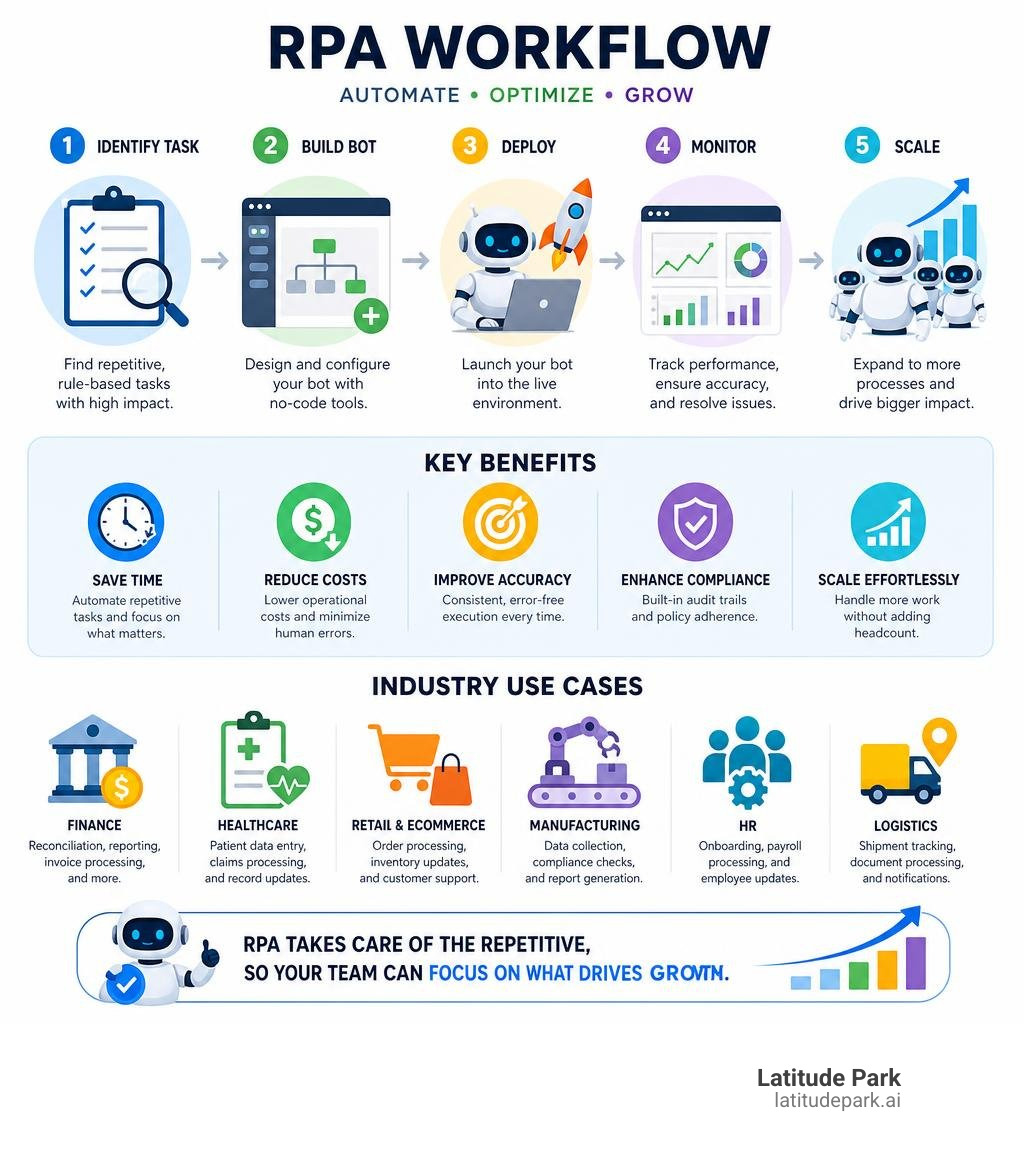
A typical RPA workflow follows these steps:
- Identify a process, such as copying lead data from a spreadsheet into a CRM.
- Map or record the steps in a visual workflow tool.
- Configure a bot to follow those steps.
- Test the bot with real-world examples and exceptions.
- Deploy, monitor, and improve the automation over time.
Modern platforms automate desktop apps, web apps, cloud tools, spreadsheets, PDFs, ERPs, and CRMs. Some platforms also connect through APIs, which is often more stable than relying solely on the screen.
To see how a modern no-code RPA tool presents this concept, the Robotic process automation software page from Zoho RPA gives a useful overview of recording steps, automating UI actions, and connecting apps.
How Software Robots Emulate Human Actions
RPA bots copy human actions on a computer, including:
- Clicking buttons and typing into fields
- Selecting dropdown options
- Opening and moving files
- Reading data from screens
- Downloading reports and uploading documents
- Sending messages or notifications
This is called UI automation. When a system lacks an API, RPA operates through the same screens your team already uses.
Some bots use screen scraping or computer vision to identify interface elements even when layouts change slightly. This prevents automations from breaking during minor design updates.
RPA can also combine UI automation with:
- API integrations
- OCR for reading scanned documents
- AI document processing
- Business rules and workflow approvals
- Data validation and human review steps
This combination turns RPA into an execution layer for business operations.
RPA vs. Traditional Business Process Management
RPA and Business Process Management (BPM) are related but distinct.
BPM focuses on designing, improving, and orchestrating end-to-end business processes across people and departments. RPA focuses on automating specific digital tasks inside those processes.
| Area | RPA | BPM |
|---|---|---|
| Main purpose | Automates tasks | Designs and manages processes |
| Best for | Repetitive digital work | End-to-end workflow improvement |
| Integration style | UI automation, APIs, scripts | Workflow orchestration, system integrations |
| Typical user | Operations, finance, IT, citizen developers | Process owners, business analysts, IT |
| Legacy system support | Strong, because it can use the interface | Depends on available integrations |
In practice, they work best together. BPM defines the road, while RPA drives the repetitive miles.
If you are mapping larger operational workflows, our Business Automation Workflow Knowledge Center is a helpful next step.
Attended vs. Unattended Automation: Which Do You Need?
Not all RPA bots work the same way. The two main types are attended automation and unattended automation. Many organizations eventually use both.
| Type | How It Works | Best For | Human Involvement |
|---|---|---|---|
| Attended automation | Runs on a user’s computer and helps in real time | Customer service, sales support, desktop tasks | High |
| Unattended automation | Runs in the background on a schedule or trigger | Finance, reporting, data processing, batch work | Low |
| Hybrid automation | Combines human input with background automation | Approvals, exceptions, complex workflows | Medium |
Attended Automation for Front-Office Tasks
Attended bots act like digital assistants. They usually run on an employee’s desktop and are launched by a person during their normal work.
For example, a customer service rep might be speaking with a customer and click one button to:
- Pull up account details
- Check order history
- Verify policy rules
- Generate a response
- Update the CRM
- Send a follow-up email
The human stays in control, but the bot handles the tedious clicking and data lookup.
Attended automation is useful when:
- A person needs to make the final decision
- The task happens during a live customer interaction
- Data needs to be gathered quickly from multiple systems
- The workflow changes based on the conversation
- You want to reduce employee frustration without removing the human touch
This is especially relevant for franchise and multi-location businesses. Local teams often repeat the same administrative work across locations: lead follow-up, appointment updates, reporting, customer record cleanup, campaign intake, and CRM maintenance. If that sounds familiar, our guide to Small Business Automation Tools may help you spot quick wins.
For sales and customer management specifically, we also recommend reviewing how to stop doing manual work with CRM automation.
Unattended Automation for Back-Office Workflows
Unattended bots run without someone sitting at the keyboard. They can be triggered by a schedule, an incoming email, a file upload, a database update, or a system event.
Common unattended workflows include:
- Invoice processing
- Payroll updates
- Account reconciliation
- Report generation
- Data migration
- Claims processing
- Compliance checks
- Database updates
- Form submissions
- File transfers
Unattended RPA is usually best for high-volume back-office work where the rules are clear and exceptions are manageable.
For example, a bot could run every night to download campaign performance data, update a reporting spreadsheet, check for missing values, and email a summary to the right team. Nobody needs to babysit it. Nobody needs to whisper encouragement to the spreadsheet. It just runs.
The Business Benefits and ROI of Automation

The business case for RPA is strong because it targets work that already costs time and money daily.
Key benefits include:
- Faster process completion
- Lower labor costs for repetitive tasks
- Fewer manual errors
- Better compliance and auditability
- Higher employee productivity
- More consistent customer experiences
- Easier scaling during busy periods
RPA is attractive because it does not require a full system replacement. Instead of rebuilding applications, bots work across the tools you already use.
This makes RPA a practical part of broader business automation. We cover this bigger picture in From Chaos to Control: How Automation Services Fuel Business Growth.
Key Features to Look For in RPA Software
The right platform should help you build, manage, secure, and scale automations safely. Look for these capabilities:
| Feature | Why It Matters |
|---|---|
| Low-code or no-code builder | Lets non-technical users build simple workflows |
| Drag-and-drop design | Makes process creation easier to understand |
| Recorder | Captures user actions and converts them into automation steps |
| UI and API automation | Supports both screen-based and system-to-system work |
| Attended and unattended bots | Covers front-office and back-office needs |
| Centralized orchestration | Schedules, monitors, and manages bots in one place |
| Role-based access controls | Limits who can build, edit, approve, and run bots |
| Audit trails | Tracks bot activity for compliance and troubleshooting |
| Exception handling | Sends unusual cases to humans instead of failing silently |
| Credential management | Protects passwords and sensitive data |
| Analytics dashboards | Shows time saved, success rates, and ROI |
| Scalable deployment | Supports desktop, cloud, on-premises, or hybrid setups |
Some platforms support AI-assisted development, document understanding, and agentic workflows. For example, UiPath Studio for agentic, robotic, and API workflows shows how RPA development is expanding beyond simple task automation into AI-assisted and API-connected workflows.
For another example of enterprise feature packaging, Automate Plus presents common RPA capabilities such as recorders, native actions, API integrations, security, and multiuser environments.
Start with your actual workflow needs rather than buying the most complex platform on day one.
Real-World ROI and Value Generation
RPA ROI can happen quickly because the technology automates documented, repetitive, and expensive manual work. Many organizations see payback within weeks.
Research and case examples show what is possible:
- Kimberly-Clark reportedly generated more than $140 million in business value by applying RPA across 269 processes.
- Alberta Health Services freed the equivalent of 250 years of work across more than 100 automated processes.
- Banco Supervielle reduced processing time by 58% and increased case capacity by 43% through automation.
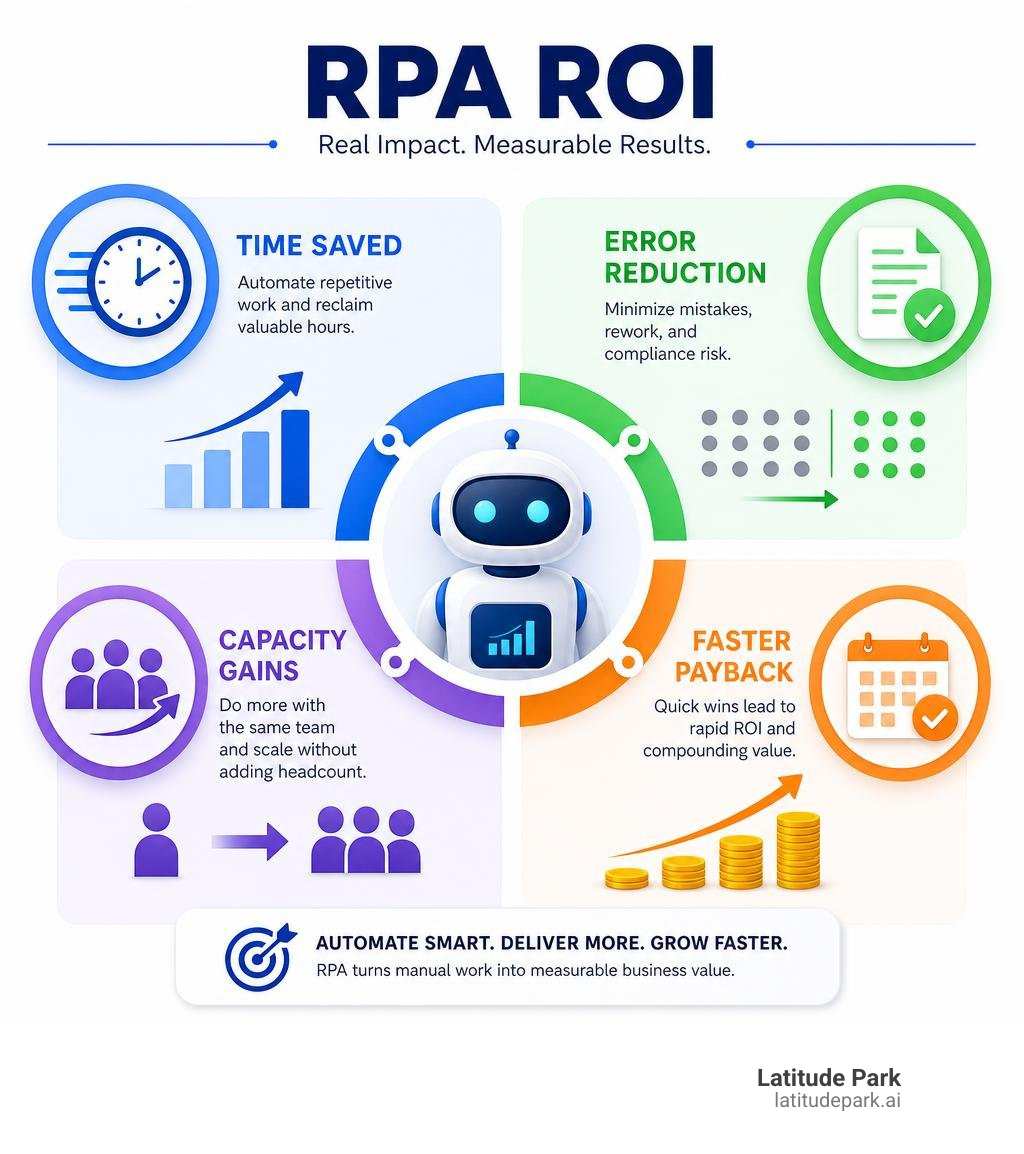
To estimate your own ROI, use this simple formula:
- Count the number of times a task happens per month.
- Multiply by the average minutes required per task.
- Multiply by the fully loaded hourly cost of the person doing it.
- Add the cost of errors, delays, or missed opportunities.
- Compare that with software, implementation, and maintenance costs.
The best first automation is a high-volume, rules-based process with low exception rates and a clear business owner.
The Evolution of Automation: From Simple Bots to Agentic AI
RPA has changed significantly. Early RPA focused on simple task automation: logging in, copying data, pasting data, and submitting forms.
Then intelligent automation added advanced technologies:
- Machine learning
- Natural language processing
- OCR and document understanding
- Predictive analytics and generative AI
Now, automation is moving toward agentic automation. AI agents can plan, reason, decide what action is needed, and then hand execution to RPA bots, APIs, or humans.
A useful way to think about this evolution:
| Phase | Main Capability | Example |
|---|---|---|
| Task automation | Bots follow rules | Copy invoice data into accounting software |
| Intelligent automation | Bots use AI to interpret information | Extract fields from PDFs and classify documents |
| Agentic automation | AI agents plan and coordinate work | Review an email, decide next steps, trigger bots, escalate exceptions |
If you are exploring how AI fits into everyday operations, read our guide on how AI tools can automate your business tasks.
The Rise of Agentic Process Automation
Agentic process automation does not make RPA obsolete; it makes RPA more useful.
AI agents excel at interpreting context and deciding what should happen next, while RPA bots reliably execute structured work across business systems. Together, they create a powerful model:
- AI agents think and plan.
- RPA bots execute.
- APIs move data directly when available.
- Humans review exceptions and make judgment calls.
For example, in an order-to-cash workflow:
- An AI agent reads a customer email and identifies the request.
- It checks business rules and pricing conditions.
- It triggers an RPA bot to enter the order into an ERP system.
- The bot generates the invoice and updates inventory.
- A human is alerted only if something looks unusual.
This model is why many modern platforms describe RPA as the execution layer for AI agents. You can see this positioning in resources like Robotic Process Automation from Automation Anywhere and the UiPath business orchestration and automation platform.
RPA is not being replaced by AI; it is becoming one of the primary ways AI gets real work done.
How to Choose the Right RPA Software for Your Business
The right RPA platform depends on your business size, process complexity, compliance needs, and internal skills.
Use this selection checklist:
- Define your top workflows: What tasks are repetitive, slow, error-prone, or expensive?
- Confirm process readiness: Is the process documented, rules-based, and structured?
- Decide who will build automations: Will you use business users, IT, or outside specialists?
- Review integration needs: Do your systems have APIs, or do you rely on legacy software?
- Evaluate governance: Who approves, monitors, and tests automations?
- Start small, then scale: Pilot one or two workflows, measure outcomes, and improve.
For smaller organizations and franchise teams, our Small Business Automation Tools Complete Guide can help you compare automation categories before choosing a platform.
Common Use Cases Across Key Industries
RPA can be used in almost any industry because repetitive digital work exists almost everywhere. If there is a spreadsheet, an inbox, and a person sighing deeply, there may be an automation opportunity.
Common use cases include:
- Data entry and migration
- Invoice processing
- Customer onboarding
- Employee onboarding
- Payroll updates
- Claims processing
- Compliance reporting
- Inventory updates
- Order processing
- Report generation
- Email routing
- CRM updates
- IT support tasks
For more examples of how organizations apply automation, see The RPA Roll Call: Discovering Leading Companies Embracing Automation.
Finance and Accounting Workflows
Finance teams are a natural fit for RPA because much of the work is structured, rules-based, and high volume.
Common finance and accounting automations include:
- Invoice capture and validation
- Purchase order matching
- Vendor setup
- Payment status updates
- Account reconciliation
- Expense report checks
- Payroll processing
- Tax data preparation
- Compliance reporting
- Month-end close support
Example: A bot receives invoices from an email inbox, extracts key fields, checks the purchase order, flags mismatches, enters approved invoices into the accounting system, and sends a status update.
This reduces manual keying, speeds up payment cycles, and creates a better audit trail.
For franchise businesses, this can be especially valuable when each location submits similar reports, invoices, or reimbursement requests. Instead of chasing files from every location, automation can standardize the intake and validation process.
Healthcare and Patient Data Management
Healthcare workflows often involve large volumes of forms, records, claims, and scheduling tasks. RPA can support administrative work while keeping humans focused on care and decision-making.
Common healthcare automations include:
- Claims processing
- Appointment scheduling
- Patient record updates
- Eligibility checks
- Prior authorization support
- Credentialing workflows
- Data extraction from forms
- Billing updates
- Compliance documentation
- EHR data entry support
Because healthcare data is sensitive, security and governance matter. Bots need proper access controls, audit logs, and exception handling. RPA should support compliance, not create a mysterious digital intern wandering through patient records.
Overcoming Challenges and Risks in Implementation
RPA is powerful, but it is not magic. If a process is messy, automating it simply makes the mess move faster.
Common RPA challenges include:
- Choosing the wrong process
- Underestimating exceptions
- Poor documentation and weak governance
- Bot failures after system changes
- Security gaps and lack of employee buy-in
- Scaling problems after a successful pilot
- Unclear ownership between business and IT
RPA should be part of a thoughtful automation strategy, not a random project. For the bigger picture of process-led automation, see our guide to Digital Process Automation Services.
Process Selection and Scaling Pitfalls
Good RPA starts with good process selection. The best candidates usually have high transaction volume, clear rules, stable applications, structured data, and low exception rates.
Poor candidates often have constantly changing rules, messy data, heavy judgment calls, or unstable systems.
Before building bots, use process discovery techniques such as:
- Employee interviews and screen recordings
- Task mining and process mining
- Workflow mapping and error analysis
Once you move beyond a pilot, consider creating an automation operating model or Center of Excellence to define:
- Who identifies and approves automation opportunities
- Who builds, tests, and monitors bots
- Who fixes them when systems change
- How ROI is measured
This prevents automation sprawl, where every team builds bots differently and nobody knows what is running.
Security and Maintenance Best Practices
RPA bots often access critical systems, so security is essential. Use these best practices:
- Assign each bot a unique identity and use role-based access controls.
- Store credentials in a secure vault and limit bot permissions.
- Keep detailed audit trails and monitor bot activity.
- Test automations before production changes.
- Build retry logic for temporary failures and create alerts for failed jobs.
- Document every automation and review bots regularly.
Maintenance is critical because applications, login screens, and fields change. A bot that works perfectly today may fail next month if the underlying system updates.
If you use a platform like UiPath, keeping development tools current is part of the maintenance lifecycle. Their Studio update documentation is an example of the operational detail teams need to manage as automation programs mature.
Frequently Asked Questions about Robotic Process Automation
Does RPA require coding knowledge?
No, not always.
Many modern RPA platforms are low-code or no-code. They use visual designers, drag-and-drop steps, recorders, templates, and prebuilt connectors. This allows business users, sometimes called citizen developers, to build simple automations without writing traditional code.
However, coding skills can still help with:
- Complex logic
- API integrations
- Custom scripts
- Advanced error handling
- Data transformations
- Enterprise-scale deployment
- Security and governance
The best model is usually a partnership. Business users understand the process. Technical users understand architecture, security, and scale. Put them together and you get better automations with fewer “why is the bot clicking the wrong button?” moments.
What is the difference between RPA and AI?
RPA follows rules. AI learns from data and makes predictions or decisions.
Here is the simple version:
| Technology | What It Does Best | Example |
|---|---|---|
| RPA | Executes repetitive, rule-based tasks | Move invoice data into accounting software |
| AI | Interprets, predicts, classifies, or generates | Read an invoice and identify missing fields |
| RPA plus AI | Combines decision support with execution | AI extracts data, RPA enters it into a system |
RPA is great when the process is structured and predictable. AI is useful when the work involves language, images, probability, classification, or judgment.
For example:
- RPA can log into a portal and download a report.
- AI can summarize the report or detect unusual patterns.
- RPA can send the summary to the right person.
They are different tools, but they work very well together.
How long does it take to see ROI from RPA?
Many RPA projects can show ROI within weeks, especially when they automate high-volume, repetitive work with clear rules.
The speed depends on:
- Process complexity
- Number of systems involved
- Data quality
- Exception rates
- Security requirements
- Approval cycles
- Team experience
- Platform choice
A simple desktop automation might be built quickly. A regulated enterprise workflow with multiple systems, approvals, and audit requirements will take longer.
To get faster ROI:
- Start with a simple, high-volume process.
- Avoid automating broken workflows.
- Define success metrics before building.
- Keep the first pilot focused.
- Measure time saved, errors reduced, and capacity gained.
- Use lessons from the pilot to build the next automation.
Conclusion
RPA software is one of the most practical ways to reduce repetitive digital work, improve accuracy, and scale operations without immediately adding headcount.
For non-techies, the important thing is not memorizing every technical term. It is understanding where RPA fits:
- It automates repetitive digital tasks.
- It works across existing systems.
- It can support both front-office and back-office teams.
- It is different from AI, but stronger when combined with AI.
- It requires governance, process discipline, and ongoing maintenance.
- It can deliver fast ROI when applied to the right workflows.
At Latitude Park, we care about automation because we care about growth. In franchise marketing, especially with Meta advertising, multi-location businesses need structure, consistency, reporting, and speed. The same thinking applies to RPA: the goal is not to replace people, but to remove friction so teams can focus on higher-value work.
If you are just getting started, begin with one question:
“What repetitive task is stealing the most time from our team right now?”
Then document it, measure it, and decide whether automation can help.
For more practical ideas, read Beyond CRM: Essential Automation Tools for Every Small Business Owner or explore our small business automation tools guide.