YouTube in-stream ads are video ads that run before, during, or after other videos on YouTube and its Google video partner network. Skippable in-stream ads are the workhorse for reach and consideration because viewers can bail after 5 seconds and you only pay for real engagement. Non-skippable and bumper ads exist for the opposite reason: guaranteed completion and repetition when awareness matters more than politeness. Billing and view definitions differ by format, and that distinction changes how you should budget.
Table of Contents
- What Are Skippable, Non-Skippable, and Bumper In-Stream Ads?
- What Technical Specs Do In-Stream Ad Creatives Need?
- How Are You Billed for YouTube In-Stream Ads?
- How Do You Measure In-Stream Ad Performance?
- What Creative Choices Improve In-Stream Ad Performance?
- Which YouTube Campaign Type Fits Your Goal?
- What Disclosure Rules Apply to Sponsored YouTube Videos?
- Latitude Park’s Framework for Planning an In-Stream Campaign
- Get Your YouTube In-Stream Campaign Managed by Latitude Park
- Sources
- FAQ
What Are Skippable, Non-Skippable, and Bumper In-Stream Ads?
Each in-stream format solves a different problem, and confusing them is how budgets get wasted on the wrong objective.
Skippable in-stream ads (the format most people mean when they say TrueView) let viewers skip after 5 seconds. You’re billed only when someone watches 30 seconds, watches to completion if the ad is shorter, or clicks on it, according to Google Ads Help. That billing structure makes skippable ads the default choice for reach and consideration campaigns, since you’re only paying for people who actually stuck around.
Non-skippable in-stream ads run 15 to 20 seconds (with some 30 second formats reserved for certain Connected TV placements) and viewers can’t fast forward through them. Use these when message completion matters more than efficiency, like a limited-time offer that only works if the whole thing gets seen.
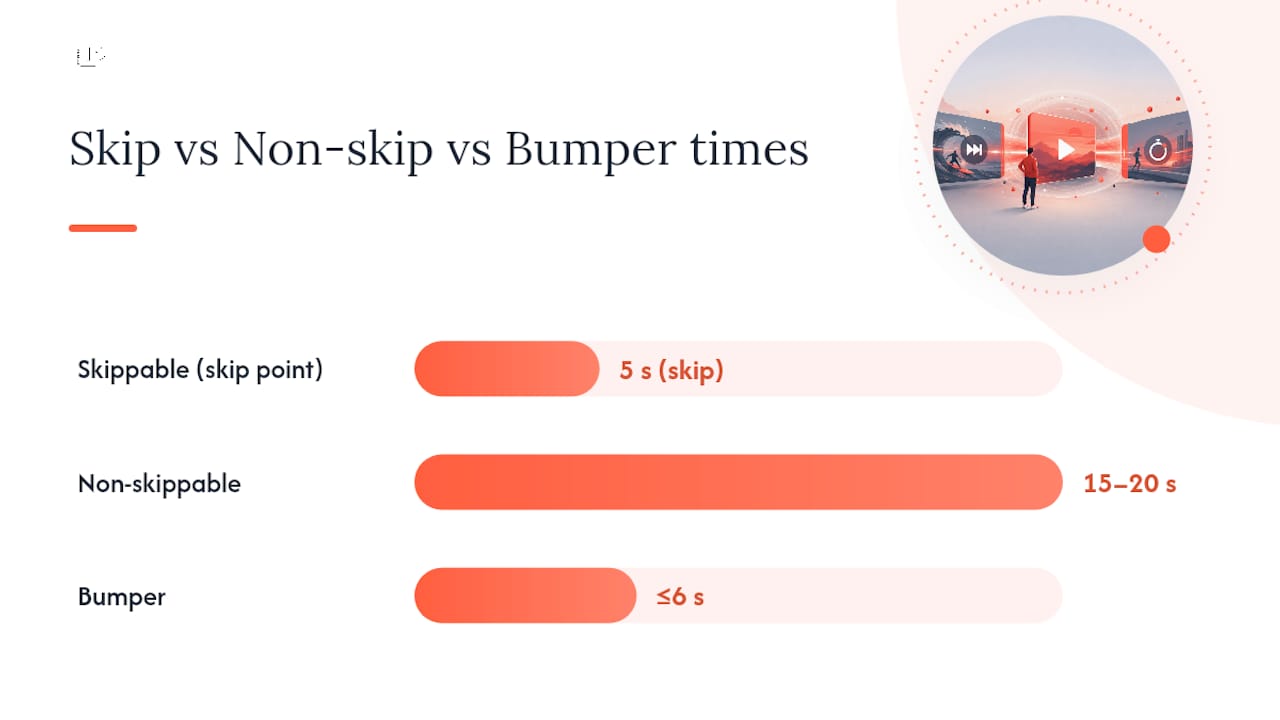
Bumper ads cap out at 6 seconds and can’t be skipped. They’re built for frequency and top-of-funnel awareness, the digital equivalent of a billboard flash.
In-stream ads can appear:
- Pre-roll (before the main video)
- Mid-roll (inside videos over 8 minutes long)
- Post-roll (after the video ends)
- Connected TV and Google video partner (GVP) inventory, per Google Ads Help
What Technical Specs Do In-Stream Ad Creatives Need?
Your creative team can build the sharpest hook in the world, but if the file doesn’t meet spec, it never runs. Here’s what to lock in before production:
- Resolution and aspect ratio: 1080p horizontal video at 16:9 for standard in-stream, 9:16 vertical for Shorts placements, and 1:1 square as a flexible backup for mixed inventory.
- File format: MP4 with H.264 compression is the safest bet across placements.
- Companion banners: A 300×60 companion banner is recommended for desktop in-stream ads and requires a linked YouTube channel with the video already uploaded.
- Channel requirements: The ad’s source video must live on a YouTube channel connected to your Google Ads account before you can run it as a paid unit.
- TV and QR considerations: On Google TV and other Connected TV placements, a scannable QR code often replaces a clickable CTA, since living room viewers can’t tap a remote the way they’d tap a phone screen.
Get these specs wrong and you’ll burn a review cycle just resubmitting assets, which is time better spent testing creative variants.
How Are You Billed for YouTube In-Stream Ads?
Billing is where most new advertisers get tripped up, because “impression” and “view” don’t mean the same thing across formats.
CPV (cost per view) is the standard bidding model for skippable in-stream ads. You pay when a viewer hits that 30 second or full completion threshold, or interacts with the ad, as defined by Google Ads Help. tCPV (target CPV) lets Google’s bidding system automate toward a view cost you set, which matters more as you scale spend across multiple ad groups.
Non-skippable and bumper ads run on a CPM basis, since there’s no skip decision to measure and no partial view to count. You’re paying for guaranteed impressions, not engagement.
In multi-format Video Reach and Video View campaigns, Google’s automated bidding shifts spend across formats in real time. Testing on these campaign types showed 54% more reach at a 42% lower CPM versus running in-stream ads alone, with Video View tests separately delivering roughly 40% more views at about 30% lower CPV.
- Skippable: CPV or tCPV bidding
- Non-skippable/bumper: CPM bidding
- Multi-format: automated bidding blends both, optimizing toward your stated goal
How Do You Measure In-Stream Ad Performance?
Impressions, views, and “YouTube view count” are three different numbers, and mixing them up will make you misread a campaign.
An impression is any time the ad loaded. A billable “view” for in-stream ads only counts at the 30 second or completion mark, while in-feed and Shorts ads count a view at 10 seconds. Average view rate benchmarks vary widely by category, so watch your own trend line over time rather than chasing an industry number.
Brand Lift measures shifts in ad recall, awareness, and consideration, but it’s not available on every account. Full access typically requires coordination with a Google account representative. Larger advertisers sometimes turn to Ads Data Hub for deeper, privacy-safe analysis outside the standard Ads interface.
- Link your YouTube channel to Google Ads to unlock retention quartile data
- Check “Ads data” views (paid) separately from “Organic data” views in reporting
- YouTube’s continued MRC brand safety accreditation gives advertisers suitability tier controls worth reviewing before launch
What Creative Choices Improve In-Stream Ad Performance?
The first 5 seconds decide whether your ad gets skipped, so that opening beat deserves more attention than the rest of the script combined. Lead with the product, the payoff, or a face, not a logo animation nobody asked for.
- Build a distinct 0 to 5 second hook and test a short cutdown against a longer narrative version
- Design for sound off, since many viewers watch with muted autoplay
- Use companion banners, on-screen CTAs, and end cards to give viewers a next step beyond watching
- Sequence formats: bumpers for reach, skippable for engaged viewers, then a retargeting pass on people who watched past 50%
- If the video contains a paid partnership, disclose it clearly on screen, not just in the description
Pro Tip: Cut three versions of your hook, one benefit-led, one curiosity-led, one social-proof-led, and let the data pick a winner before you scale spend behind any single script.
For a deeper breakdown of hook structure and sequencing, Latitude Park’s creative best practices guide covers testing frameworks in more detail.
Which YouTube Campaign Type Fits Your Goal?
Matching campaign type to objective saves you from optimizing the wrong metric for weeks.
- Awareness goal: Run a Video Reach campaign, which blends in-stream, in-feed, and Shorts to maximize unique reach at the lowest CPM.
- Consideration goal: Run a Video View campaign (VVC), optimized for cost-efficient views and watch time.
- Action goal: Run Demand Gen or Video Action campaigns, both built around driving clicks, leads, or purchases.
- Set your KPI before launch: decide whether you’re measuring reach, view rate, or cost per action, then choose bidding accordingly.
Turn on Google video partners when you need scale; keep it off if you need tighter audience targeting control at the channel level. For broader discovery placements alongside in-stream, Latitude Park’s Discovery Ads guide walks through goal mapping in more depth.
What Disclosure Rules Apply to Sponsored YouTube Videos?
The FTC’s endorsement guidance expects clear, conspicuous disclosure whenever a video contains a paid endorsement, and a description-only disclosure usually doesn’t cut it. Disclosures should appear near the start of the video, and for livestreams, repeated or persistent on-screen text is the safer approach since viewers join mid-stream. For space-constrained or interactive ad units, a link to a clear landing-page disclosure can supplement what fits on screen.
Latitude Park’s Framework for Planning an In-Stream Campaign
Most in-stream campaigns fail before they launch, not because the format was wrong, but because nobody sequenced the decisions. Every YouTube plan should follow the same order: objective first, creative architecture second, format mix third, measurement and pacing last. Skip a step and you end up buying reach when you needed conversions, or vice versa.
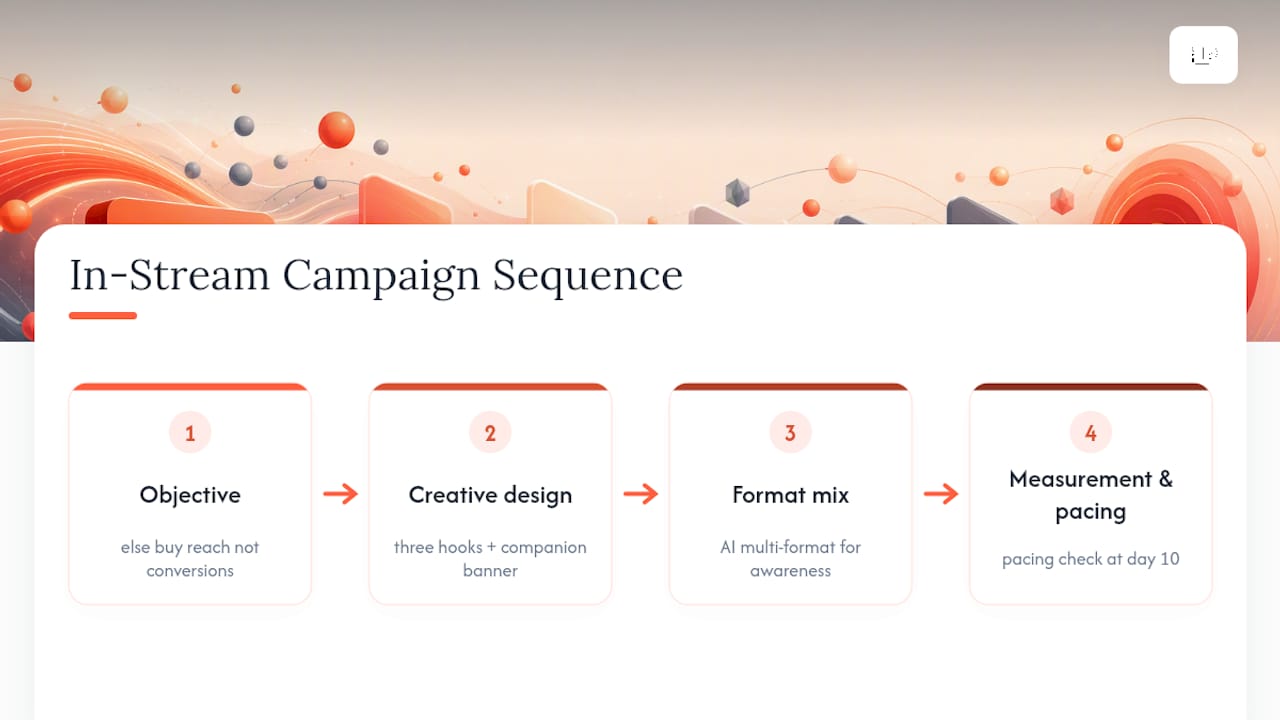
We recommend AI-powered multi-format campaigns for most awareness and consideration goals, since Google’s own testing backs the efficiency gains. Focused skippable-only buys still make sense when you’re retargeting a narrow, already-warm audience.
A 30-day starter checklist: three creative hooks, one companion banner, a linked YouTube channel, a defined view-rate benchmark, and a pacing check at day 10 to catch overspend early.
— Rusty
Get Your YouTube In-Stream Campaign Managed by Latitude Park
Instead of guessing at bid strategies and burning budget on formats that don’t match your goal, consider working with a team that builds the format mix, tests the hooks, and reports results in plain numbers tied to revenue.

Our Google Ads management service covers campaign setup, creative production, and ongoing optimization across YouTube’s in-stream, Discovery, and Demand Gen formats, backed by transparent reporting so you always know what’s working. If you’re running local campaigns alongside YouTube, our Google Ads for local businesses guide shows how the two channels reinforce each other. Ready to see where your current YouTube spend is leaking? Request a campaign audit through Latitude Park and get a clear read on what to fix first.
Sources
FAQ
Why Is YouTube Showing Ads During Live Streams?
Live streams monetize the same way regular videos do, and creators can insert mid-roll ads manually or automatically during a broadcast. YouTube Premium generally removes ads platform-wide, but ads can still surface during some live streams due to how live monetization works.
What Does “In-Stream Ads” Mean?
In-stream ads are video ads that play before, during, or after other YouTube videos, covering skippable, non-skippable, and bumper formats. They differ from in-feed or Shorts ads, which appear alongside content rather than interrupting playback.
Why Is YouTube Suddenly Full of Ads?
Advertiser demand on YouTube has grown alongside multi-format campaign tools like Video Reach and Demand Gen, which make it easier and more cost-efficient for brands to buy volume across formats. More efficient bidding tends to mean more total ad inventory gets filled, not less.
Does YouTube Premium Get Rid of Ads on Streams?
YouTube Premium removes most ads across the platform, but live streams are a partial exception since creators can still run ads during a broadcast. Standard in-stream, in-feed, and Shorts ads disappear for Premium subscribers outside of that live-stream carve-out, per YouTube’s help documentation.