Invalid clicks are any clicks or impressions that do not reflect genuine user interest, from bot traffic to deliberate competitor clicks, and Google already filters most of them before they ever hit your invoice. When filtering happens after billing, Google issues a credit you can see in your transaction history. Before you panic about a CTR spike, add the Invalid clicks column to your account and pull the Invalid Activity Credit Report.
Table of Contents
- 1. What invalid traffic and click fraud actually mean
- 2. How Google detects, filters, and reports invalid clicks
- 3. How click fraud shows up in your campaign metrics
- 4. A step-by-step detection checklist you can run this week
- 5. Prevention tactics that reduce future exposure
- 6. How we approach invalid traffic for client accounts
- 7. Why platform filters alone leave you exposed
- 8. How we help you stop paying for clicks that never should have counted
- FAQ
- Sources
1. What invalid traffic and click fraud actually mean
Invalid traffic is the umbrella term Google uses for any click or impression that does not represent a real, interested user. Click fraud is the deliberate subset of that: someone clicking your ad on purpose to drain your budget or inflate publisher revenue, which is a different animal from a user who double-clicks by accident on a phone screen the size of a playing card.
The sources vary, but they tend to fall into familiar buckets:
- Bots and scripted traffic that crawl ads automatically, sometimes to scrape pricing data, sometimes just to generate noise.
- Click farms, which are low-cost human labor pools paid to click ads or complete fake engagement tasks.
- Manual competitor clicks, where a rival taps your ad repeatedly to burn your daily budget.
- Accidental or double clicks, the least sinister category and the hardest to fully eliminate.
- Data-center traffic, where requests originate from server farms instead of real residential devices.
Risk is not evenly distributed across campaign types. Search campaigns tend to see lower invalid traffic rates because intent-driven queries are harder to fake convincingly, while Display and Video inventory carry more exposure because placements vary wildly in quality and some publishers have a financial incentive to inflate impressions. If you are running Display alongside Search, treat them as separate risk profiles, not one blended number.
2. How Google detects, filters, and reports invalid clicks
Google runs automated, multi-layered detection around the clock, and it deliberately keeps some of the filtering logic private. That is not evasiveness for its own sake. According to Google’s own click measurement methodology, disclosing every filter signal would let bad actors reverse-engineer around them, which defeats the purpose.
Here is what actually happens to a click once it lands on your ad, step by step:
- Google’s systems evaluate the click in real time against known invalid patterns, including IP reputation, click timing, and device signals.
- Clicks caught before billing are filtered silently. You are never charged for them, and they show up in your account specifically under the Invalid clicks column once you add it to your reporting view.
- Clicks caught after billing trigger a credit, which appears in your transaction history and is summarized in the Invalid Activity Credit Report.
- If you suspect fraud that the automated system missed, Google documents the evidence it wants for a manual review: GCLIDs, IP addresses, user agents, timestamps, and a clear trend showing the anomaly.
Google’s measurement methodology also references the IAB and MRC industry standards, and it breaks invalid traffic into two tiers: general invalid traffic, which accounts for roughly 80% of filtered clicks and includes known bots and crawlers, and sophisticated invalid traffic, which is harder to catch and requires more advanced detection. Knowing that split matters because it tells you the obvious stuff is probably already handled. What is left in your data is the harder case.
3. How click fraud shows up in your campaign metrics
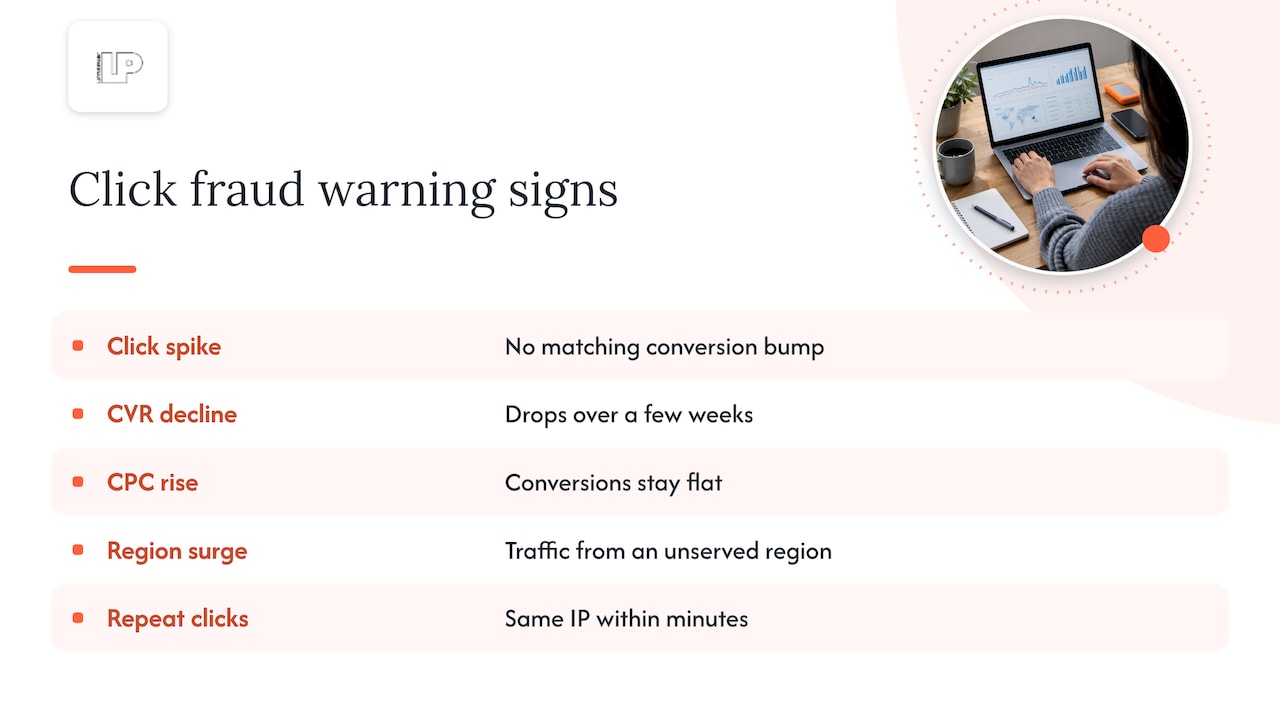
You will rarely see a neat “fraud detected” flag sitting in your dashboard. Instead, click fraud tends to announce itself through distortions that look like performance problems until you dig in. Watch for a click spike with no matching bump in conversions, a CVR that quietly drops over a few weeks, or CPC creeping up while conversion volume stays flat. Geographic anomalies (a sudden surge from a region you do not serve) and repeat clicks from the same IP address within minutes of each other are both red flags worth pulling logs for.
One of the more overlooked risks is what invalid clicks do to your bidding algorithms. Smart Bidding strategies learn from your conversion signal, and feeding them noisy, fraudulent clicks can push your bids toward the wrong audiences entirely, which means the damage outlasts the fraudulent clicks themselves. This is opportunity cost on top of wasted spend, and it is the part advertisers underestimate most.
Here is a simple way to size the problem using your own numbers. Say your account sees 10,000 clicks a month at an average CPC of $2, for $20,000 in spend. Run that math against your own invalid click rate from the column in your account, not a guess.
4. A step-by-step detection checklist you can run this week
Confirming click fraud is a documentation exercise as much as a technical one. Google will not act on a hunch, and neither should your campaign budget. Here is the sequence that gets you from suspicion to evidence.
- Add the Invalid clicks column to your campaign view and pull the Invalid Activity Credit Report to see what Google has already caught and credited.
- Export GCLIDs for the clicks you are suspicious of. These are the unique identifiers attached to every ad click and they are your anchor for matching across systems.
- Cross-reference those GCLIDs against your web server logs and your GA4 sessions to confirm, or disprove, that a real session with real on-site behavior actually happened. Our guide to Google Ads data analysis walks through building this kind of matched view if you have not set one up.
- Look for repeat IPs, identical user agents firing in rapid succession, and traffic originating from known data-center IP ranges or proxy and VPN exit nodes.
- Compare session depth and time-to-conversion across the suspect clicks. A real user who double-clicked by accident usually still browses normally; a fraudulent click tends to bounce instantly or behave identically across sessions.
- Mapping clicks to Analytics sessions in GA4 can also surface unusual traffic patterns worth flagging, including automated or LLM-driven crawler activity that does not always announce itself as a bot in the user-agent string.
- Package the evidence Google actually asks for, which is GCLIDs, IP addresses, user agents, and timestamps with a clear before-and-after trend, then submit it through the Click Quality Form or request a manual investigation.
Pro Tip: Keep a running spreadsheet of flagged GCLIDs and their outcomes. When you submit a manual investigation request, having three months of documented patterns carries more weight than a single bad week.
5. Prevention tactics that reduce future exposure
Detection tells you what already happened. Prevention is about shrinking the window for it to happen again, and most of the tools for that live inside settings you already have access to.
- Apply IP exclusions for addresses you have confirmed are generating invalid clicks, and revisit the list monthly since IP ranges rotate.
- Use placement exclusions on Display and Video campaigns to cut out specific sites or apps serving low-quality or fraudulent traffic.
- Start with audience observation before layering on hard exclusions, so you are not cutting off a segment that is actually converting.
- Tighten device targeting, geography, and bid caps while you investigate a suspected issue, which limits exposure without pausing the campaign outright.
For Display and Video inventory specifically, granular placement-category exclusions matter more than a blanket approach, because the inventory quality swings so much from one placement to the next. If exclusions inside Google Ads are not enough on their own, server-side blocking or an hourly IP blocklist adds another layer, particularly for accounts that have already identified a recurring source of bad traffic. Our breakdown of why Google Ads performance drops covers how to triage when multiple issues, fraud included, are hitting a campaign at once.
Pro Tip: Review your placement exclusion list quarterly. Publishers that were clean six months ago do not always stay that way, and an exclusion list that never changes is a sign nobody is actually checking it.
6. How we approach invalid traffic for client accounts
Managing click fraud at scale is less about one clever trick and more about a repeatable rhythm: monitor, document, adjust, repeat. We run anomaly detection on client accounts and check for unusual click patterns on a near-daily cadence rather than waiting for a monthly report to surface a problem that has already cost three weeks of budget.
Our process leans on the same evidence trail outlined above: server logs, matched GCLIDs, and session data pulled into a single view so a spike in clicks can be checked against actual on-site behavior within hours, not weeks. We balance blocking aggressively against preserving signal quality, since an exclusion list applied too liberally can starve Smart Bidding of the real conversion data it needs.
If you are vetting any agency on this specific problem, these are the questions worth asking:
- How often do you review invalid click data, and what does that reporting cadence look like in practice?
- Do you have direct access to raw server logs, or are you relying solely on platform-reported numbers?
- What is your turnaround time between identifying a suspicious pattern and implementing an exclusion?
- Can you show a documented before-and-after from a prior remediation?
7. Why platform filters alone leave you exposed
Platforms have an obvious incentive to catch the obvious fraud and a less obvious incentive to look too hard for the sophisticated kind, since every filtered click is revenue they do not collect either. A 2020 FTC statement on bot-driven engagement made this exact point: platforms’ limited visibility into their own traffic makes independent verification difficult, and that gap does not close just because Google’s filters are genuinely good.
That leaves a gray zone of sophisticated, human-like automated traffic that general filters are not built to catch. The practical answer is not choosing between platform protection and your own monitoring. It is running both, with your server logs and GCLIDs as the tiebreaker when the numbers in your account do not add up.
— Rusty
8. How we help you stop paying for clicks that never should have counted
Chasing down invalid traffic while also running your actual campaigns is a lot to ask of one person, which is exactly where ongoing Google Ads management earns its keep. We provide monitoring, exclusion strategy, and data analysis so suspicious patterns get flagged and acted on promptly instead of sitting in a report unnoticed until the budget is affected.

Our work on client accounts includes:
- Ongoing Google Ads management with proactive monitoring built into the weekly workflow, not bolted on as an afterthought.
- Data analysis that matches GCLIDs, server logs, and conversion patterns to separate real demand from noise.
- Exclusion strategy built around observation first, so cutting bad traffic does not accidentally choke off a converting segment.
- Transparent reporting that shows exactly what was flagged, what was excluded, and what it did to your numbers.
If your invalid click rate has been climbing and you want a second set of eyes on the data, request a Google Ads audit and we will walk through what is actually happening in your account.
FAQ
How do I stop fake clicks in Google Ads?
Start by adding the Invalid clicks column and pulling the Invalid Activity Credit Report to see what Google has already filtered or credited. From there, apply IP and placement exclusions based on logs and GCLID evidence, and tighten device or geographic targeting while you investigate a specific spike.
Why am I getting a charge from Google Ads?
Charges reflect clicks Google’s real-time filters did not catch before billing occurred. If invalid activity is confirmed afterward, Google issues a credit that shows up in your transaction history and the Invalid Activity Credit Report.
Is click fraud illegal?
Deliberate click fraud, such as a competitor manually clicking your ads to drain your budget, can violate advertising platform terms of service and may expose the person responsible to legal liability depending on jurisdiction and intent. We are not a legal authority on this, so a specific case involving suspected criminal intent is worth running past an attorney rather than relying on a general answer.
What are the signs of click fraud?
Common signs include a click spike with no matching rise in conversions, a falling conversion rate, rising CPC with flat conversion volume, geographic traffic that does not match your targeting, and repeated clicks from the same IP address in a short window. Cross-referencing GCLIDs against server logs and GA4 sessions is the most reliable way to confirm whether a pattern is actually fraud.
Sources
- Google Ads click measurement methodology – Google Ads Help
- Statement of Commissioner Rohit Chopra Regarding Social Media Bots and Deceptive Advertising