Dynamic Search Ads automatically generate headlines and select landing pages from your site to capture long-tail search demand without building keyword lists. That means more coverage with less manual list-building, which is the whole appeal. The catch is simple: DSA only performs as well as your website lets it, so a messy, uncrawlable, or thin site will produce messy, irrelevant ads no matter how clever your settings are.
Table of Contents
- 1. What Dynamic Search Ads Are and When to Use Them
- 2. How Dynamic Search Ads Work: Crawling, Indexing, and Ad Generation
- 3. Targeting Methods, Controls, and Account Limits
- 4. How to Set Up a Dynamic Search Ads Campaign
- 5. Best Practices and Optimization Tips for DSA
- 6. DSA vs Responsive Search Ads, Performance Max, and the AI Max Migration
- 7. Troubleshooting and Common Mistakes With DSA
- 8. Our Operational Checklist for DSA and AI Max Readiness
- How We Help With Dynamic Search Ads and AI Max Readiness
- FAQ
- Sources
1. What Dynamic Search Ads Are and When to Use Them
Dynamic Search Ads work differently than standard search campaigns. Instead of you writing headlines tied to keywords, Google generates headlines and picks the landing page by analyzing your website’s content in real time, matching it to a searcher’s query, according to Google Ads Help. You still control the parts that matter for brand voice and economics: description lines, final URL rules (when you want them), bids, budgets, and the targeting scope itself.
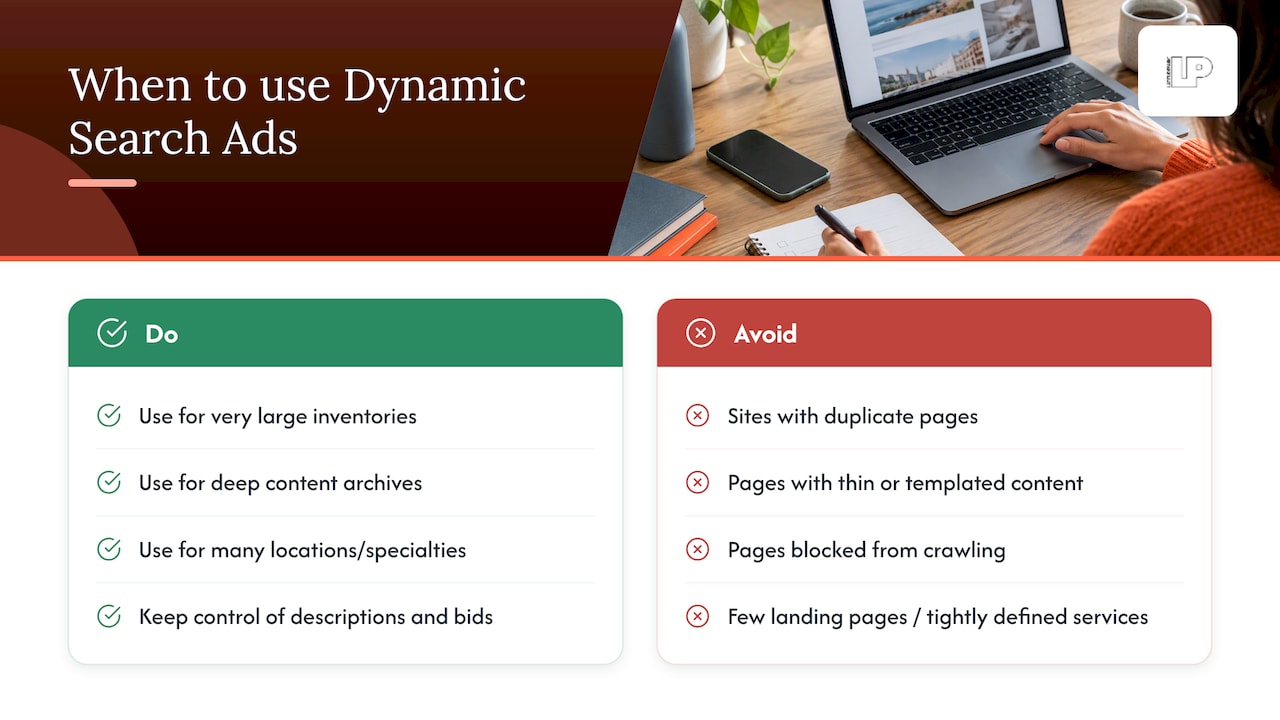
This setup shines for businesses with inventory too large to keyword every single page: ecommerce catalogs with thousands of SKUs, content publishers with deep archives, or service businesses whose site covers dozens of locations or specialties. A furniture retailer with 4,000 product pages isn’t writing 4,000 keyword lists. DSA fills that gap by matching “mid-century walnut dresser” to the exact product page, even if that phrase never appeared in a keyword plan.
Where DSA struggles: sites with duplicate or near-duplicate pages, thin content, or pages blocked from crawling. If your product pages are templated with little unique text, Google has nothing distinct to match against, and you’ll see generic or off-target headlines. Businesses with a handful of landing pages and tightly defined services usually get more precision from standard keyworded search campaigns instead.
2. How Dynamic Search Ads Work: Crawling, Indexing, and Ad Generation
DSA runs on a pipeline, not a single setting. First, Google crawls your site (or the URLs in your page feed), indexes the content, and groups pages into categories based on shared themes, titles, and on-page text. This categorization is what powers “All webpages” and “Categories” targeting, and it typically takes 24 to 48 hours for new or updated targets to initialize and stabilize, per Google Ads Help. Don’t panic over a quiet first day or two: that cold-start window is normal.
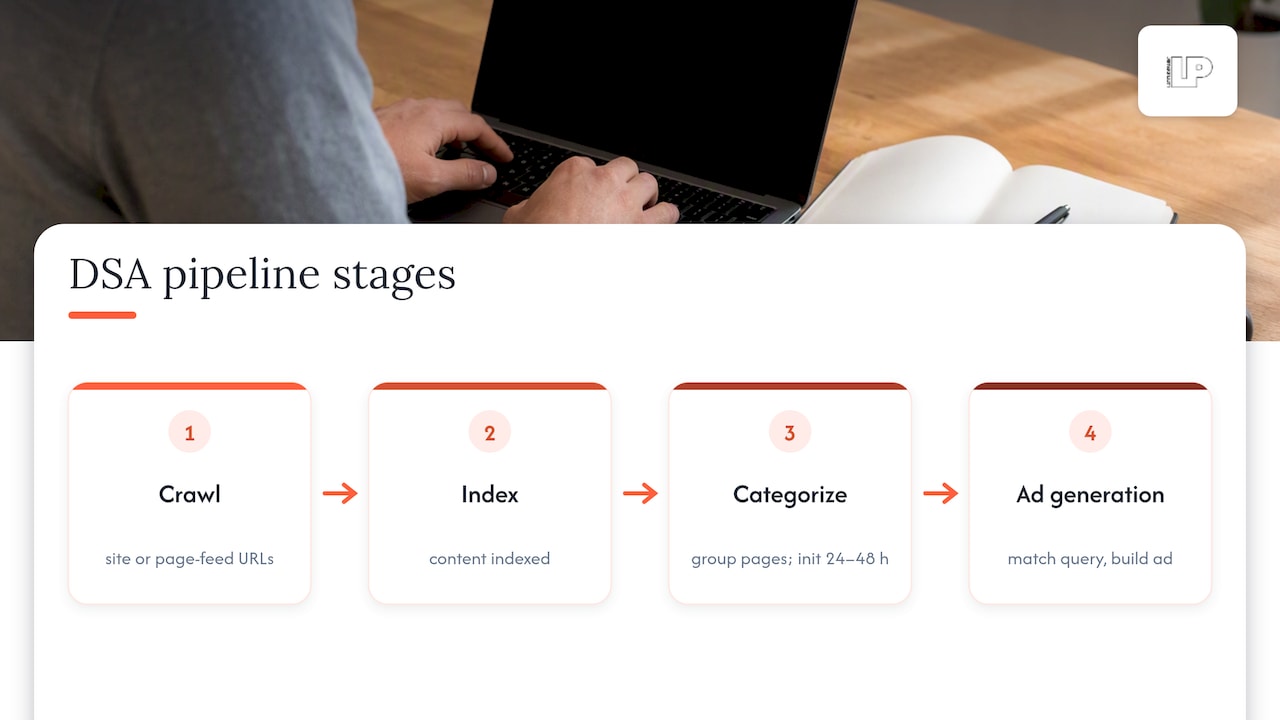
When a search query comes in, Google matches it against the crawled content and your targeting settings, then dynamically builds a headline and picks the final URL most relevant to the intent behind the query. The display URL is based on your domain and the landing page path, so it stays recognizable even though the headline itself is machine-generated. You still write the description lines, and those stay fixed.
At auction time, DSA competes exactly like any other search ad. Ad Rank is calculated from your bid, expected click-through rate, ad relevance, and landing page experience, according to Google Ads Help. There’s an important wrinkle here: DSA has no keyword-level Quality Score equivalent, since there are no keywords to score. That makes landing page quality and site content even more important, because they’re doing double duty as both the targeting signal and part of the ranking calculation. A page with a vague title tag and generic body copy won’t just rank poorly in organic search. It’ll actively weaken your DSA performance by sending Google the wrong signals about what the page is for.
3. Targeting Methods, Controls, and Account Limits
Choosing the right targeting method is the single biggest lever you have in a DSA campaign, and it’s where most accounts either scale cleanly or turn into a mess of irrelevant impressions.
- All webpages: Google crawls your entire site. Fastest to launch, lowest precision, best for small sites with uniformly strong content.
- Categories: Google groups your crawled pages into Google-generated or custom categories, giving you a layer of control without manual URL lists.
- Specific webpages (URL_Equals, URL_Contains): You target exact URLs or URL patterns, useful for isolating high-margin product lines or seasonal pages.
- Page feeds: You upload a structured list of URLs with custom labels, giving you the most control for large or fast-changing catalogs, per the Google Ads API documentation.
Page feeds are worth the setup time once you’re past a few hundred URLs. Group pages into labeled segments like “clearance,” “seasonal,” or “high-margin,” then set label-based bids so your best-performing inventory gets the budget priority it deserves.
Plan around account limits before you scale: Google enforces a cap of 25,000 dynamic ad targets per account and up to 100 page feeds per account, according to Google Ads Help. Large catalogs that exceed these limits need consolidated page feeds rather than one target per product. When targets overlap, Google resolves the conflict using the most specific matching rule, so a URL_Equals target will win over a broader category. Negative keywords and page-level exclusions remain your cleanup tool for queries or pages that shouldn’t trigger ads at all.
4. How to Set Up a Dynamic Search Ads Campaign
Before touching campaign settings, confirm your site is actually ready for DSA. Skipping this step is the most common reason new campaigns underperform in week one.
- Run a preflight check: confirm pages are crawlable (no stray robots.txt blocks), indexed, and have descriptive, unique HTML titles.
- Create a Search campaign and, in campaign settings, enable the Dynamic Search Ads option, then select your website’s domain and language.
- Build a dynamic ad group and choose your targeting method (All webpages, Categories, Specific webpages, or Page feed).
- Write your description lines, since Google generates the headline and picks the landing page, but your descriptions stay fixed and brand-controlled.
- Set bids and budget at the ad group or target level, starting conservative until you see real search term data.
- Optional: upload a page feed and apply custom labels to segments you want to bid or report on separately.
Once live, give the campaign the 24 to 48 hour initialization window mentioned earlier before judging early performance. The first batch of search terms will tell you more about where to tighten targeting than any amount of pre-launch guessing.
5. Best Practices and Optimization Tips for DSA
Site content hygiene isn’t a one-time setup task. It’s an ongoing optimization lever, and treating it that way is what separates accounts that scale smoothly from ones that drift into irrelevant traffic over time, per Google Ads Help. Descriptive, specific HTML titles and unique page content give Google better material to generate accurate headlines from. Structured data can help too, particularly for ecommerce pages where product attributes matter.
- Review the Search terms report weekly, not monthly, to catch irrelevant matches before they burn meaningful budget.
- Build negative keyword lists continuously, treating exclusions as a living document rather than a launch-day checklist.
- Pair DSA with automated bidding once you have enough conversion data, and test bid levels separately for high-intent categories versus broad ones.
- Check the Landing page report to confirm traffic is actually hitting the pages you’d expect for a given query theme.
Pro Tip: Set a recurring calendar reminder to pull the Search terms report every Monday, because DSA drift happens quietly and compounds fast if nobody’s watching it.
The combination of consistent content hygiene and disciplined exclusion work is what keeps DSA cost-efficient past the first few months. Businesses that treat the site itself as part of the ad account, rather than a separate project owned by a different team, tend to see the cleanest results.
6. DSA vs Responsive Search Ads, Performance Max, and the AI Max Migration
Responsive search ads rely on advertiser-written headlines and descriptions that Google mixes and tests, anchored to keywords you choose. DSA flips that: Google writes the headline and picks the page, and you supply targeting rules instead of keywords. Performance Max goes further still, spanning multiple Google inventory types with minimal manual targeting at all.
In 2026, Google is folding Dynamic Search Ads into AI Max, a broader automation layer, and advertisers are being told to migrate manually rather than to wait for automatic upgrades, with Google’s own announcement noting automatic migration timelines pushed into early 2027. AI Max pulls in more signals than page content alone and can expand final URLs beyond what a traditional DSA target would have selected, according to Search Engine Land’s coverage of the shift.
That broader signal set is powerful, but practitioners report it can route specific product queries toward generic category or homepages unless you actively constrain it.
- Migrate manually and early rather than waiting for the forced auto-upgrade.
- Keep strict exclusions and brand controls active to preserve landing-page precision.
- Run a controlled experiment comparing legacy DSA against AI Max with the same goals before committing your full budget.
7. Troubleshooting and Common Mistakes With DSA
Most DSA problems trace back to one of three causes: the site, the targeting, or impatience. Start with the Search terms report spotting irrelevant matches, then cross-check the Landing page report to see whether traffic is landing where it should.
If pages aren’t crawlable, check robots.txt for accidental AdsBot blocks and confirm pages aren’t returning 404 or 403 errors. Indexing delays are common right after a site migration or a bulk content update, so give it the same 24 to 48 hour window noted earlier before assuming something’s broken.
When generic or category pages keep pulling specific product queries, that’s usually a targeting precision problem, not a site problem. Tighten things with URL_Equals targets, exclusions, or a dedicated page feed rather than relying on broad “All webpages” targeting. And resist the urge to overreact in the first week: cold-start noise is expected, and real signal takes a little longer to settle than most advertisers want to wait.
8. Our Operational Checklist for DSA and AI Max Readiness
Our audits for DSA accounts follow a consistent sequence: crawl check, title hygiene review, page-feed mapping, negative keyword seeding, then a controlled pilot before full migration. We sequence AI Max moves the same way: audit first, pilot next, controlled migration, then scale once the data holds up. It’s a slower start that avoids the generic-landing-page problem entirely.
— Rusty
How We Help With Dynamic Search Ads and AI Max Readiness

If your DSA account has been quietly leaking budget to irrelevant category pages, or you’re staring down the AI Max migration without a plan, that’s exactly the kind of mess our Google Ads management work exists to fix. Site audits for crawlability and title hygiene, building out page feeds with proper labeling, and piloting AI Max migrations under controlled conditions help prepare accounts before full budget commitment.
- Technical site audits that flag crawlability and content gaps before they hurt ad performance
- Hands-on Google Ads management can include DSA setup, page feeds, and exclusion workflows.
- A staged AI Max migration approach can involve audit, pilot, controlled rollout, then scale.
A straight path through this starts with a conversation. Visit our Google Ads management page to request an audit and see where your current setup stands.
FAQ
What is the difference between responsive search ads and dynamic search ads?
Responsive search ads use advertiser-written headlines and descriptions tied to keywords you choose, which Google tests in combinations. Dynamic Search Ads skip keywords entirely: Google generates the headline and selects the landing page directly from your website content, based on the searcher’s query.
Is PPC better than SEO?
Neither is universally better since they serve different timelines and goals: PPC delivers immediate visibility and is easy to measure and adjust, while SEO builds compounding organic traffic that doesn’t disappear when you stop paying. Most effective strategies use both together rather than picking one over the other.
What are dynamic ads?
Dynamic ads are ads where the creative, typically the headline and sometimes the landing page, is generated automatically based on a data source like a website, product catalog, or feed, rather than written manually for each one. In Google Ads, Dynamic Search Ads generate headlines and pick landing pages from your site’s crawled content, per Google Ads Help.
Can you provide an example of a dynamic ad?
A shoe retailer running Dynamic Search Ads might have a searcher type “waterproof hiking boots size 11,” and Google generates a headline referencing that product and sends the click to the exact product page on the retailer’s site, without the retailer ever having built a keyword or ad for that specific size and style combination.
Sources
- About Dynamic Search Ads – Google Ads Help
- We’re upgrading Dynamic Search Ads to AI Max — Google blog
- How to prepare for Google’s DSA sunset and move to AI Max — Search Engine Land