Streamline Your Enterprise with Business Automation Workflow on Cloud
Understanding On-Premises vs Cloud Workflow Automation
For decades, companies managed operations using on-premises workflow engines installed directly on physical server racks inside local data centers. While these legacy setups offered strict localized control, they presented significant maintenance hurdles, expensive hardware refresh cycles, and prolonged setup timelines. Updating a single process or connecting to a modern web application often required months of custom engineering work.
Deploying a business automation workflow on cloud fundamentally changes how enterprises handle operational architecture. Instead of managing servers, software licenses, and infrastructure updates in-house, organizations tap into cloud-hosted process engines. This transition offers virtually unlimited scalability, dynamic operational flexibility, and remote availability. Understanding the DPA difference and how digital process automation services drive innovation highlights how modern enterprises replace rigid manual steps with cloud-first digital workflows.
Key Differences in Architecture and Deployment
The architectural shift from on-premises servers to cloud process engines transforms every stage of software deployment and maintenance.
- Infrastructure Management: On-premises automation requires in-house IT teams to maintain physical servers, manage hardware redundancy, and manually install patch updates. Cloud workflow engines run on managed cloud infrastructure with guaranteed 99.9% uptime and automatic security patching.
- Deployment Speed: Launching new processes on-premises involves provisioning databases, configuring localized web servers, and setting up network access controls. Cloud platforms allow teams to build, test, and deploy automated flows in days using web browser visual drag-and-drop tools.
- Resource Allocation and Scaling: When business volumes spike, physical servers hit memory limits and crash. Cloud workflow environments dynamically scale processing power to manage unexpected task surges smoothly without manual intervention.
Why Migrate to a Business Automation Workflow on Cloud
Transitioning process management to cloud infrastructure delivers immediate operational advantages across every business unit:
- Turnaround Acceleration: Organizations dramatically shorten task completion timelines. For instance, title insurance providers reduced application turnaround times from two weeks down to 15 minutes by replacing manual paper handoffs with automated cloud workflows.
- Seamless Remote Collaboration: Cloud workflows give distributed teams, field managers, and franchise locations instant access to shared tasks, automated approval queues, and central status tracking from any device or modern browser.
- Significant Cost Reduction: Companies eliminate recurring hardware capital expenses, simplify software licensing, and slash operational overhead. Organizations adopting platforms like Microsoft Power Automate routinely report a 248% ROI over three years alongside substantial reductions in legacy system maintenance costs.
- Dynamic Work Routing: Built-in cloud intelligence evaluates document contents, budget limits, or geographical rules in real time to reassign tasks instantly to the right manager or AI agent.
Core Capabilities of a Business Automation Workflow on Cloud Platform
Modern cloud workflow solutions do much more than pass digital documents from one email inbox to another. They act as central operational hubs, orchestrating applications, processing unstructured content, and directing complex business decisions.

To build a truly resilient system, enterprises rely on a combination of process mining, decision logic, system orchestration, and agentic artificial intelligence. Readers exploring comprehensive implementation strategies can reference our detailed business automation workflow knowledge center for additional technical frameworks.
AI and Agentic Process Automation Integration
The evolution of generative AI has introduced agentic process automation into cloud workflow engines. Unlike standard rule-based automations that follow pre-programmed logic, autonomous AI agents analyze contextual data, evaluate incoming document requests, and execute multi-step business actions independently.
These advanced AI capabilities integrate smoothly through standardized protocols like the Model Context Protocol (MCP). This allows cloud process engines to connect with external models such as watsonx, Copilot, or Claude seamlessly.
Key agentic AI capabilities in cloud platforms include:
- Natural Language Command Processing: Business owners can describe complete business processes using simple text prompts, allowing platforms like Dhumi Flow to automatically construct multi-step visual workflows in seconds.
- Autonomous Task Execution: AI agents summarize complex case histories, extract key information from unstructured invoices or contracts, and auto-populate ERP databases without human data entry.
- Human-in-the-Loop Safeguards: While AI agents manage routine data extraction, built-in approval thresholds route unusual edge cases or high-value decisions directly to human managers for final sign-off.
Process Mining and Dynamic Decision Logic
Before automating an enterprise process, organizations must understand how work actually flows across departments. Cloud workflow suites include process and task mining modules that inspect event logs across business applications.
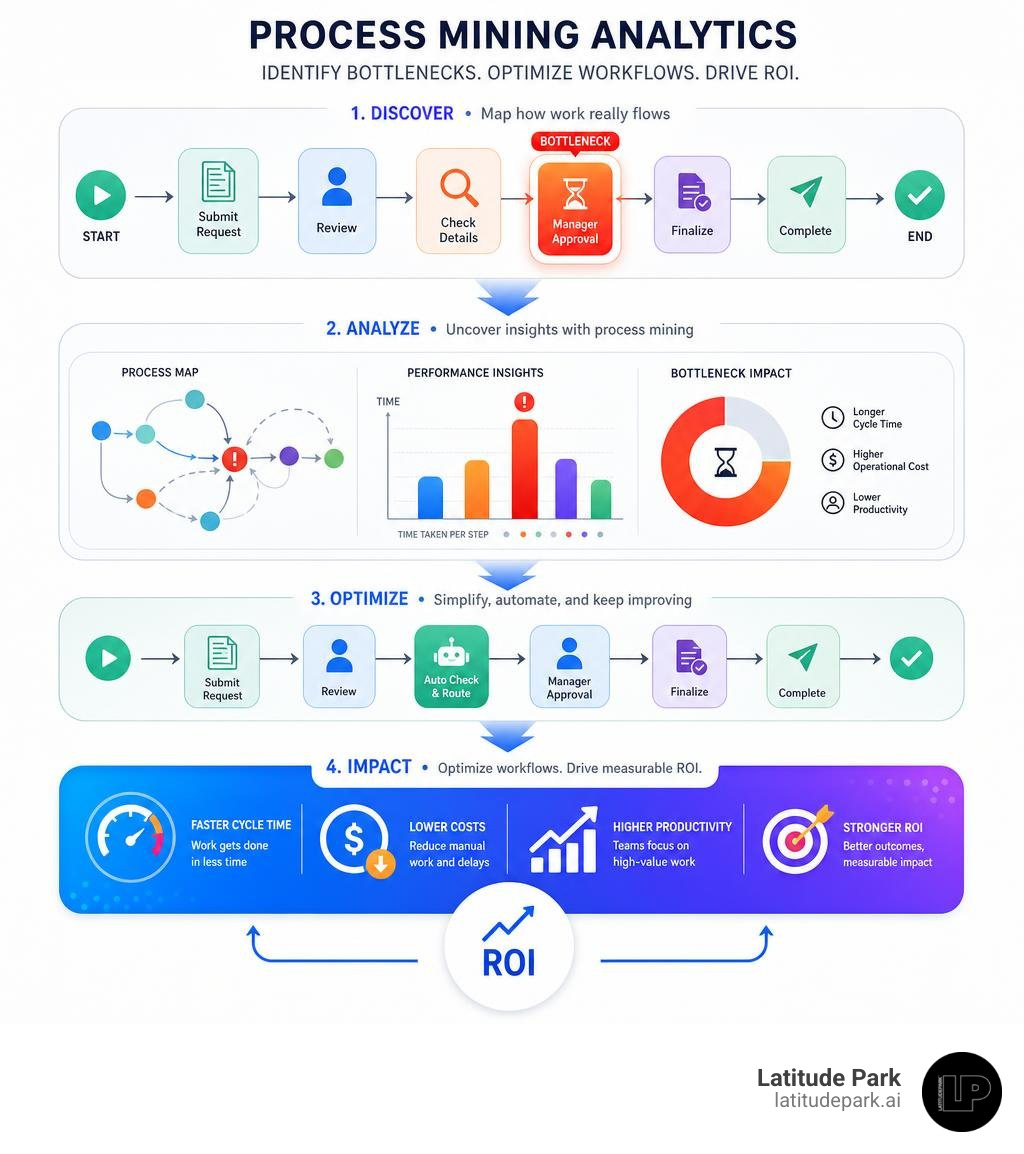
Process mining pinpoints hidden operational bottlenecks, redundant approval steps, and high-frequency manual tasks. Combining real-time process mining with decision intelligence allows platforms like IBM Cloud Pak for Business Automation to continuously evaluate operational KPIs and update business rules dynamically. This gives leaders complete visibility into execution bottlenecks while ensuring all automated steps comply with corporate governance standards.
Implementation Strategy and Key Considerations
While the benefits of cloud process execution are compelling, successfully rolling out a enterprise-wide automation initiative requires careful strategic planning. Organizations must balance operational speed with risk management, security standards, and legacy system integration.
To secure executive sponsorship early, leaders should review strategies on how to prove ROI before spending a dime on automation. Building a solid business case guarantees alignment across IT, finance, and operations before launching major migration projects.
Selecting the Right Business Automation Workflow on Cloud Platform
Choosing the right platform depends on your organization’s technical maturity, existing IT stack, and specific operational needs. The matrix below outlines how primary cloud workflow platforms compare across core enterprise metrics:
| Platform Capability | IBM Business Automation Workflow | Microsoft Power Automate | Zoho Flow | Dhumi Flow |
|---|---|---|---|---|
| Target Audience | Large Enterprises & Global Operations | Mid-Market & Microsoft 365 Enterprises | Small-to-Mid Businesses & SMBs | Growth Enterprises & E-commerce |
| Primary Focus | Complex BPM & Case Management | DPA, Desktop RPA & Copilot Integration | AI-powered app integration | Visual AI Agent Orchestration |
| Integrations & Connectors | Deep Enterprise & Hybrid Cloud | 1,400+ Prebuilt Connectors | 1,000+ Cloud & On-Prem Apps | ERP, CRM, APIs & Webhooks |
| Deployment Options | Public, Private, or Hybrid Cloud | Cloud SaaS with Local Gateway | Cloud SaaS with Local Agent | Low-code Cloud Builder |
| Key Advantage | Unified Case & Decision Intelligence | Native M365 & Low-Code Accessibility | Affordable App Integration Tiers | Grounded AI & Custom Rules |
Overcoming Migration and System Integration Challenges
When moving process execution to the cloud, IT teams usually encounter three primary technical challenges:
- Integrating Non-API Legacy Systems: Many enterprise operations still rely on legacy desktop software without available REST APIs. Modern platforms address this by deploying robotic process automation (RPA) bots alongside cloud digital process flows, bridging old software with modern cloud engines.
- Maintaining Hybrid Cloud Security: Protecting sensitive corporate data in transit requires robust encryption protocols (AES-256 and TLS 1.2+). Cloud platforms employ secure on-premises gateways to establish encrypted VPN tunnels between cloud workflows and local database servers.
- Change Management and Adoption: Success relies on frontline employee adoption. Leading organizations train citizen developers to build basic team flows while centralizing security governance inside managed admin environments.
Measuring ROI and Scalability Metrics
Tracking concrete performance metrics is essential for demonstrating the business value of your cloud workflow investments and guiding expansion into other enterprise departments.

Key metrics to evaluate across your business automation workflow on cloud initiatives include:
- Processing Acceleration: Measuring turnaround times before and after automation. For example, enterprise users leveraging Power Automate reported saving 200 hours per year per employee involved in high-impact RPA use cases, alongside a 20% reduction in developer time required to build custom flows.
- Cost Reduction and Error Minimization: Tracking direct financial savings from reduced manual labor and eliminated data entry errors. Software users using Copilot features achieved 60% time savings and 50% cost savings when building and running workflows.
- Capacity and Revenue Scaling: Organizations routinely unlock significant revenue growth without adding operational headcount. By automating application flows, platforms like Zoho Flow helped businesses save over 1,500 hours per year while increasing annual revenue by over half a million euros.
For a deeper look into structuring corporate metrics and reporting frameworks, explore our guide on the future of efficiency and business data automation.
Frequently Asked Questions About Cloud Workflows
What is a cloud-based business automation workflow?
A cloud-based business automation workflow is a cloud-hosted platform that automatically manages, executes, and routes multi-step business operations across connected digital systems. Instead of storing process logic on local servers, cloud workflow engines orchestrate tasks, data transfers, user approvals, and AI instructions using secure internet infrastructure.
How does cloud workflow automation ensure enterprise security?
Cloud automation platforms implement multi-layered security frameworks, including end-to-end data encryption (AES-256 at rest and TLS 1.2+ in transit), strict role-based access control (RBAC), multi-factor authentication, and compliance certifications like GDPR, ISO/IEC 27001, and GoBD. Enterprise platforms also utilize managed administrative environments to provide centralized oversight and audit logging for every automated action.
What is the typical turnaround time reduction when switching to cloud workflows?
While specific results depend on process complexity, organizations typically see turnaround times drop by 50% to over 90%. Real-world implementations show dramatic efficiency leaps, such as property insurance claims resolving 70% faster and title application timelines dropping from two weeks down to 15 minutes.
Conclusion
Adopting a business automation workflow on cloud provides the operational foundation modern organizations need to eliminate repetitive tasks, improve data accuracy, and maintain agility. By uniting visual low-code flow builders, process mining intelligence, and autonomous AI agents, growing companies can scale business execution while maintaining governance and control.
At Latitude Park, we understand how critical operational consistency and scaled execution are to business growth. Whether you are seeking to streamline complex multi-location franchise operations or maximize lead generation ROI, taking control of your core processes is the first step toward long-term success. Discover how tailored automation strategies can elevate your operations by exploring our recommended small business automation tools today.