LinkedIn lead gen ads work by pre-filling a native form with the prospect’s LinkedIn profile data, so they submit in two taps instead of retyping their name on a landing page for the fifth time this week. Use Lead Gen Forms for mid-funnel offers and warm audiences; keep the landing page for high-intent asks like demo requests, where you need real detail. The one thing to get right first: match the offer to the audience’s actual intent, and pipe every submission into your CRM in real time so sales calls before the lead forgets they clicked.
Table of Contents
- How to Set Up a LinkedIn Lead Gen Campaign
- Lead Gen Form Anatomy: Fields, Limits, and What They Cost You
- Field Strategy: Matching Friction to Buyer Intent
- Which Audiences Convert Best on LinkedIn Lead Gen Ads?
- Lead Routing: CRM Sync, Webhooks, and the Lead Sync API
- What to Measure: The Metrics That Actually Move Pipeline
- Ready-to-Use Lead Gen Form Templates
- Latitude Park’s Pre-Launch Checklist for LinkedIn Lead Gen
- How Latitude Park Handles LinkedIn Lead Gen Ads and Integrations
- Sources
- FAQ
How to Set Up a LinkedIn Lead Gen Campaign
Opening Campaign Manager for the first time and staring at objective options is its own small ritual in B2B marketing. Here’s the fast path:
- Create a new campaign and select the Lead Generation objective, not Website Visits or Engagement.
- Choose your ad format (single image, carousel, or document ads all support Lead Gen Forms).
- Under Account Assets, either attach an existing form or build a new one from scratch.
- Assign campaign manager or campaign admin permissions to anyone who needs to create forms or export responses.
- If you plan to sync leads programmatically instead of downloading CSVs by hand, request Lead Sync API access before launch, not after your first hundred leads pile up.
Developers building custom integrations will need specific permissions to fetch form responses through LinkedIn’s leadForms and leadFormResponses endpoints. Request that access early. LinkedIn’s approval process is not instant, and a lead sitting synced for three days is a lead your competitor already called.
Lead Gen Form Anatomy: Fields, Limits, and What They Cost You
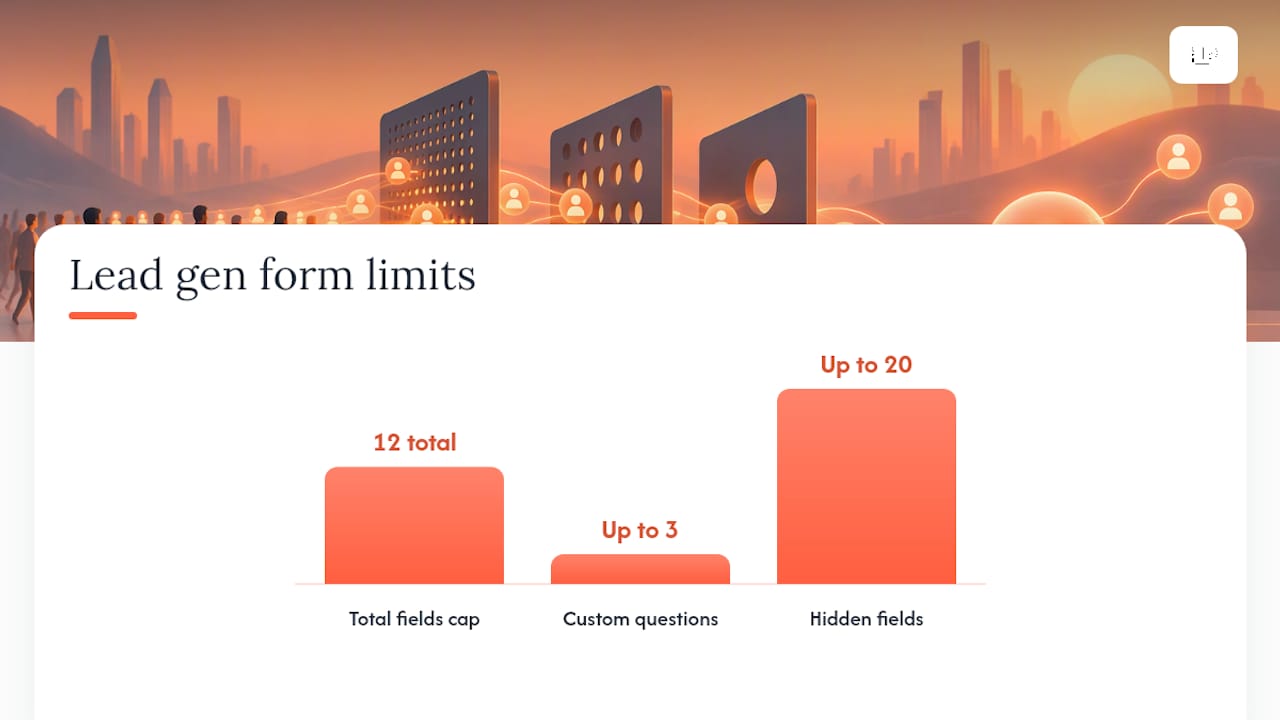
LinkedIn caps every form at 12 total fields, combining prefilled profile data and custom questions. That ceiling forces discipline, which is the point.
Profile fields pull directly from what the member has listed on LinkedIn: name, email, job title, company, seniority, location, and similar attributes. You don’t write these; LinkedIn autofills them, which is the entire reason completion rates beat a typed-out landing page form.
Beyond that, LinkedIn’s Lead Gen Forms allow up to three custom questions, in either multiple choice or open text format. Multiple choice wins almost every time for operational reasons:
- It routes cleanly into CRM pick-lists without manual cleanup.
- It reports accurately in dashboards without free-text parsing.
- It takes less effort for the prospect, which protects your completion rate.
You also get hidden fields, up to 20 of them, invisible to the prospect but useful for stamping campaign ID, ad name, or account tier onto every submission. LinkedIn also offers a work-email validation toggle, which filters out personal Gmail addresses at the cost of some completion volume.
Pro Tip: Name your hidden fields with a consistent convention (campaign_id, not sometimes campaignID and sometimes camp_source) before you launch your first form. Retrofitting naming conventions across a dozen live campaigns is a special kind of misery.
Field Strategy: Matching Friction to Buyer Intent
More fields mean fewer submissions but better leads. That tradeoff is the entire game, and most teams get it backwards by defaulting to either extreme.
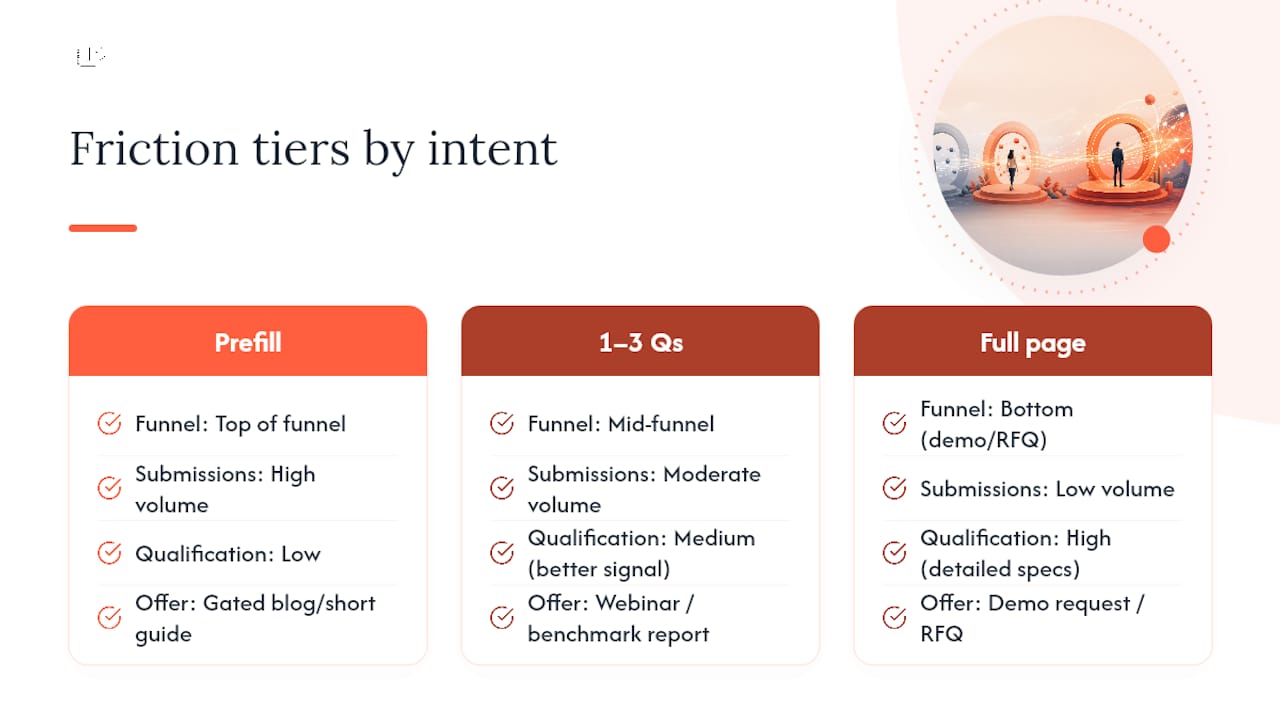
Think in three friction tiers. Prefill-only forms (name, email, company, nothing else) belong at the top of the funnel, on gated blog content or short guides where volume matters more than qualification. Forms with one to three qualifier questions fit mid-funnel offers like webinars and benchmark reports, where you want signal without killing completion. Full landing pages stay reserved for demo requests and RFQs, where you genuinely need detailed specs and a prospect willing to invest five minutes proves real intent.
For qualifiers, three questions consistently produce better sales-qualified-lead rates than generic ones: purchase timeline, role in the buying decision, and company size. All three work better as multiple choice than open text.
Practitioner data from ClickPop Marketing suggests that requiring a work email can cut submissions by roughly 20 to 30 percent while lifting lead quality by 50 to 80 percent, a trade that makes sense for high-ticket B2B offers and makes no sense for a low-stakes checklist download.
The right question isn’t “how many leads did we get.” It’s “what did each qualified lead cost us, and did that cost go down after we added the third question.” Measure cost per qualified lead, not cost per form fill, and re-test every friction change for at least one full sales cycle before calling it a win.
Which Audiences Convert Best on LinkedIn Lead Gen Ads?
Cold traffic on a lead gen form is a coin flip. Warm traffic is where the format earns its reputation.
- Website retargeting audiences built from your LinkedIn Insight Tag consistently outperform cold prospecting lists, since these people already know your brand.
- Content engagers, people who liked or commented on prior posts, convert well on next-step offers like webinars or gated reports.
- Previous form openers who didn’t submit are worth a second pass with a lighter-friction version of the same offer.
For cold audiences, run an awareness or engagement campaign for two to three weeks before introducing a lead gen ad. That warm-up window gives LinkedIn’s algorithm and the prospect both time to recognize your brand before you ask for anything.
Account-based marketing tightens this further: build narrow audiences around named target accounts, tailor the offer to their industry, and use hidden fields to tag which account list generated each submission. That tagging is what lets a sales team prioritize a lead from a target account over one from an unrelated company, even if both filled out the identical form.
Lead Routing: CRM Sync, Webhooks, and the Lead Sync API
A lead gen form that isn’t connected to anything is just an expensive way to collect names nobody calls.
- Start with native integrations. LinkedIn connects directly to HubSpot and Salesforce, and Salesforce’s own setup guide walks through connecting the account, mapping form fields to lead fields, mapping consent fields, and assigning default lead owners.
- Fall back to Zapier or Make only when a native option doesn’t exist for your CRM, since middleware adds a point of failure native sync avoids.
- Choose webhooks over scheduled pulls. LinkedIn’s own Lead Sync guidance recommends push notifications for real-time delivery, which matters because speed to lead is one of the strongest predictors of whether a prospect ever answers the phone.
Never edit a form’s field schema after it’s mapped into your CRM without re-testing the connection. A field you swap from open text to multiple choice can silently break the mapping, and you won’t notice until a sales rep asks why the pipeline went quiet. Submit a test lead after every schema change before trusting it live.
What to Measure: The Metrics That Actually Move Pipeline
Cost per lead is the vanity metric of this entire channel. It looks great on a dashboard and tells you almost nothing about revenue.
- Track cost per qualified lead, not cost per lead, by feeding a “qualified” or “disqualified” tag back from your CRM.
- Track qualified-lead rate (what percentage of raw submissions your sales team actually accepts) alongside meeting-booked rate and pipeline influenced.
- Send qualified-lead events back to LinkedIn through Conversions API or CRM sync so the platform’s qualified-lead optimization can start favoring the prospects who actually convert, not just the ones who click fastest.
- Run structured tests on offer angle, number of qualifier questions, work-email validation on versus off, audience warm-up length, and creative format (single image versus document ads).
This is the same discipline that separates a functioning social media lead generation program from one that just burns budget. Feed LinkedIn better signal, and it repays you with better delivery.
Ready-to-Use Lead Gen Form Templates
Staring at a blank form builder is where most campaigns stall. Borrow one of these instead.
- Webinar registration: name, email, job title, company (all prefilled) plus one qualifier: “What’s your role in evaluating [topic]?” Keep it prefill-heavy since urgency, not depth, drives this offer.
- Benchmark report download: standard profile fields plus a hidden field tagging the source campaign (name it
report_source, notsrc), followed by an automated email with a calendar link as the immediate next step. - Demo request from a warm retargeting list: profile fields plus two qualifiers: company size and purchase timeline. Route straight to a sales rep within minutes, since this audience already knows your brand and expects a fast response.
Latitude Park’s Pre-Launch Checklist for LinkedIn Lead Gen
Before any LinkedIn lead gen campaign goes live, we run through five checks: test the lead sync end to end with a dummy submission, confirm hidden fields actually arrive in the CRM, map every qualifier question to a CRM field, decide whether work-email validation fits this specific offer, and set a follow-up SLA the sales team will actually honor.
Most of that checklist takes an internal marketer twenty minutes. What eats time is everything around it: mapping a new CRM object, building white-labeled reports for a leadership team, or scaling from two campaigns to twenty across multiple business units. That’s usually the point where hiring outside help stops being a luxury and starts being math, especially when internal bandwidth is already stretched across lead nurturing and five other channels at once.
— Rusty
How Latitude Park Handles LinkedIn Lead Gen Ads and Integrations
Running LinkedIn lead gen ads well means juggling form design, audience sequencing, CRM mapping, and weekly optimization all at once, and most internal teams are already stretched thin managing five other channels. The service can include campaign setup, CRM integration, lead routing, and ongoing testing aimed at optimizing cost per qualified lead.
What that looks like in practice: we build and attach your Lead Gen Forms in Campaign Manager, connect the Lead Sync API or native CRM integration so leads land in your system in real time, and run the friction and audience tests most teams never get around to. You get transparent reporting tied to pipeline, not just click counts, and direct access to the people running your campaigns instead of a monthly PDF nobody reads. If your LinkedIn lead volume is fine but your sales team keeps calling the leads “junk,” that’s usually a field-strategy and routing problem, and it’s exactly what we fix first. Request a campaign audit and we’ll tell you within a week whether your current setup is costing you qualified pipeline.
Sources
- Lead Sync use cases – LinkedIn | Microsoft Learn
- LinkedIn Lead Gen Forms | LinkedIn Marketing Solutions
- Generate Leads from LinkedIn Lead Gen Ads | Salesforce Help
FAQ
Do LinkedIn Lead Gen Ads Actually Work for Lead Generation?
Yes, and the mechanism is simple: prefilled forms remove the friction that kills landing-page completion rates, so more qualified prospects finish the submission. They work best for mid-funnel content offers and warm audiences rather than cold, high-ticket asks like enterprise demos.
What Is the 3-2-1 Rule on LinkedIn?
Definitions of this rule vary across marketing circles and it isn’t an official LinkedIn framework, so treat any specific version cautiously. Most versions describe a content mix, roughly three educational posts to two engagement posts to one promotional post, rather than anything tied specifically to lead gen ads.
Do LinkedIn Lead Gen Forms Actually Produce Good Leads?
Lead quality depends almost entirely on how the form is built, not on the format itself. Forms with zero qualifier questions produce high volume and mixed quality; adding one or two multiple-choice qualifiers, plus work-email validation where appropriate, meaningfully improves the sales-qualified-lead rate.
What Is LinkedIn Lead Generation?
LinkedIn lead generation is the practice of collecting prospect contact and qualification data directly through LinkedIn ads, most commonly through Lead Gen Forms attached to sponsored content. It covers everything from campaign setup in Campaign Manager to routing submissions into a CRM like HubSpot or Salesforce for sales follow-up.
How Does Latitude Park Help With LinkedIn Lead Gen Campaigns?
Latitude Park manages the full setup: form design, CRM integration through native sync or the Lead Sync API, audience sequencing, and the ongoing testing that lowers cost per qualified lead. Pricing is available on request through a campaign audit.