Why Mastering Facebook Advertising Is a Game-Changer for Your Business
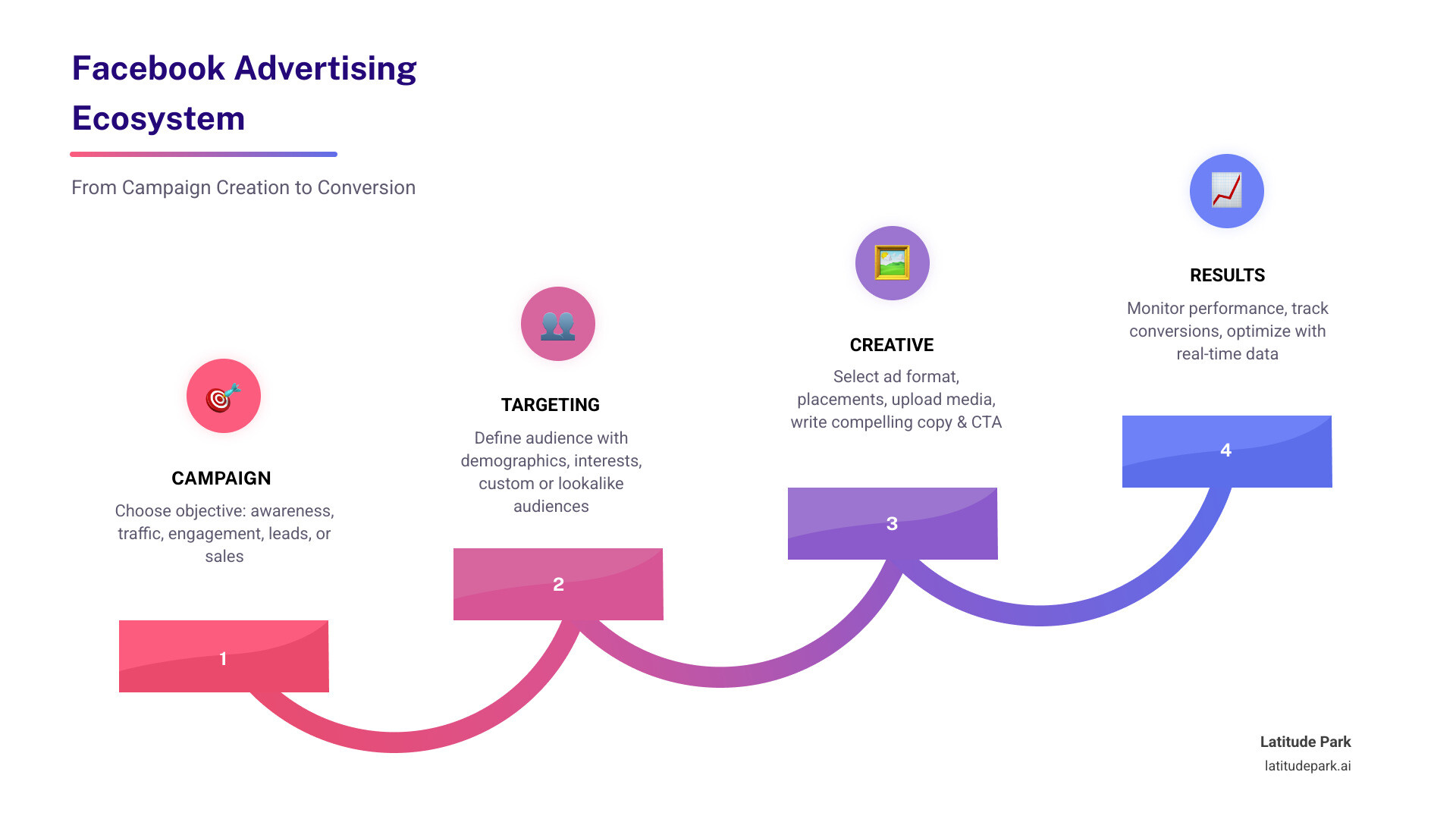
How to advertise on Facebook is one of the most valuable skills a marketer can develop today. Here’s a quick overview of the core steps:
- Create a Facebook Page and verify your payment method
- Open Meta Ads Manager and click “Create Ad”
- Choose a buying type — Auction or Reservation
- Select a campaign objective — awareness, traffic, leads, or sales
- Define your audience — manually or using Meta Advantage+ AI
- Set your budget — daily or lifetime spend
- Pick your ad format and placements — Feed, Reels, Messenger, and more
- Add your creative and copy, then publish
- Monitor performance in real time via Ads Manager
With over 3 billion monthly active users, Facebook is the largest social advertising platform in the world. Its global ad revenue hit $156.8 billion in 2025 — and for good reason. The platform lets businesses reach incredibly specific audiences at a fraction of the cost of other channels, with an average CPC of just $0.83 compared to $4.22 on Google Ads.
For franchise marketing managers, that scale matters even more. Coordinating consistent, high-performing campaigns across multiple locations — while staying on-brand — is exactly the kind of challenge Facebook’s ad infrastructure is built to solve.
I’m Rusty Rich, President of Latitude Park, a full-service digital advertising agency I’ve been running since 2009, and helping businesses of all sizes understand how to advertise on Facebook effectively is one of my core areas of expertise. In this guide, I’ll walk you through everything you need — from setup to scaling.
How to advertise on facebook helpful reading:
Why Your Business Needs to Know How to Advertise on Facebook

If you have ever felt like the Facebook algorithm is a moving target, you aren’t alone. For many businesses, organic reach—the number of people who see your posts for free—has become increasingly difficult to maintain. This is exactly where paid advertising steps in. It provides a reliable, predictable way to get your message in front of the right people at the right time.
The sheer scale of the platform is its greatest strength. With over 3 billion monthly active users, Facebook offers a level of social media strategy depth that few other platforms can match. Whether you are a local mom-and-pop shop or a massive national franchise, your customers are on this platform.
Beyond just “being there,” Facebook advertising allows for incredible precision. You aren’t just shouting into a void; you are targeting individuals based on specific demographics, interests, and behaviors. This precision leads to a high return on advertising spend (ROAS). In fact, a recent survey indicated that 41% of US retailers see their greatest return on advertising spend coming specifically from Facebook Ads.
When we look at Facebook and Instagram Promotion, we see a unified ecosystem. Because Meta owns both Facebook and Instagram, you can run ads across both platforms simultaneously. This integration gives you a competitive advantage by maximizing the value of every dollar spent. Efficiency is also rising; the average Facebook ad now reaches 2,417 users per $10 spent, which represents a 5% increase in reach efficiency year-over-year.
Key Benefits for Small Businesses and Franchises
For smaller entities, the primary benefit is predictable reach. You no longer have to hope the algorithm picks up your post; you can guarantee it. Using Facebook Ads for Small Business allows you to build customer loyalty by staying top-of-mind with your local community.
For franchises, the stakes are even higher. We often work with franchisors who need to maintain brand consistency while allowing for local relevance. Our Facebook Ads for Franchisors Guide highlights how real-time tracking allows every location to see exactly how their budget is performing. You can measure everything from foot traffic to online sales, ensuring that every marketing dollar is working toward growth.
Setting Up for Success: Meta Ads Manager Essentials
Before you can dive into the creative side of things, you need to get your “office” in order. All of Facebook’s ad campaigns run through the Meta Ads Manager tool.
To get started, you will need:
- A Facebook Business Page: You cannot run ads from a personal profile. If you don’t have one, you can follow Facebook’s steps to set it up.
- A Verified Payment Method: Facebook needs to know how you’ll pay for the impressions you buy.
- Access to Ads Manager: You can find your Ads Manager ID in the upper left-hand corner of the tool.
We recommend bookmarking this direct link to Meta Ads Manager to save time. If you are managing multiple locations or a larger team, you should set up a Business Manager account. This allows you to assign you an admin, editor, or advertiser role to employees or agencies without sharing your personal login credentials. For a deeper dive into these technicalities, check out our Facebook Marketing Solutions Ultimate Guide.
Boosting Posts vs. Full Ad Campaigns
Many beginners start by clicking the “Boost Post” button on their page. While this is a great, simplified interface for getting quick engagement, it has its limits.
Full Facebook Ad Campaigns created within Ads Manager offer:
- Advanced Control: You can choose exactly where your ads appear (placements).
- Objective Variety: You can optimize for specific goals like lead generation or app installs, rather than just “engagement.”
- Placement Customization: You can tailor your creative specifically for Instagram Stories, Facebook Feed, or the Audience Network.
Step-by-Step Guide: How to Advertise on Facebook Effectively
Creating an ad might seem daunting, but it follows a logical flow. Here is how we break it down into actionable steps:
- Start the Campaign: Click the green “+ Create” button in Ads Manager.
- Choose Your Buying Type: Most advertisers use Auction, which offers the most flexibility. However, Reservation (formerly Reach and Frequency) allows you to plan and buy your reach in advance for more predictable performance.
| Feature | Auction Buying | Reservation Buying |
|---|---|---|
| Flexibility | High – change budget/targeting anytime | Low – terms are set in advance |
| Predictability | Varies based on market competition | High – guaranteed reach/frequency |
| Objectives | All objectives available | Limited to Awareness/Engagement |
| Best For | Performance marketing and ROI | Brand awareness and big launches |
- Select Your Objective: This tells Facebook what you want the viewer to do. (We’ll cover this in detail in the next section).
- Name Your Campaign: Be specific (e.g., “Spring2026LeadGenFranchiseLocation_A”).
- A/B Split Testing: We highly recommend turning this on. A/B split testing lets you compare two versions of an ad to see which performs better.
- Set Your Budget and Schedule: Decide if you want a daily budget or a lifetime budget for the campaign.
- Target Your Audience: This is the “who.” You can use manual targeting or Meta’s AI tools.
- Select Placements: You can let Facebook decide (Advantage+ placements) or manually choose where the ad appears.
- Choose Ad Format: Options include single image, video, or carousel ads.
- Add Media and Copy: Upload your visuals and write your headlines and primary text.
- Call-to-Action (CTA): Choose a button like “Learn More,” “Shop Now,” or “Sign Up.”
- Publish: Once you hit publish, Facebook will review it to ensure it meets their community standards.
For those looking to maximize results, our guide on Facebook Ad Campaign Optimization provides advanced tactics for these steps.
Choosing the Right Objectives for how to advertise on Facebook
Your objective is the “why” behind your ad. Facebook uses this to show your ad to people within your target audience who are most likely to take that specific action.
- Awareness: Best for reaching the maximum number of people to build brand recognition.
- Traffic: Sends people to a website, app, or Facebook Messenger conversation.
- Engagement: Good for getting more page likes, event responses, or post comments.
- Leads: Vital for service-based businesses. Check out our Facebook Lead Generation Strategies Guide for help with this.
- App Promotion: Specifically designed to get people to install or engage with your mobile app.
- Sales: Optimized for conversions, like a purchase on your website.
Mastering Audience Targeting and Meta Advantage+
The magic of how to advertise on Facebook lies in the targeting. You have three main ways to find your people:
- Core Audiences: Targeting based on data like age, gender, location, and interests.
- Custom Audiences: Reaching people who have already interacted with your business (e.g., visited your website or joined your email list).
- Lookalike Audiences: Finding new people who are similar to your best existing customers.
To make this work effectively, you must install the Meta Pixel. This small piece of code on your website tracks user behavior, allowing you to see if someone actually bought something after clicking your ad. This is the foundation of Geo Targeted Facebook Ads, which are essential for franchises aiming to dominate specific local territories.
Leveraging AI with Meta Advantage+ for how to advertise on Facebook
In 2023, Meta leaned heavily into AI with the release of Meta Advantage+. This suite of features uses machine learning to automate the heavy lifting of campaign management.
The Meta Advantage+ audience tool is particularly powerful. Instead of you guessing which interests to target, the AI learns from your ad performance in real-time. It identifies who is engaging and automatically shifts your budget toward the people and placements that offer the highest impression value. This “dynamic creative” approach ensures your ad stays fresh and relevant without constant manual tweaking.
Budgeting, Costs, and Measuring Performance
One of the most common questions we get is: “How much does it cost?” The beauty of Facebook is that it is accessible to almost any budget. You can start with as little as $5 a day.
However, costs vary by industry. According to data from Wordstream, the average cost per click (CPC) is roughly $0.70 for traffic campaigns and $1.92 for lead campaigns. In contrast, Google Ads averages over $4.00. For a more comprehensive breakdown, see our Facebook Ads Cost Ultimate Guide.
When you launch a new ad, it enters a “learning phase.” During this time, the algorithm is calibrating. It usually takes about 24 hours for the initial review it process, but the campaign won’t reach peak stability for 3 to 7 days.
Tracking ROI and Key Metrics
Since Meta got rid of its full Facebook Analytics platform in 2021, advertisers now rely on the reporting tools within Ads Manager.
Key metrics to watch include:
- Reach: How many unique people saw your ad.
- CTR (Click-Through Rate): The percentage of people who saw your ad and clicked it. (Average is around 0.90%).
- Conversion Rate: The percentage of people who took your desired action. The average conversion rate across all industries is 8.25%.
- Cost Per Result: How much you paid for each lead or sale.
For a full understanding of how these metrics interact, our Facebook Instagram Ads Ultimate Guide is an excellent resource.
Frequently Asked Questions about Facebook Ads
How much does it cost to start advertising?
You can start with a very flexible spend. While there is a $5 daily minimum for many ad types, your total cost depends on your industry’s competition and your target audience’s size. While the average CPC is under a dollar, highly competitive fields like law or finance will naturally see higher costs.
How long does it take for ads to start performing?
Once submitted, ads are usually approved within 24 hours. However, don’t panic if you don’t see immediate results. The algorithm needs a 3-7 day learning phase to calibrate and find the most efficient way to deliver your ads. Performance stability usually arrives after the ad set has reached about 50 conversion events.
What are common beginner mistakes to avoid?
- Broad Targeting: Trying to reach “everyone” usually means you reach no one. Be specific.
- Missing Meta Pixel: If you don’t track what happens after the click, you’re flying blind.
- Weak CTAs: Don’t leave your audience guessing. Tell them exactly what to do next.
- Ignoring Data: Use A/B split testing to let the numbers tell you what creative works, rather than relying on gut feeling.
Conclusion
Mastering how to advertise on Facebook is a journey of constant testing and refinement. For franchises and multi-location businesses, the complexity of managing these campaigns grows exponentially with every new territory.
At Latitude Park, we specialize in navigating these complexities. We help franchises grow through tailored ad structures that ensure brand consistency while driving local results. If you’re ready to take your digital marketing to the next level, we’re here to help.
Start your high-performance Meta campaign today and let’s grow your business together.