Stop Typing and Start Automating with Google Sheets
Why Most Businesses Are Still Wasting Hours Every Week in Spreadsheets
Business automation using Google Sheets is one of the fastest ways for small and medium businesses to eliminate repetitive manual work — without buying expensive software.
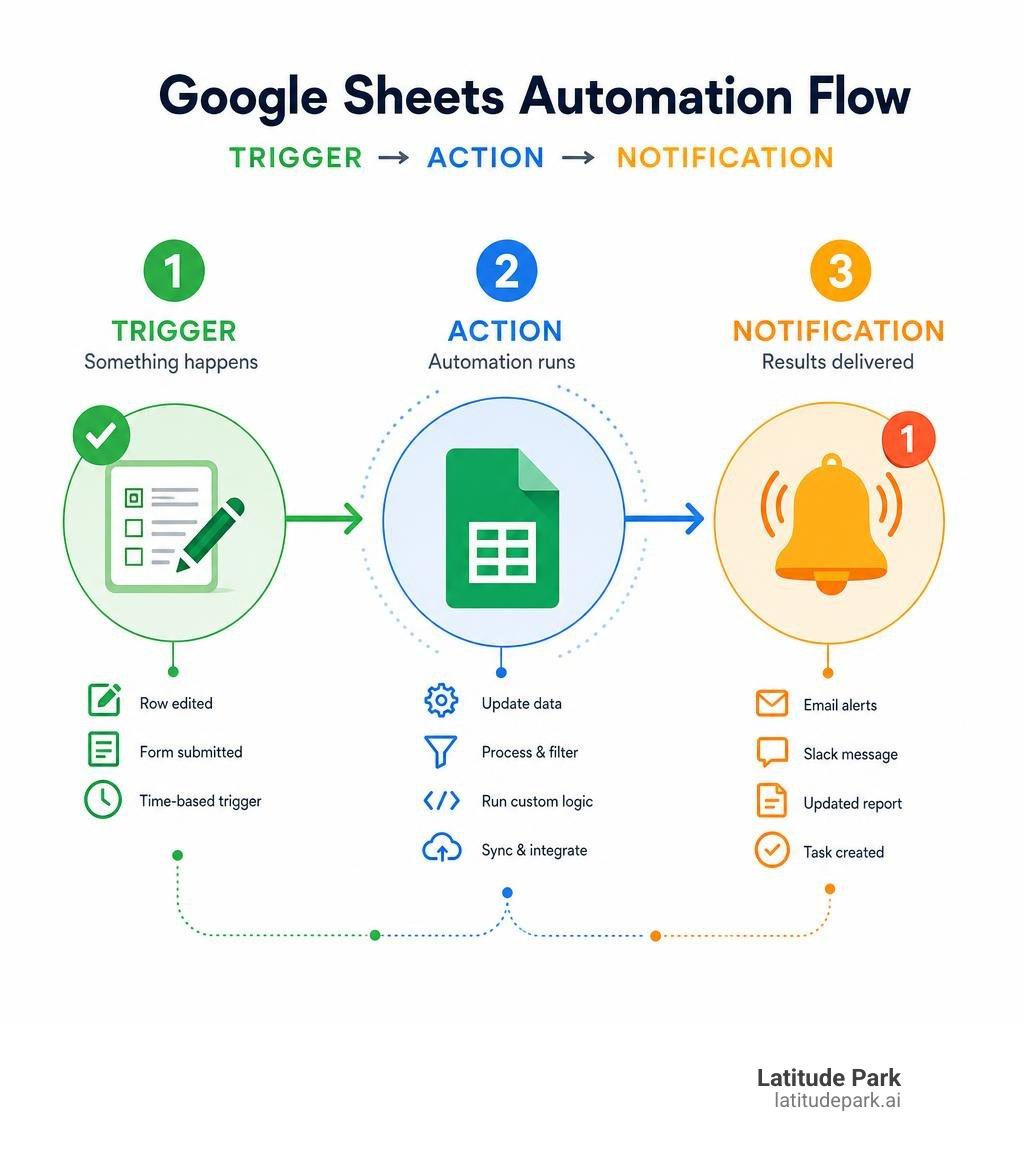
Here’s a quick overview of how it works and what it can do:
| What You Can Automate | How Google Sheets Does It | Time Saved |
|---|---|---|
| Data entry and row updates | Triggers on edit or form submission | Up to 15 hrs/week |
| Email and Slack notifications | Rules-based alerts via add-ons or Apps Script | Near-instant delivery |
| Report generation | Scheduled scripts or formulas | 4 hrs → 5 minutes |
| CRM data syncing | Webhooks and third-party integrations | 68% less manual entry |
| Order and task tracking | Conditional logic and row actions | 30% faster processing |
The core idea is simple: instead of copying, pasting, and re-entering data by hand, you set up rules that do it for you — automatically.
Google Sheets is already built for collaboration. Most teams are already using it. The problem is that most of them are still doing the manual parts themselves, and that’s where the real time loss happens.
One business documented in open-source case studies reduced its weekly admin workload from 15 hours down to just 2 — an 87% drop — using nothing more than Google Sheets, Apps Script, and a few smart automation rules. Another saw 40% revenue growth simply by freeing up time that had been spent on repetitive data tasks.
The opportunity is real, and the tools are already available to you.
I’m Rusty Rich, President of Latitude Park, a full-service digital advertising agency — and I’ve seen how business automation using Google Sheets can free up franchise marketing teams to focus on growth instead of grunt work. In this guide, I’ll walk you through exactly how to set it up.
Discover more about business automation using google sheets:
- business automation tools
- automation services for growing businesses
- digital process automation services
Why Business Automation Using Google Sheets is a Game-Changer for SMBs
For small and medium-sized businesses, operational complexity can quickly outpace resources. You do not always need a massive, six-figure enterprise resource planning (ERP) system to keep things running smoothly. Instead, leveraging business automation using google sheets offers a highly accessible, customizable, and cost-effective alternative.
By turning your spreadsheets from static data dumps into dynamic, self-updating engines, you can achieve enterprise-level scaling on an SMB budget. We often see teams struggle with tool fatigue, trying to manage a dozen different subscriptions when a well-configured Google Workspace could handle the majority of their administrative needs.
If you are looking to audit your current tech stack, our Small Business Automation Tools: Complete Guide is a great place to start.
To see what is possible at the absolute limit of spreadsheet capabilities, look no further than the open-source emilacho/Zero-Risk-Business-Administration-Automation-System . This project demonstrates how a business can completely automate its administrative lifecycle—from quotations and automated invoicing to double-entry bookkeeping—all within Google Sheets.
Implementing these types of workflows yields massive returns:
- 15 hours saved weekly: On average, businesses utilizing spreadsheet automation reclaim nearly two full workdays every single week by eliminating manual data entry and report preparation.
- 30% reduction in processing time: Orders, customer requests, and approvals move through the pipeline significantly faster when human hand-offs are automated.
- 98% faster report generation: What used to take a manager four hours of manual compilation at the end of the month can be compressed into a self-updating dashboard that populates in 5 minutes.
Streamlining Operations and Reducing Manual Work
The true cost of manual data entry is not just the hourly wage paid to the person doing it; it is the cost of the inevitable human errors. A single misplaced decimal point or a forgotten row can throw off your entire financial projection or lead to a missed customer shipment.
By automating these pathways, you ensure absolute data accuracy. Row actions can automatically move completed tasks, sort entries, and archive old data without a human ever clicking a button.
To understand how these workflows transform messy day-to-day operations into highly optimized machines, check out our insights on From Chaos to Control: How Automation Services Fuel Business Growth.
The productivity gains are staggering. Studies show that teams using Google Sheets automation tools experience a 68% reduction in manual spreadsheet-to-CRM data entry. When your staff is no longer acting as human copy-paste bridges between your spreadsheets and your sales pipeline, they can focus on high-value initiatives. This shift is why small businesses that embrace automation frequently experience up to 40% revenue growth—they finally have the breathing room to focus on business development and strategic outreach.
Creating Lightweight CRMs and Notification Hubs
Many growing businesses do not need a complex, highly restrictive CRM platform that requires months of onboarding. Instead, they can use Google Sheets as a flexible, lightweight CRM.
By setting up structured columns for lead tracking, contact details, and deal stages, you can easily monitor your sales pipeline. To make this sheet active rather than passive, you can build automated alerts that trigger based on specific criteria. For example, if a sales representative changes a lead status to “Follow Up,” an automated rule can instantly send them a reminder email or ping a dedicated Slack channel.
This approach keeps your team completely aligned without forcing everyone to log into multiple software platforms. You can also automate task management by setting up due-date reminders. If a project deadline is three days away, Google Sheets can automatically draft and send a notification to the assignee.
To explore how to eliminate these repetitive administrative tasks entirely, read our guide on how to Stop Doing Manual Work with CRM Automation.
How to Build Your First Google Sheets Automation Workflow
Setting up your first automation does not require a degree in computer science. By following a structured, step-by-step approach, you can design a reliable workflow that runs in the background while you focus on your business.
Before building, it is vital to map out your process: what is the input, what is the rule, and what should be the final output? To set yourself up for success, always use data validation (like dropdown menus) to keep your inputs clean and consistent.
For a broader look at the systems you can connect, check out our Business Automation Tools: Ultimate Guide.
Setting Up Triggers for Business Automation Using Google Sheets
Every automation workflow consists of two main parts: a trigger (the event that starts the process) and an action (the task that happens automatically as a result).
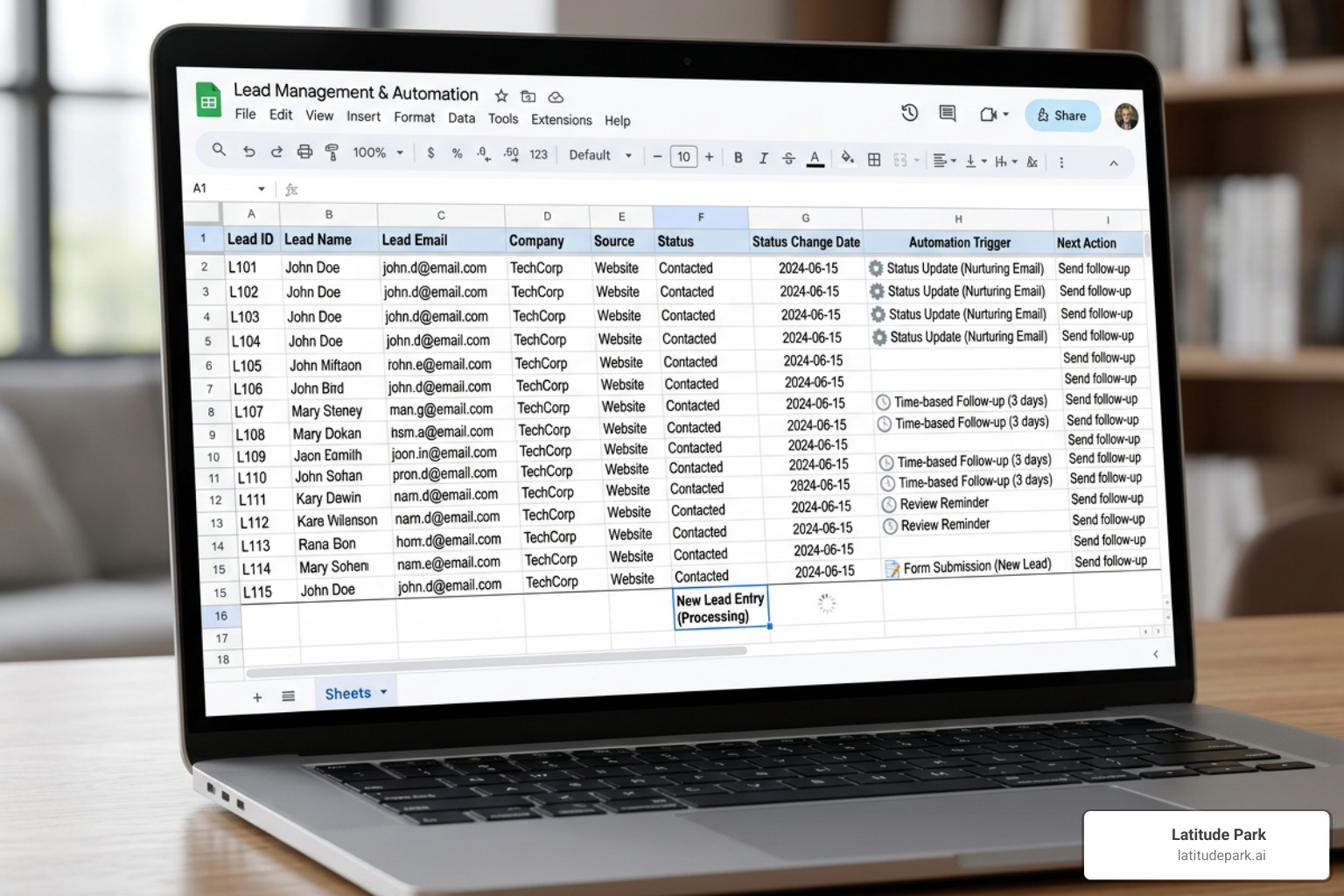
When automating Google Sheets, you can choose from several types of triggers:
- Edit-based triggers: These run instantly when a user changes a value in a specific cell or column (e.g., changing a status from “Pending” to “Approved”).
- Time-based schedules: These execute workflows at specific intervals, such as hourly, daily, or weekly (perfect for generating and emailing weekly sales reports).
- Form submissions: When a customer or team member submits a Google Form, the response instantly populates a new row in your sheet, immediately triggering downstream actions like confirmation emails or lead routing.
Connecting External Tools for End-to-End Workflows
While keeping your automation inside Google Sheets is incredibly useful, the real magic happens when you connect your spreadsheet to the other tools your business relies on daily. By utilizing API integrations and webhooks, you can turn your sheet into a central operational hub.
For instance, you can use Google Sheets Integrations — 1,000+ Apps Free | Flozic to build no-code connections between your spreadsheets and platforms like HubSpot, Mailchimp, Slack, and Stripe. When a new row is added to your sheet, Flozic can automatically create a contact in your CRM, send a notification to Slack, and subscribe the user to an email list.
This seamless data flow ensures you never have to manually sync contact lists or copy payment details again. If you are looking to expand your toolkit beyond standard CRM systems, our guide on Beyond CRM: Essential Automation Tools for Every Small Business Owner covers the must-have applications that keep modern businesses running smoothly.
Comparing Native Features, Apps Script, and Third-Party Add-ons
When planning your automation strategy, you have several paths to choose from. Google Sheets offers powerful built-in capabilities, but complex business logic often requires stepping up to custom scripting or third-party tools.
| Feature | Built-In Formulas & Macros | Google Apps Script | Third-Party Add-ons (e.g., Sheet Automation, Flozic) |
|---|---|---|---|
| Ease of Use | Very High (No-code) | Medium to Low (Requires coding) | High (Visual UI) |
| Setup Speed | Minutes | Hours | Minutes |
| External Integrations | None | Unlimited (via APIs) | Extensive (Pre-built) |
| Execution Limits | None | 6-minute runtime limit | Subject to provider quotas |
| Cost | Free | Free | Free tier to Paid monthly subscriptions |
Choosing the Right Tool for Business Automation Using Google Sheets
Deciding which tool to use depends heavily on your team’s technical comfort level and the complexity of your workflow.
- Built-in Formulas & Macros: Best for simple, internal spreadsheet tasks. Functions like
ARRAYFORMULAorQUERYcan automatically process data across entire columns without manual copying. Macros are excellent for recording repetitive formatting steps and playing them back with a single keyboard shortcut. - Google Apps Script: A JavaScript-based platform that allows you to write custom code to extend Google Sheets. It is incredibly powerful and completely free, but it requires development knowledge to build and maintain. If you want to dive into robotic process automation without writing code, check out The Ultimate Guide to RPA Software for Non-Techies.
- Third-Party Add-ons: Tools like Sheet Automation or Flozic provide a visual, code-free interface to build complex rules. If you are a developer looking for advanced command-line control over your spreadsheet pipelines, you might explore the MattSchwope/rowbound CLI tool, which allows you to run data enrichment pipelines, use waterfall logic, and integrate directly with AI models.
Security and Permission Best Practices
When you begin connecting your spreadsheets to external automation tools, security must be a top priority. Many add-ons and integration platforms require broad read and write access to your Google Workspace account to function.
To protect your business data, always adhere to these security best practices:
- Use Scoped OAuth Permissions: Only grant the specific permissions an app needs to do its job. Avoid tools that demand unnecessary access to your entire Google Drive if they only need to edit a single sheet.
- Regularly Audit Access: Periodically review which third-party applications have access to your Google account and revoke permissions for tools you no longer actively use.
- Implement GDPR and Data Privacy Standards: Ensure that any customer data stored in your sheets is handled securely, encrypted in transit, and compliant with local privacy laws.
- Monitor Audit Logs: Use Google Workspace’s built-in sharing and version history tools to track exactly who—and which automation script—made changes to your critical spreadsheets.
Frequently Asked Questions About Spreadsheet Automation
As you dive deeper into automating your business operations, you will likely run into technical questions. Here are answers to some of the most common queries we encounter. For a look at how major enterprises handle automated systems, read The RPA Roll Call: Discovering Leading Companies Embracing Automation.
How can I automate Google Sheets without writing any code?
You can easily build powerful automations without writing a single line of code by using visual rule builders and third-party add-ons. Tools like Sheet Automation let you build “If-This-Then-That” workflows directly inside your spreadsheet’s sidebar. You can configure rules to send emails when a due date is reached, copy rows to another tab when a status updates, or automatically format data.
To learn more about setting up these systems for your sales pipeline, view our Small Business Sales Automation: Ultimate Guide and explore our dedicated Sales Automation Software page.
What are the main limitations of native Google Sheets automation?
While native tools are incredibly powerful, they do have technical limits:
- Execution Timeouts: Google Apps Script has a strict 6-minute execution limit per run. If your script is trying to process thousands of rows or make hundreds of external API calls, it will time out.
- API Quotas: Google imposes daily limits on the number of emails you can send via Gmail scripts and the number of external fetch requests you can make.
- Scalability: Google Sheets is not a relational database. Once your sheet grows past a few hundred thousand cells, formulas can slow down significantly, and the sheet may become sluggish.
For high-volume, enterprise-grade digital process automation, you may need to transition to dedicated database solutions. Learn how this transition works in our article on The DPA Difference: How Digital Process Automation Services Drive Innovation.
How does AI integration enhance spreadsheet workflows?
In June 2026, AI integrations have completely revolutionized what is possible within a spreadsheet. Rather than relying solely on rigid conditional logic, you can now embed intelligent reasoning directly into your Google Sheets workflows.
For instance, the Jeeves Inc’s Gemini-Powered Credit Reports in Google Sheets case study highlights how a financial services firm used Google’s Gemini model to interpret complex financial data and generate automated credit risk reports in seconds right inside their sheets.
Similarly, tools like the AI Google Sheets Collaboration Agent | Automate Your Spreadsheets allow you to use plain English to generate formulas, clean unstructured data, and write custom scripts.
Even enterprise giants are bridging this gap. The announcement that Precisely Brings Governed SAP Automation to Google Workspace Users with Support for Google Sheets in Automate Studio shows how businesses can securely validate, update, and post critical SAP ERP data directly from a spreadsheet, maintaining strict corporate governance while leveraging the flexibility of Google Workspace.
Conclusion
Embracing business automation using google sheets is one of the smartest, lowest-risk operational moves your business can make. By taking advantage of the tools you already own, you can eliminate hours of tedious admin work, drastically reduce costly data entry errors, and scale your business without dramatically increasing your overhead.
At Latitude Park, we specialize in franchise marketing, helping multi-location businesses grow through highly optimized Meta (Facebook) advertising strategies. We understand the complex, multi-layered marketing needs of franchise networks, and we know that operational efficiency is key to unlocking rapid, sustainable growth. When your internal teams are freed from manual spreadsheet updates, they can focus on executing high-performing campaigns that drive real revenue.
If you are ready to take your business operations to the next level and explore the best ways to streamline your tech stack, visit our dedicated hub for Small Business Automation Tools and let us help you build a foundation for growth.