LinkedIn Conversation Ads are branching, inbox-delivered ads that let prospects choose their own path through a series of clickable buttons instead of just clicking or scrolling past. Use them when your goal is lead generation, account-based marketing, or qualifying mid-funnel prospects who need to self-select before you invest a sales call on them. Skip them if you’re chasing pure top-of-funnel reach or working with a tight cost-per-click budget, since Conversation Ads run on a cost-per-send model with limited inventory.
TL;DR:
- Conversation Ads are suited for mid-funnel qualification, account-based marketing, and event or demo campaigns, but not ideal for broad awareness or low-cost, high-volume efforts.
- They support up to 5 CTA buttons per message and 50 across the entire conversation tree, with a recommended maximum of three to four buttons per layer to maintain engagement.
- Designing effective flows requires defining your audience, choosing a human sender, crafting concise openers, and mapping CTAs to specific destinations like Lead Gen Forms or external URLs.
- Measurement should focus on tracking CTA click paths and CRM outcomes, with regular optimization of underperforming paths based on conversion quality rather than click volume alone.
- Campaign success depends on proper audience exclusion, CRM integration, and compliance adherence, with campaign management best led by experienced teams to avoid wasted budget and low engagement.
Table of Contents
- What Are LinkedIn Conversation Ads and How Do They Differ From Message Ads?
- Technical Specs and Limits You Must Know Before Building a Flow
- When to Use Conversation Ads (Objectives and Campaign Fit)
- How to Build a High-Converting Conversation Ad Campaign
- Copy, Creative, and Conversation Architecture Best Practices
- Measurement and Reporting: What to Track and Why It Matters
- Examples, Templates, and Conversation Architectures to Copy
- Connecting Conversation Ads to Your CRM and Lead Management System
- Compliance and Privacy Considerations for Messaging on LinkedIn
- Using Conversation Ads Inside a Multichannel B2B Campaign
- Common Pitfalls and Troubleshooting Tips When Running Conversation Ads
- Latitude Park’s Perspective: Conversation Ads as Part of the Full Funnel
- Let Latitude Park Build and Run Your Conversation Ad Campaigns
- Sources
- FAQ
What Are LinkedIn Conversation Ads and How Do They Differ From Message Ads?
Conversation Ads land directly in a prospect’s LinkedIn Messaging inbox, tagged as “Sponsored,” and behave more like a choose-your-own-adventure than a static banner. Instead of one message and one link, the format uses branching CTAs that let the recipient pick a path: read a case study, book a demo, or keep chatting through another layer of options.
This is a real departure from the old single-shot Message Ads format, which Microsoft Learn’s developer documentation confirms was deprecated, with LinkedIn pushing advertisers to migrate existing campaigns over to Conversation Ads. If you’re still running Message Ads or referencing old playbooks built around them, it’s time to rebuild.
The mechanics that matter:
- Each message layer can carry multiple CTA buttons, and each button can trigger a different next step
- CTAs can point to an external URL, open a native LinkedIn Lead Gen Form, or continue the conversation deeper into a new layer
- Most well-built flows use two to three layers total, keeping the exchange fast and low-friction rather than turning it into an interrogation
Technical Specs and Limits You Must Know Before Building a Flow
LinkedIn’s official specs set the outer boundaries you’re designing inside. Blow past them and your campaign gets flagged before it ever reaches an inbox.
Statistic Callout: A single Conversation Ad supports up to 5 CTA buttons per message and up to 50 buttons across the full conversation tree, which is plenty of room to build multistep qualification without cramming every option into one screen.
Beyond button counts, a few other constraints shape how you write and design:
- Intro messages and follow-up copy both have character limits, so front-load your value proposition in the first line
- Banner images follow fixed dimension requirements, and low-resolution uploads get rejected at the ad review stage
- CTA button text has its own character ceiling, which forces short, punchy labels instead of full sentences
- If you’re building through the API, Microsoft Learn’s Conversation Ads documentation outlines validation rules for sponsoredConversation and sponsoredMessageContent objects, including how Lead Gen Forms must be linked correctly to avoid a failed submission
Send a test message before you activate anything. It costs nothing and it’s the only way to see how your flow actually renders on mobile versus desktop.
When to Use Conversation Ads (Objectives and Campaign Fit)
Conversation Ads earn their keep in a specific part of the funnel: mid-funnel qualification, account-based marketing, demo bookings, and event sign-ups where a prospect needs to make a small decision rather than just absorb a message.
They’re a poor match for broad awareness plays or campaigns built around rock-bottom cost-per-click, because LinkedIn charges on a cost-per-send basis and inventory only opens up when a member is active on the platform. That scarcity is exactly what makes the format effective, but it also means you’re paying a premium for attention, not casting a wide net.
- Best fit: lead generation, ABM outreach to named accounts, demo requests, webinar or event registration
- Weak fit: brand awareness, low-budget campaigns prioritizing volume over conversation depth
- The trade-off in one line: higher engagement per send, in exchange for tighter inventory and a bid model that rewards patience over spray-and-pray budgets
How to Build a High-Converting Conversation Ad Campaign
Setting up a Conversation Ad isn’t complicated, but skipping a step usually shows up as a flat CTR three weeks later. Work through this order:
- Define your ideal customer profile and pick “Lead Generation” or the appropriate objective inside Campaign Manager before you touch a single line of copy.
- Choose a sender identity. A named person at your company almost always outperforms a generic company page, because it reads as a real message, not an ad.
- Write a short, personalized opener. Use LinkedIn’s dynamic macros (first name, company name) sparingly, once or twice, so it still sounds human.
- Design your CTA architecture. Start with two to three CTA buttons in the first layer, and build out two to five total layers depending on how much qualification you actually need.
- Map each CTA to its destination. Decide upfront which buttons trigger a Lead Gen Form and which point to an external URL like a case study or booking page.
- Test before you launch. Send yourself a test message, review the conversation flowchart in Campaign Manager, and if you’re integrating via API, validate against LinkedIn’s schema rules first.
- Set your budget and bids. Configure your maximum cost-per-send bid, respect LinkedIn’s frequency caps, and exclude anyone who has already converted so you’re not paying to message a closed lead.
Pro Tip: Build your excluded audience list before launch, not after. Nothing burns budget faster than sending a “book a demo” flow to someone who already booked one last week.
Copy, Creative, and Conversation Architecture Best Practices
The opener is doing the heaviest lifting in the entire flow. Keep it short, conversational, and built around a single value idea rather than three. One or two personalization macros is the ceiling. Past that, it starts reading like a mail merge that got away from you.
CTA labels need to work in roughly 25 characters, so make every word earn its place: “See the Case Study” beats “Click Here to Learn More About Our Case Study.” Industry guidance recommends pairing a soft CTA, like a content download, with at least one harder CTA, like booking a call, so you’re capturing leads at different stages of readiness inside the same conversation.
Follow-up messages need to deliver on whatever the button promised. If someone clicks “See Customer Results,” the next layer better open with a result, not another pitch. Middle-tier messages are a good place to drop a proof point or client stat, since that’s usually the moment a prospect is deciding whether to go deeper or bail.
- Keep openers to one idea, one ask
- Cap personalization macros at one or two per message
- Always pair at least one low-commitment CTA with a higher-intent one
- A/B test sender identity, opener phrasing, and CTA labels separately, not all at once
Pro Tip: Test sender identity before you test copy. Switching from a company page to a named sales rep can move open rates more than any headline tweak you make.
Measurement and Reporting: What to Track and Why It Matters
Sends and opens tell you whether the ad got delivered and noticed. CTA click distribution and drop-off by layer tell you whether the conversation itself is working, and that second number is where most of the useful signal lives.
Statistic Callout: Shopify’s guide to Conversation Ads notes the format tends to produce higher inbox click-through rates than standard feed ads, which is the core argument for using the format at all when you need engagement, not just impressions.
Pull the CTA Performance report inside Campaign Manager and cross-reference which paths are actually turning into pipeline in your CRM, not just which buttons get the most clicks. A path with mediocre CTR but strong close rates deserves more budget than a flashy CTA that generates form fills nobody follows up on. Measuring drop-off at each layer and optimizing the weakest paths improves lead quality more reliably than chasing raw click volume ever will.
- Track sends, open rate, CTA click distribution, and cost-per-send against budget
- Map every CTA path to its downstream CRM outcome, not just its click count
- Pause or rebuild low-performing paths monthly and shift spend to the CTAs producing real pipeline
Examples, Templates, and Conversation Architectures to Copy
Three structures cover most B2B use cases. Adapt the wording, keep the architecture.
- The Qualifier Hub: Open with a broad value statement, then offer three paths: “Research the Problem” (leads to a guide), “Compare Options” (leads to a comparison page), and “Talk to Someone” (leads to a Lead Gen Form). Each path gets its own short follow-up message that actually delivers the promised content.
- The Event Invitation: Lead with the event name and date, then offer “Register Now” tied to a native Lead Gen Form, “Send Me the Recording” for people who can’t attend live, and “Remind Me Closer to the Date” to keep low-intent registrants warm.
- The Demo Path: Open with a specific outcome your product delivers, then branch into “Book a Demo,” “Send Me a Custom Brief,” and “Download a Case Study,” each mapped to a distinct conversion goal so you can measure which promise actually pulls the most qualified leads.
Connecting Conversation Ads to Your CRM and Lead Management System
A Conversation Ad that generates form fills but never reaches a sales rep is just an expensive chat bot. The Lead Gen Form CTAs inside Conversation Ads sync natively with LinkedIn’s Campaign Manager, but the real value shows up when that data flows automatically into your CRM instead of sitting in a CSV export someone forgets to download.
Most CRM platforms connect to LinkedIn Lead Gen Forms through native integrations or middleware like Zapier, and the setup usually takes less time than people expect. The part that actually matters is field mapping: make sure the data captured in your Conversation Ad form (job title, company size, use case) maps to the exact fields your sales team uses to prioritize outreach. A lead that lands in your CRM without context is a lead that sits untouched for three days.
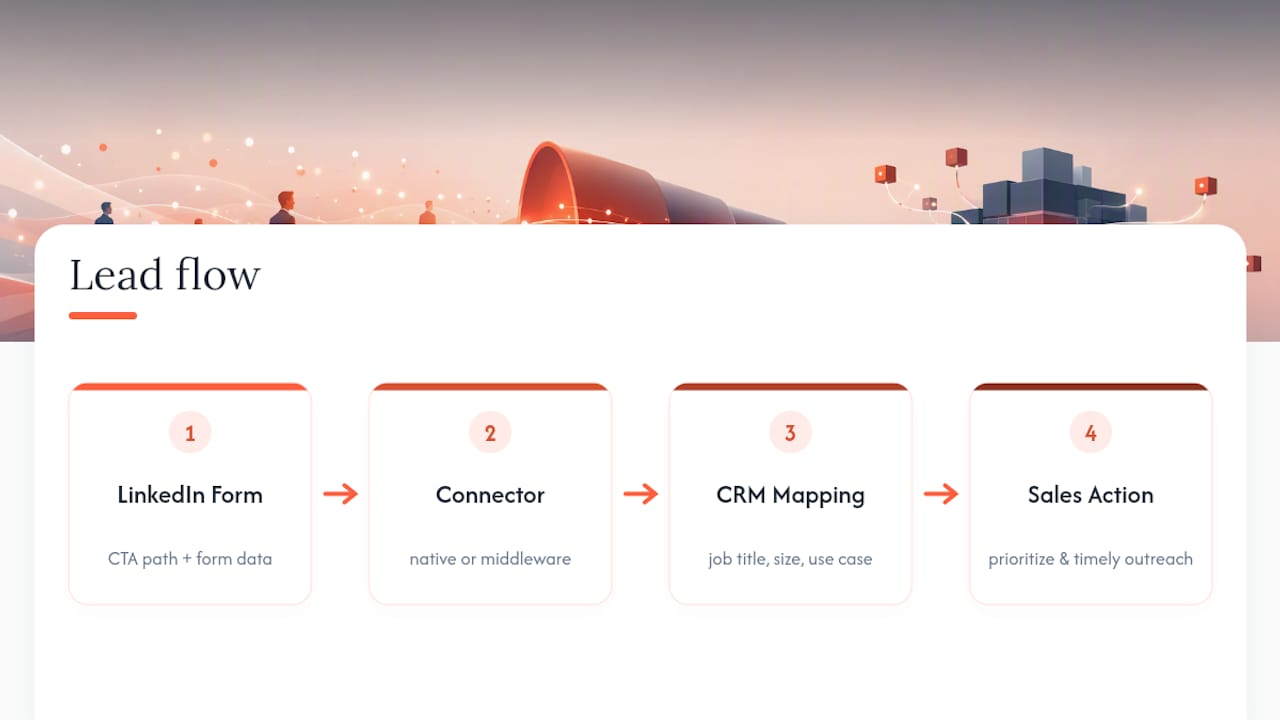
Tag leads by which CTA path they came through. Someone who clicked “Book a Demo” needs a different follow-up cadence than someone who clicked “Download a Case Study,” and if your CRM can’t tell the difference, you’re treating a hot lead and a lukewarm one identically. That’s a fast way to torch conversion rates on your best-performing paths.
Set up a feedback loop between sales and marketing on lead quality by CTA path, not just lead volume. If reps report that “Send Me a Custom Brief” leads are converting into actual deals while “Book a Demo” leads are ghosting, that’s information marketing needs within days, not at the end of a quarterly review. Conversation Ads generate structured, path-tagged data almost nowhere else in the funnel does. Wasting that by dumping every lead into one generic pipeline stage is a missed opportunity.
Compliance and Privacy Considerations for Messaging on LinkedIn
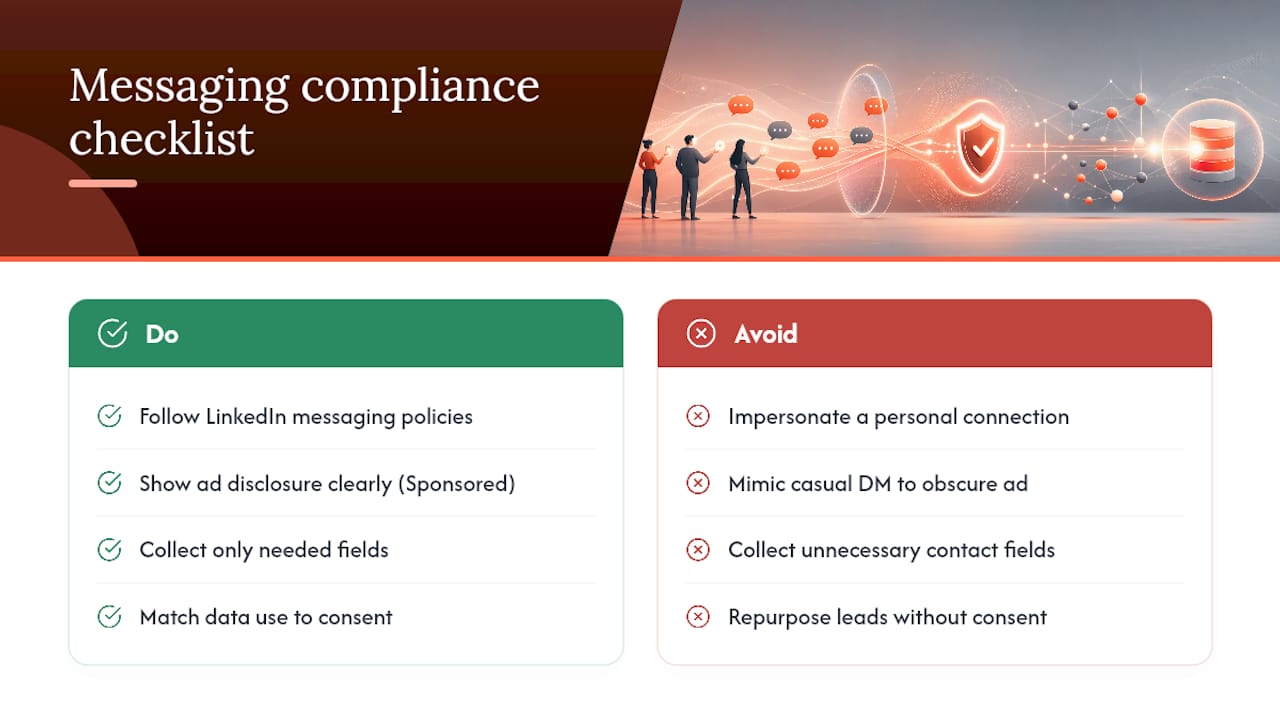
Conversation Ads live inside a real messaging inbox, which means the compliance bar is different from a display ad sitting in a feed. LinkedIn requires advertisers to follow its advertising policies around messaging content, including restrictions on misleading claims, prohibited content categories, and rules against impersonating a personal connection when the message is clearly sponsored.
The “Sponsored” tag on every Conversation Ad exists specifically so recipients know they’re interacting with an ad, not a colleague. Advertisers shouldn’t try to write copy that obscures this or so closely mimics a casual DM tone that it creates confusion about who’s messaging them. That’s both a policy risk and a trust problem with your actual prospects.
Data collected through Lead Gen Forms falls under the same privacy obligations as any other lead capture mechanism. If you’re targeting prospects in regions covered by GDPR or similar regional privacy frameworks, your downstream use of that data, including how long you retain it and what you do with the contact information, needs to match the consent language shown at the point of capture. Don’t collect a field you don’t have a legitimate use for, and don’t quietly repurpose Conversation Ad leads for a use case the prospect never agreed to.
Sender identity is a compliance detail too easy to overlook. If you’re sending as a named individual rather than a company page, that person needs to be aware their name and photo are attached to a live ad campaign, and ideally should be prepared to respond if a prospect replies expecting an actual conversation.
Using Conversation Ads Inside a Multichannel B2B Campaign
Conversation Ads work best as one instrument in a larger arrangement, not a standalone channel running in isolation. The format’s real strength is reaching someone who already has some familiarity with your brand, which makes it a strong mid-funnel layer sitting between broader awareness efforts and bottom-funnel sales outreach.
A common sequence: build initial awareness through content marketing and organic search, warm up the account through display or feed-based social lead generation, then deploy a Conversation Ad once someone has engaged with your brand at least once. That sequencing matters because a cold, unfamiliar name sliding into someone’s inbox tends to get ignored or reported, while a name they’ve seen once in an ad or article gets a second look.
Email nurture and Conversation Ads pair particularly well for account-based marketing. If a target account has engaged with an email sequence but hasn’t taken the next step, a Conversation Ad sent to the same buying committee, using a different message angle, can re-engage stalled prospects without repeating content they’ve already seen. The branching format also lets you segment intent within that same account, since a marketing director and a VP of sales at the same company might click entirely different CTAs.
Coordinate frequency across channels so the same prospect isn’t getting hit by a retargeting ad, an email, and a Conversation Ad in the same 48 hours. That kind of overlap reads as aggressive rather than helpful, and it’s one of the fastest ways to burn goodwill with an account you’re trying to close.
Common Pitfalls and Troubleshooting Tips When Running Conversation Ads
The single most common mistake is overloading the first message with too many CTAs. Five buttons is the technical maximum, but three is usually the practical ceiling before a recipient’s eyes glaze over and they close the message without clicking anything.
A second frequent problem: generic sender identities. A campaign sent from a faceless company page routinely underperforms one sent from a named team member, since sender identity has a measurable effect on open rates, and testing a more senior sender against a junior one can shift engagement meaningfully.
Watch for these issues specifically:
- Low open rates: Usually a sender identity or subject-line problem, not a targeting issue. Test a named individual before you touch your audience settings.
- High opens, low CTA clicks: The opener promised something the buttons don’t deliver, or the value proposition is buried past the first sentence.
- Ad rejected during review: Almost always a character limit or image dimension violation. Recheck the official specs before resubmitting.
- Leads captured but never followed up: A CRM integration gap, not an ad performance problem. Confirm your Lead Gen Form is actually syncing before you blame the creative.
- Budget burning fast with few conversions: Check your frequency caps and exclusion lists. You may be re-messaging people who already converted or already declined once.
Most of these fixes take fifteen minutes once you know where to look. The expensive mistake is letting a broken flow run for three weeks before anyone checks the CTA Performance report.
Latitude Park’s Perspective: Conversation Ads as Part of the Full Funnel
We don’t run Conversation Ads as a standalone tactic. They work best stitched into an existing ABM motion, layered against email nurture and paid search retargeting, so the inbox message lands on a prospect who’s already seen your name once. Our cadence is weekly: pull CTA-path data, cross-reference it against pipeline in the CRM, and kill whatever path isn’t producing qualified conversations, regardless of how good its click-through rate looks on the surface.
— Rusty
Let Latitude Park Build and Run Your Conversation Ad Campaigns
Reading a setup guide is one thing. Building a branching flow, mapping five CTA paths to your CRM, and adjusting bids weekly while also running your Google Ads and SEO campaigns is a different job entirely. An AI-driven approach can handle the strategy, creative build, campaign setup, and ongoing A/B testing for Conversation Ads as part of a broader paid social and lead-generation engine, with transparent reporting tied directly to the pipeline it produces, not just click counts.
Clients typically see campaigns launch faster when creative architecture, sender testing, and CRM mapping happen in parallel instead of in sequence, with weekly check-ins to ensure timely reviews. If your current Conversation Ad flow is generating clicks but not conversations your sales team actually wants, get in touch for a campaign audit and see where the drop-off is actually happening.
Sources
Building a technical flow means working from primary documentation, not secondhand summaries. Start with LinkedIn’s official Conversation Ads specs and Microsoft Learn’s API reference for validation rules.
- LinkedIn Conversation Ads specs
- Message Ads deprecation notice and guidance | Microsoft Learn
- LinkedIn Conversation Ads: How to Use Them – Shopify
FAQ
What Are Conversational Ads on LinkedIn?
Conversational ads, more precisely called Conversation Ads, are interactive sponsored messages delivered to a user’s LinkedIn inbox that let recipients choose their next step through clickable CTA buttons. Each button can open a Lead Gen Form, link to an external page, or branch into another message layer, which turns a single ad into a self-guided mini-conversation.
What Is the Difference Between LinkedIn Message Ads and Conversation Ads?
Message Ads were a single, non-branching message with one CTA, and LinkedIn has deprecated the format in favor of Conversation Ads. Conversation Ads support multiple CTA buttons per message and up to several layers of branching, giving prospects a choice instead of a single forced action.
How Much Do LinkedIn Conversation Ads Cost?
LinkedIn charges for Conversation Ads on a cost-per-send (CPS) basis, meaning you bid a maximum amount you’re willing to pay each time your message is delivered to an inbox. Actual cost depends on audience competition and your bid strategy, and LinkedIn does not publish a fixed rate since it varies by targeting and demand. Latitude Park’s current pricing for managing Conversation Ad campaigns is available directly through a discovery call.
Can You Give Examples of LinkedIn Conversation Ads?
Common examples include a “Qualifier Hub” offering research, comparison, or direct contact paths; an event invitation with register, request-recording, and reminder options; and a demo path offering a live demo, a custom brief, or a case study download. Each path routes to a different follow-up message and, often, a distinct Lead Gen Form tied to that specific CTA.
How Many CTA Buttons Can a Conversation Ad Have?
A single message within a Conversation Ad supports up to 5 CTA buttons, and the full conversation can include up to 50 buttons across all layers combined. Most effective flows use two to three CTAs per layer to avoid overwhelming the recipient.