How to Manage Local Google Ads Without Losing Your Mind
Why Google Ads Management for Local Businesses Is Harder Than It Looks
Google Ads management for local businesses is one of the fastest ways to put your service in front of customers who are ready to buy — but getting it right takes more than just turning on a campaign.
Here’s a quick snapshot of what effective local Google Ads management involves:
| What You Need to Do | Why It Matters |
|---|---|
| Choose the right campaign type (Search, LSA, Performance Max) | Different campaign types serve different goals and budgets |
| Set up conversion tracking (calls, forms) | You can’t optimize what you don’t measure |
| Target the right geography and keywords | Prevents wasted spend on irrelevant clicks |
| Set a realistic budget ($500–$3,000/month) | Underfunding kills campaigns before they can learn |
| Monitor and optimize every week | Google’s algorithm rewards active management |
| Integrate your Google Business Profile | Boosts local visibility and ad performance |
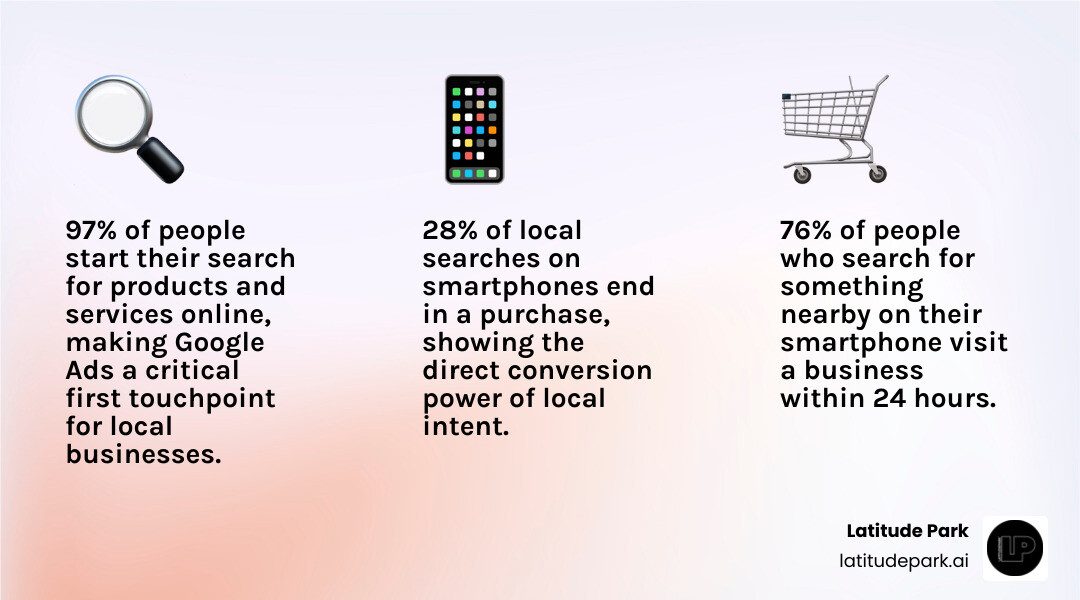
The stakes are real. 97% of people start their search for products and services online, and 76% of people who search for something nearby on their smartphone visit a business within 24 hours — with 28% of those searches ending in a purchase. That’s an enormous opportunity for local businesses and franchise operators.
But here’s the problem: most local campaigns are set up once and left to run, burning through budget on the wrong keywords, the wrong audiences, and landing pages that don’t convert. For franchise marketing managers juggling campaigns across multiple locations, the complexity multiplies fast.
This guide walks you through everything — from choosing between Google Local Services Ads and traditional Search campaigns, to scaling across dozens of locations without losing consistency or control.
I’m Rusty Rich, President and founder of Latitude Park, a full-service digital advertising agency based in St. Petersburg, Florida, and I’ve spent over 15 years helping small businesses and growing franchises get real, measurable results from Google Ads management for local businesses. Let’s cut through the noise and show you exactly how it’s done.
Simple google ads management for local businesses glossary:
- Google Ads for Local Business
- Local Service Google Ads Complete Guide
- How to Run Google Ads for Local Business
Google Local Services Ads vs. Traditional Google Ads
When you are planning your budget for google ads management for local businesses, the first major decision is choosing where your ads will actually live. Google offers two entirely distinct advertising platforms for local lead generation: Google Local Services Ads (LSAs) and traditional Google Ads (which include Search, Display, and Performance Max).
To unlock local growth with a comprehensive look at local service ads, we have to compare how these two systems function. Traditional Google Ads operate on a Pay-Per-Click (PPC) model. You bid on keywords, and every time someone clicks your ad—whether they call you, fill out a form, or immediately hit the “back” button—you pay Google.
Local Services Ads, on the other hand, operate on a Pay-Per-Lead (PPL) model. Your ads appear at the absolute top of the search results page, even above traditional PPC ads. Best of all, you only pay when a customer actually contacts your business through the ad via a phone call or text message.
| Feature | Google Local Services Ads (LSAs) | Traditional Google Ads (PPC) |
|---|---|---|
| Payment Model | Pay-per-lead (calls, texts) | Pay-per-click (website visits, landing page views) |
| Ad Placement | Absolute top of Google search results | Below LSAs, above organic map pack and search results |
| Targeting | Selected zip codes and specific service categories | Keywords, demographics, radius targeting, and custom audiences |
| Trust Badges | Google Guaranteed or Google Screened badge | Visual assets/extensions, but no official safety badge |
| Lead Disputes | Yes, you can dispute and get refunded for invalid leads | No, you cannot dispute invalid or accidental clicks |
| Creative Control | Minimal (Google auto-generates the ad from your profile) | High (custom headlines, descriptions, and assets) |
Understanding Google Local Services Ads for Home Services
If your business falls under the umbrella of home services or specialized professional services, LSAs are a game-changer. Originally designed for plumbers, electricians, and HVAC technicians, Google has expanded LSA eligibility significantly in 2026.
Today, eligible categories span multiple sectors:
- Home Services: Appliance repair, roofing, landscaping, plumbing, pest control, house cleaning, and window cleaning.
- Business/Legal Services: Family law, bankruptcy lawyers, real estate agents, and financial planners.
- Health & Wellness: Dermatologists, acupuncturists, and physical therapists.
- Other Niches: Learning services, care services, beauty, pet grooming, and automotive repair.
To get started, you must walk through a structured setup process to verify your eligibility, build your LSA profile, and complete Google’s verification requirements.
Once your profile is active, Google monitors your response times to calls and texts. If you let calls go to voicemail or ignore messages, your local ranking will drop. To win the local search war, you must treat LSA leads like gold and answer them instantly. For home service businesses specifically, you can read our deep dive on Google Local Services Ads for home services to learn how to dominate your local market.
The Google Guaranteed and Screened Badges
The most powerful psychological trigger of LSAs is the green badge that appears next to your business name. For home service providers, this is the Google Guaranteed badge. For professional services like lawyers or financial planners, it is the Google Screened badge.
These badges build instant trust with consumers who have never heard of your business. To earn them, you must pass Google’s rigorous screening process, which includes:
- Background Checks: Free background checks for the business owner and field employees (conducted by Google’s third-party safety partners).
- License Verification: Proof of active state, provincial, or local business licenses.
- Insurance Check: Verification of general liability insurance.
The Google Guaranteed badge also acts as a financial safety net: Google will reimburse customers up to $2,000 (lifetime limit) if they are not satisfied with the quality of work booked through the ad. To leverage this trust-building tool for your lead generation, read our guide on how to win more local leads with the Google Guaranteed badge.
Mastering Google Ads Management for Local Businesses
While LSAs are fantastic, they lack the keyword control and creative flexibility of traditional Google Ads. To build a robust pipeline of high-intent leads, you must master traditional Search campaigns. This requires a strategic approach to campaign setup, conversion tracking, geographic targeting, keyword match types, and ad scheduling. For a foundational overview, check out a practical guide to Google Ads for local business.
Setting Up Conversion Tracking for Local Campaigns
If you launch a local campaign without conversion tracking, you are essentially throwing money into a black hole. You cannot optimize your bids, keywords, or ad copy if you do not know which clicks are turning into paying customers.
For local businesses, conversion tracking must focus on two primary actions:
- Phone Calls: Track calls made directly from your ad assets (call extensions), calls from mobile users clicking your phone number on your website, and manual dials from desktop users.
- Form Submissions: Track contact forms, quote requests, and booking confirmations.
To set this up correctly, we recommend using Google Tag Manager (GTM) integrated with Google Analytics 4 (GA4). By placing a GTM container on your website, you can track button clicks, form submissions, and dynamic call tracking numbers (using third-party call tracking software like CallRail). This data flows directly back into Google Ads, allowing Google’s Smart Bidding algorithms to optimize for conversions. For a complete blueprint on auditing and analyzing your campaign data, read our Google Ads data analysis ultimate guide.
Geographic and Keyword Targeting Strategies
Local advertising is won or lost on relevancy. If you target too broadly, you will waste your budget on clicks from users who are too far away to buy from you. If you target too narrowly, your ads won’t get enough impressions to generate leads.
To strike the perfect balance, implement these advanced targeting strategies:
- Radius Targeting: Instead of targeting an entire city, target a 5- to 15-mile radius around your physical storefront or primary service area.
- Keyword Match Types: Avoid using broad match keywords when you are starting out with a limited budget. Stick to Phrase Match (e.g.,
"emergency plumber near me") and Exact Match (e.g.,[hvac repair st petersburg]) to ensure your ads only trigger for highly relevant searches. While Google’s AI has made broad match more effective when paired with Smart Bidding, it can still burn through small budgets if not monitored closely. - Negative Keywords: Build a robust negative keyword list before your campaign goes live. Exclude terms like “jobs”, “salary”, “DIY”, “training”, and “free” to prevent paying for non-commercial searches.
- Ad Scheduling: If your business is only open from 8 AM to 5 PM, and you do not have an answering service or online booking engine active after hours, schedule your ads to only run during business hours. Paying for a click at 11 PM that goes to an unanswered phone is a waste of cash.
For a deeper dive into these optimization tactics, explore the pro guide to effective local PPC strategies.
Scaling Multi-Location Campaigns with Location Groups
For multi-location businesses and franchises, managing local campaigns presents a unique challenge. You want to maintain brand consistency across all locations while allowing each individual storefront or service territory to target its local neighborhood.
This is where Google Business Profile (GBP) integration and location groups become essential.
By linking your Google Ads account to your Google Business Profile manager, you can sync all of your physical locations into Google Ads as location assets (formerly location extensions). This allows your ads to appear directly on Google Maps and within local search results packs, driving physical foot traffic and local phone calls.
To manage this at scale without creating dozens of separate, messy campaigns, you should utilize location groups. According to Google’s official documentation on how to create and manage location groups, location groups allow you to organize your physical assets by region, city, or custom labels.
For example, if you manage a franchise with 50 locations, you can apply the label “Southeast Region” to your GBP listings. In Google Ads, you can create a location group that automatically pulls in any storefront with that label. This makes it incredibly simple to apply localized geographic targeting, custom budgets, and tailored ad copy to specific groups of locations.
To learn more about scaling your marketing efforts across multiple territories, check out our multi location advertising guide 2025 for modern automation best practices.
Budgeting, Timelines, and Key Metrics for Local Success
One of the most common questions we get from local business owners is: “How much do I actually need to spend, and when will I see results?”
Let’s talk numbers. For most small- to medium-sized local businesses, a realistic starting budget for Google Ads ranges from $500 to $3,000 per month.
If you spend less than $500, you likely won’t generate enough clicks or conversion data for Google’s machine-learning algorithms to optimize your campaigns. If your average cost-per-click (CPC) in your industry is $10, a $500 monthly budget only buys you 50 clicks. If your landing page converts at a standard 10%, you’ll end up with just 5 leads.
To prevent this, you must understand your local market’s competitive landscape. Read our guide on how to stop wasting cash and start running local Google Ads the right way to calculate your target metrics.

When it comes to timelines, Google Ads is not an overnight miracle. While you can start driving traffic within the first 7 days of launching a campaign, it typically takes 30 to 60 days of consistent data collection and optimization to stabilize your conversion rates and lower your Cost Per Acquisition (CPA).
To measure your success during this learning phase, focus on these three core metrics:
- Cost Per Acquisition (CPA): How much does it cost you to generate a phone call or form submission? This is your ultimate metric for lead generation health.
- Return on Ad Spend (ROAS): If you spend $1,000 on ads, how much revenue did those closed leads generate? (An average benchmark across Google Ads is $8 in revenue for every $1 spent).
- Quality Score: This is Google’s rating of the relevance and quality of both your keywords and your PPC ads. A higher Quality Score (7/10 or above) lowers your CPC and improves your ad placement.
Common Pitfalls in Google Ads Management for Local Businesses
Even the most well-intentioned campaign can fail if you fall into these common traps:
- Sending Traffic to Your Homepage: Your homepage is designed to tell your company’s story, not to convert high-intent local searchers. If someone searches for “emergency water damage repair,” send them to a dedicated, high-converting landing page that features a prominent click-to-call button, a simple contact form, and trust badges.
- Too Broad Targeting: Targeting an entire metropolitan area when your service vehicles only travel within a 10-mile radius will waste your budget on leads you cannot service.
- Ignoring Negative Keywords: If you do not actively review your search terms report weekly and add irrelevant queries to your negative keyword list, you will continue to pay for wasted clicks.
- The “Set-and-Forget” Mentality: Google Ads is not a slow cooker. If you do not log in weekly to adjust bids, test ad copy, and review search terms, your campaign performance will steadily decline. To understand why your campaigns might be losing steam, check out our troubleshooting guide on Google Ads performance dropping.
When to Hire an Agency for Google Ads Management for Local Businesses
Managing Google Ads in-house can quickly turn into a full-time job. Between monitoring search terms, adjusting smart bidding strategies, updating negative keyword lists, and ensuring your landing pages are converting, it is easy for a business owner or busy marketing manager to feel overwhelmed.
You should consider partnering with a specialized agency if:
- You are spending more than $1,500/month on ads but do not have the time to audit your campaigns weekly.
- You have a complex multi-location or franchise business model that requires tailored campaign structures.
- Your in-house team lacks deep expertise in conversion tracking setup, GTM, or advanced local PPC strategies.
An experienced agency can restructure your accounts, optimize your budget, and implement advanced tactics that lower your CPA. If you want to see how professional management can scale your lead generation, explore our Google Ads local business guide.
Frequently Asked Questions About Local Google Ads
How much should a small local business budget for Google Ads?
A starting budget of $500 to $1,000 per month is recommended for small local businesses in low-to-moderate competition markets. However, your ideal budget depends on several key factors:
- Industry Competition: High-value service niches (like personal injury law, water damage restoration, or HVAC repair) have much higher CPCs and require larger budgets to generate viable lead volumes.
- Service Area Size: Targeting a 5-mile radius requires less budget than targeting an entire metropolitan region.
- Growth Goals: If you need to fill your schedule immediately, you will need to scale your daily budget to outbid competitors.
How long does it take to see results from local campaigns?
You can expect to see initial website traffic and phone calls within the first 7 days of launching your campaign. However, the first 2 to 4 weeks are considered a learning period for Google’s algorithms. Stable, optimized results and a lower CPA typically emerge after 30 to 60 days of continuous testing and optimization.
Do I need a separate landing page for local ads?
Yes, absolutely. Sending paid ad traffic to a generic homepage is one of the quickest ways to waste your ad spend. A dedicated landing page designed specifically for your ad’s target keyword—featuring a single, clear call-to-action (like “Call Now” or “Get a Free Quote”) and minimal navigation links—will significantly increase your conversion rate and maximize your ROI.
Conclusion
Mastering google ads management for local businesses doesn’t have to be a source of constant frustration. By choosing the right campaign types, setting up bulletproof conversion tracking, targeting your exact geographic service areas, and avoiding common setup mistakes, you can turn Google Ads into a predictable, highly profitable lead generation engine.
For multi-location brands and growing franchises, success requires a delicate balance of brand consistency and local targeting. At Latitude Park, we specialize in franchise marketing, helping multi-location businesses scale their growth through tailored campaign structures that address complex geographic needs. While we are known for our highly effective Meta (Facebook) advertising strategies, we build comprehensive, multi-channel funnels that ensure your local business dominates search results from every angle.
Ready to stop wasting your ad spend and start driving real, measurable local leads? Partner with Latitude Park for expert Google Ads management and let our team build a high-converting campaign tailored to your business goals.