Instagram Reels ads are full-screen, vertical, audio-on video ads that play between organic Reels, and the single biggest lever you have is creative that behaves like the content surrounding it. Skip the polished feed edit. Prioritize native pacing and an audio-first hook in the opening second, then verify placement and specs against Meta Ads Manager and disclosure rules against the FTC Endorsement Guides before you spend a dollar.
Table of Contents
- Where Reels ads show up and how placement behaves
- Reels ad specs and technical requirements you can’t skip
- How to launch a Reels ad through Ads Manager or Boost
- Creative best practices and archetypes that actually win
- Budgeting, bidding, and the benchmarks worth watching
- Examples and swipe-file inspiration worth studying
- Our process for running Reels campaigns that hold up
- Disclosures and FTC rules for sponsored Reels content
- Targeting and audience selection for Reels campaigns
- Measuring what actually matters on Reels
- Common challenges and how to troubleshoot them
- What the data actually supports and what doesn’t
- Running Reels ads without doing all of this yourself
- Sources
- FAQ
Where Reels ads show up and how placement behaves
Reels ads occupy a full 9:16 screen inside the Reels feed itself, sandwiched between organic content, and they play with audio on by default. That single detail changes everything about how you should be producing creative, because a silent-first feed ad dropped into an audio-on environment reads as an interruption instead of content.
This is different from Stories, which get less scroll momentum and more taps, and different from feed placements, which tolerate slower pacing and captions doing more of the work. According to Meta’s Reels ads documentation, Reels ads run through both manual placement selection and Advantage+ placements inside Ads Manager, allowing the platform to allocate impressions based on performance across placements.
That flexibility is useful once you have a proven asset. Early on, it can hide a weak spot. A few situations where isolating Reels as its own placement earns its keep:
- You are testing a new hook style and need clean, placement-specific data instead of a blended average.
- Your creative is vertical-native and would get cropped or misread in square or landscape placements.
- You are comparing hook rate or completion rate against a benchmark that only makes sense inside the Reels environment.
Once a creative proves itself in isolated Reels testing, letting Advantage+ redistribute it usually recovers reach without hurting performance.
Reels ad specs and technical requirements you can’t skip
Get the technical spec wrong and your ad gets cropped, rejected, or quietly deprioritized, none of which shows up until you’re staring at a confused performance report. Meta’s awareness video ad specs for Reels lay out the baseline every production team should have pinned above their monitor.
- Aspect ratio: 9:16, full-screen vertical, no letterboxing.
- Recommended resolution: 1080×1920 pixels for sharp playback on modern phones.
- File formats: MP4 or MOV, exported at a reasonable bitrate to avoid compression artifacts.
- Duration: Meta allows a wide range, but cold-traffic ads generally perform best between 15 and 30 seconds, with longer durations allowed for especially engaging content.
- Safe zones: keep logos, captions, and CTAs out of the top and bottom UI overlay areas, and never open on a branded intro card in the first 3 seconds.
Statistic callout: Meta’s ads guide specifies technical requirements including aspect ratio, file size limits, and recommended resolution for Reels placements. Treat that spec sheet as a compliance gate, not a suggestion, because a mismatched export is the fastest way to torch a media budget on an ad that never renders properly.
Accessibility matters just as much as format. Burn captions directly into the video rather than relying on Instagram’s auto-captions alone, since auto-caption timing can drift and hurt comprehension for sound-off viewers who tap in later. Choose a cover frame in Ads Manager that reads clearly as a static thumbnail, because that’s the first impression before the audio and motion even kick in.
How to launch a Reels ad through Ads Manager or Boost
There are two paths into Reels advertising, and picking the right one depends on whether you’re scaling a proven organic post or building a campaign from scratch.
Ads Manager flow:
- Choose a campaign objective that matches your goal, whether that’s awareness, traffic, engagement, or conversions.
- Select placements: either manual Reels-only for controlled testing, or Advantage+ to let the system allocate across eligible surfaces.
- Upload creative built to the 9:16 spec, with captions burned in and a clear cover image set.
- Add your call-to-action button and destination link.
- Confirm tracking is live: Meta Pixel or Conversions API firing correctly, plus UTM parameters on the destination URL so attribution shows up cleanly outside Meta’s own reporting.
Boost flow (from an organic Reel):
- Open the Reel from your profile and tap the boost option.
- Pick a goal, typically more profile visits, more messages, or more reach.
- Set a basic audience, budget, and duration from the limited menu the Boost a Reel flow exposes.
- Confirm and launch, understanding you’re working with a simplified subset of the targeting and bidding controls available in full Ads Manager.
The Instagram Help documentation on linking ads to Reels confirms Boost is meant for speed and simplicity, not granular control, so treat it as a way to validate an organic winner rather than your primary campaign engine.
The most common mistake teams make is repurposing a polished feed or Stories asset without re-editing it for Reels. Audio that was mixed for a silent scroll suddenly plays too loud or too quiet, and framing built for a 4:5 crop leaves dead space or cuts off a subject’s face. Re-edit for the placement every time.
Creative best practices and archetypes that actually win
Reels ads get judged by the same pattern-recognition instincts viewers use to skip past organic content, which means a creative that looks like an ad gets the thumb before it gets a chance. Native pacing wins because it matches the rhythm the platform trained people to expect: quick cuts, handheld energy, and a payoff that arrives fast.
Audio matters more here than in almost any other ad format. Practitioner research on Reels creative recommends placing an audio or visual interrupt somewhere in the first 0.5 to 2 seconds, according to research on Reels ad archetypes and creative research workflow, whether that’s a spoken hook, a sudden sound cue, or an on-screen text jolt. Captions should reinforce the hook, not just transcribe it, since a caption that restates the spoken line word for word wastes the one visual asset you control completely.
Five archetypes show up again and again in ads that survive the auction long enough to matter:
- Talking-head POV: a person speaks directly to camera as if answering a friend’s question, which builds trust fast.
- Transformation: a clear before-state moves visibly toward an after-state within the runtime.
- Before/after: a tighter, often single-cut version of transformation that relies on a stark visual contrast.
- Day-in-the-life: a loosely narrated sequence that frames the product as incidental to a bigger story.
- Unbox/first-use: the first physical interaction with a product, leaning on curiosity and texture.
Pro Tip: Build at least two hook variants for every core asset, swap only the first 3 seconds, and let the data tell you which opening earns the scroll-stopping moment.
Use Meta’s Ad Library to build a swipe file before you shoot anything. Filtering for ads that have run for an extended stretch surfaces creative that survived real budget pressure, which is a far better research input than guessing at what “should” work.
Budgeting, bidding, and the benchmarks worth watching
Reels ads inside a mixed-placement campaign don’t get a guaranteed share of impressions. Meta’s delivery system allocates spend toward whichever placement is performing, which means a weak Reels asset can get starved of impressions before you ever see a fair read on it. Isolate the placement early if you need a clean signal.
Funnel stage should drive your length decision. Cold-traffic hooks generally sit in that 15 to 30 second window because shorter runtimes protect completion rate, while retargeting or nurture content can stretch toward 60 or 90 seconds since that audience already has context and patience.
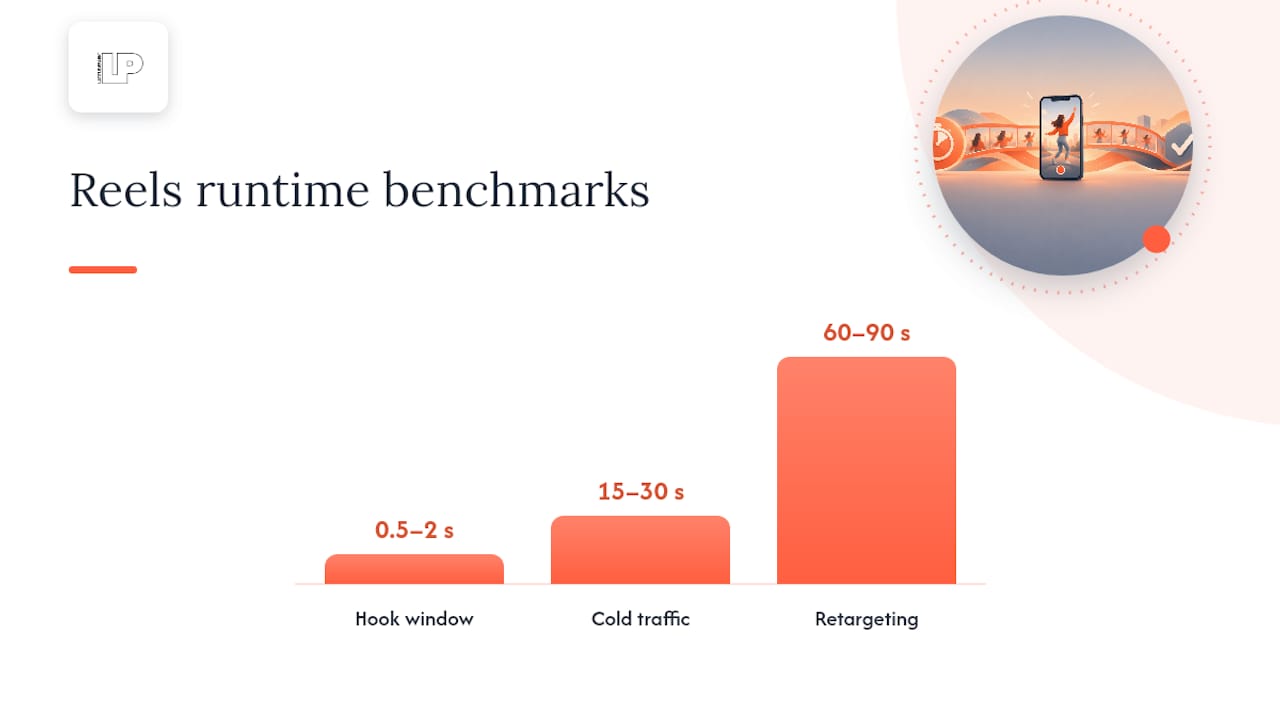
Statistic callout: research on Reels ad archetypes recommends placing the audio-on hook within the first 0.5 to 2 seconds of the creative, since that window determines whether a viewer keeps watching or scrolls past. Hook rate, the percentage of viewers who watch past the first few seconds, is the earliest and most honest signal you’ll get on a new asset. A hook that can’t hold attention past that opening window rarely recovers, no matter how strong the rest of the edit is.
A practical rhythm for spend:
- Start new creative on Advantage+ or automatic bidding to let the algorithm find its early audience without overcomplicating the setup.
- Watch hook rate first, completion rate second, and only look at cost metrics once you have enough volume to trust them.
- Kill or iterate on creative that shows a weak hook rate within the first meaningful batch of impressions rather than waiting for a full budget cycle to play out.
- Once a winner emerges, move to manual campaign budget optimization tests to chase a lower cost per action with more control than automatic bidding allows.
Examples and swipe-file inspiration worth studying
Building a swipe file is less about admiring good ads and more about reverse-engineering the decisions behind them. Watch each example with a specific checklist in mind rather than a general impression.
For every ad you save, note these six details:
- The first-3-second audio cue, whether spoken, musical, or a sound effect.
- The framing choice, meaning handheld, static, or a mix.
- The exact caption text used in the opening seconds.
- Where and how the CTA overlay appears on screen.
- The total runtime of the ad.
- The date you observed it still running, since long runtime is itself a signal.
Practitioner research on Reels ad research workflow recommends filtering ad archives for placements running 30 days or longer, since an ad still spending after a month has survived the kind of performance pruning that quietly kills weak creative. That survivorship is a more honest signal than any single view count, and it’s the fastest way to shortcut your own creative testing cycle.
Our process for running Reels campaigns that hold up
Our workflow runs research, hook testing, variant scaling, targeting refinement, measurement, and then scale, in that order, because skipping a step almost always shows up later as wasted spend. We track hook rate first, watch for runtime fatigue as an asset ages, and keep a close eye on pixel events to confirm the story the top-of-funnel numbers are telling actually matches what happens downstream. AI tools speed up the research stage significantly, helping pull patterns out of Ad Library archives and flag hook structures worth testing faster than manual review ever could.
— Rusty
Disclosures and FTC rules for sponsored Reels content
If a brand relationship influenced the content, whether through payment, free product, or any other material connection, that relationship needs disclosure, and Reels ads are not exempt just because they’re short. The FTC’s Endorsement Guides are explicit that disclosures need to be clear and conspicuous, and for video content specifically, that means visible on screen and, where possible, spoken aloud as well.
A hashtag buried in a caption that gets cut off by Instagram’s truncation is not a disclosure, it’s a liability. The guidance calls out that platform-native tools alone, like a branded content tag, may not be sufficient on their own, and recommends the disclosure live inside the video itself rather than relying solely on a description field a viewer has to tap to expand.
Practical application for Reels: overlay a plain-language disclosure such as “Ad” or “Paid partnership” early in the video, ideally within the same window as your hook, and say it out loud if the format allows narration. For creator-fronted content or any influencer collaboration running as a Reels ad, repeat the disclosure if the content includes multiple distinct segments or scenes, since a single disclosure at the very start can get lost once the viewer’s attention has moved on.
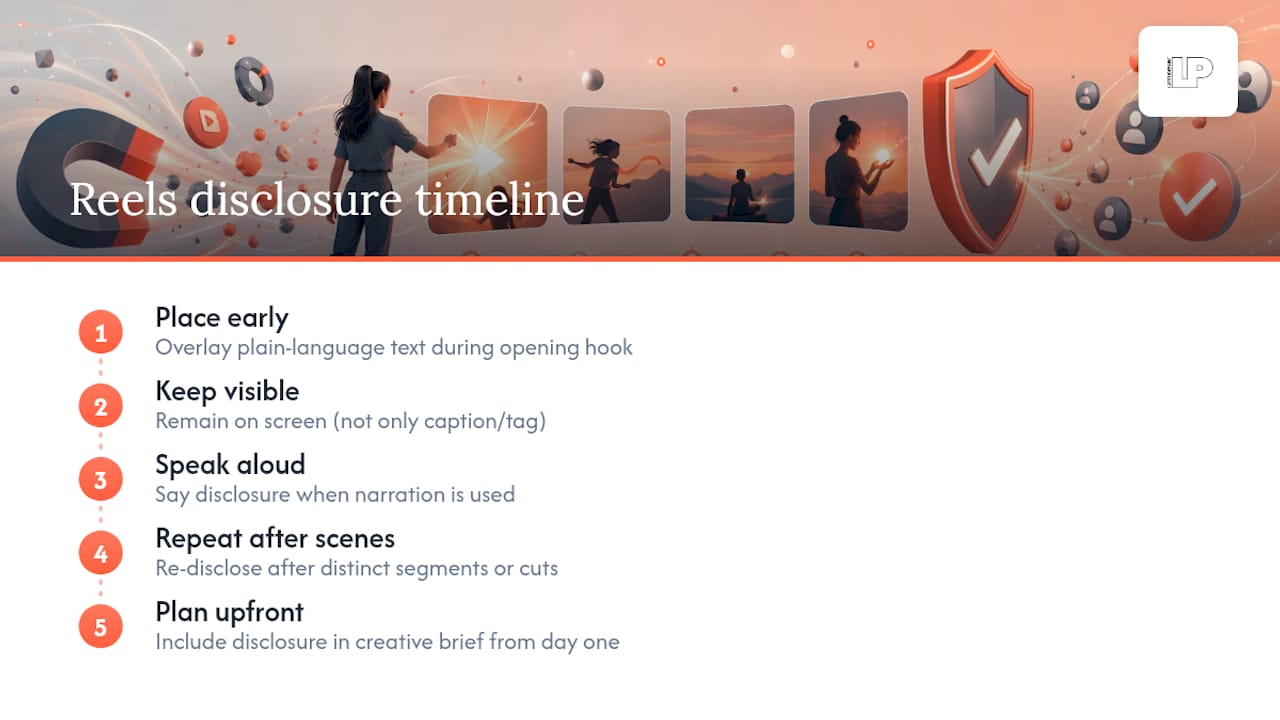
Building this into your creative brief from day one avoids the ugly rework of pulling a running ad because legal flagged it after the fact.
Targeting and audience selection for Reels campaigns
Reels ads use the same audience infrastructure as the rest of Meta’s ad system, which means your targeting decisions are less about Reels specifically and more about how you structure the campaign around it. Advantage+ audience settings let the algorithm find viewers based on your creative and conversion signals rather than a manually built interest list, and that approach tends to work well once your Pixel or Conversions API has enough conversion volume to learn from.
Manual audience building still has a place, particularly for retargeting warm visitors, past purchasers, or engaged followers who’ve already interacted with your content. Layering a custom audience of site visitors against a Reels-specific creative built for that warmer temperature, longer runtime, deeper narrative, tends to outperform showing that same warm audience a cold-traffic hook.
Lookalike audiences built from your best converters remain a reasonable starting point for early-stage campaigns without enough first-party data to fuel Advantage+ targeting on its own. As your Pixel accumulates events, shifting weight toward algorithmic targeting and away from narrow manual interest stacks usually expands reach without diluting relevance, since the system has more signal to work with than a static list of interests you guessed at.
The overlooked variable here is placement isolation. When you test whether an audience responds better to Reels specifically versus a blended placement set, keep the creative constant and only change the placement setting, otherwise you’re measuring two variables at once and learning nothing clean from either.
Measuring what actually matters on Reels
Standard feed metrics don’t tell the full story on Reels, because the format’s value shows up in the early seconds more than almost anywhere else in Meta’s ad inventory. Hook rate, the share of viewers who keep watching past the first few seconds, is the leading indicator worth checking before anything else.
Completion rate matters next, but read it in context of your runtime. A 15-second ad with a strong completion rate and a 60-second ad with a weaker one aren’t directly comparable, since longer content naturally sheds viewers along the way. Watch the drop-off curve inside Ads Manager’s video metrics rather than the single completion number alone, since a steep early drop tells a different story than a gradual fade near the end.
Downstream, your Pixel and Conversions API events remain the ground truth for whether attention is converting into action. A high hook rate paired with weak conversion events usually points to a mismatch between the hook’s promise and the landing experience, not a creative failure at the top of the funnel. UTM-tagged links help confirm Meta’s own attribution against what your analytics platform records independently, which matters more now that iOS privacy changes have made platform-reported numbers less reliable on their own.
Treat cost metrics as a lagging confirmation, not an early diagnostic. Checking cost per result before you’ve validated hook rate and completion trends is how teams kill good creative too early or scale weak creative too long.
Common challenges and how to troubleshoot them
The most frequent failure point is repurposed creative, feed or Stories assets dropped into Reels placement without re-editing for audio-on pacing. If performance looks flat compared to organic Reels benchmarks, check whether the asset was actually built for this placement or just resized into it.
Rejected or delayed ad review often traces back to spec mismatches, like an aspect ratio that doesn’t match 9:16 or a cover image that doesn’t meet Meta’s format requirements. Re-check your export settings against Meta’s awareness video ad specs before resubmitting rather than guessing at what triggered the flag.
A weak hook rate that doesn’t improve across variants usually means the problem sits earlier than the edit, often in the offer or the audience match itself, not the opening frame. Before producing another round of creative, sanity-check whether the audience actually has a reason to care about what you’re showing them.
Inconsistent Pixel data or missing conversion events point to a tracking setup problem rather than a creative one. Confirm Conversions API is firing alongside the Pixel, since browser-based tracking alone increasingly misses events on iOS.
Finally, budget starvation inside mixed-placement campaigns can make a genuinely strong Reels asset look like it’s underperforming when it simply isn’t getting enough impressions in that placement to generate a reliable read. Isolate the placement, give it a real budget, and judge it on its own data before writing it off.
What the data actually supports and what doesn’t
The conventional advice on Reels ads spends too much time on specs and not enough on the first two seconds, which is the only part of the creative most viewers ever experience. Teams treat aspect ratio compliance as the hard part and creative pacing as an afterthought, when it’s the reverse: getting the file right is a checklist item, getting the hook right is the actual skill.
The most overrated tactic is chasing polish. A cleanly lit, professionally scripted ad that ignores native pacing will consistently lose to a rougher, faster-cut asset that respects how people actually scroll through Reels. The most underrated tactic is disciplined swipe-file research, pulling long-running ads from Ad Library and studying why they’ve survived, rather than starting from a blank brief every time.
If you take one thing from this guide, prioritize hook testing over everything else. Specs, targeting, and bidding all matter, but none of it rescues an ad that loses the viewer in the first second.
— Rusty
Running Reels ads without doing all of this yourself
Getting hook rate, disclosure compliance, and placement testing right takes real time, which is why some businesses seek specialized Facebook and Instagram advertising services. Such services often include creative strategy, campaign setup, and performance measurement, sometimes employing AI-driven research to speed archetype and hook-testing processes.

If you’d rather have a team running the tests and reading the Pixel data than doing it solo, check out Latitude Park’s services and ask about a starting audit or a pilot Reels campaign to see how it fits your budget.
Sources
- Instagram & Facebook Reels: Create Short Video Ads
- Disclosures 101 for Social Media Influencers
- Reels Ads 2026: Specs, Archetypes, Research Workflow
FAQ
How do I stop ads in Reels on Instagram?
Instagram doesn’t offer a full opt-out of ads in the Reels feed, but you can tap the three-dot menu on an ad and choose “Not interested” or “Hide ad” to reduce similar ads over time. This trains the algorithm rather than removing ads entirely, since ad-supported placements remain part of how the feed operates.
Why does Instagram have ads on Reels now?
Reels became a major placement inside Meta’s ad system because it’s a high-attention, full-screen video format that fits naturally between organic short-form content. Meta’s own Reels ads documentation confirms Reels placements are integrated with standard Ads Manager campaigns and Advantage+ distribution, making them a core part of video ad delivery rather than a side experiment.
How much do Instagram Reels ads cost?
Cost depends on your bidding strategy, audience, and creative performance, since Meta runs an auction rather than a fixed rate card. There’s no single published price per view or click, so budgets are best set through testing with automatic bidding first and manual optimization once a winning creative emerges.
Do you get paid for 1,000 views on Instagram reels?
Instagram’s own creator monetization programs are separate from Reels advertising and vary by eligibility and region, with no fixed public payout rate available. This guide covers running Reels as paid ads for a business, which is a different mechanism from creator payouts for organic Reels views.