Why Local Businesses Can’t Afford to Be Invisible on Google
Google Ads for local businesses is one of the fastest ways to get your phone ringing, your calendar booked, and your storefront visited by people actively searching for what you offer near them.
Here’s a quick snapshot of what local Google advertising delivers:
| Goal | How Google Ads Helps |
|---|---|
| Get more calls | Ads appear when people search “plumber near me” or “dentist open now” |
| Drive foot traffic | Show up on Google Maps with directions and hours |
| Generate leads fast | Pay only when someone contacts you (Local Services Ads) |
| Build trust | Display Google Verified badge and reviews in your ad |
| Control spending | Set daily or weekly budgets – no surprise bills |
The numbers behind local search behavior tell a clear story. 82% of people search online to find local businesses. Mobile searches containing terms like “best” and “right now” have grown more than 125% over a short period. Voice searches are rising fast, and urgent local service searches are climbing year over year.
The reality is simple: if your business isn’t showing up when a nearby customer is searching, a competitor is getting that call instead.
Whether you run one location or manage advertising across dozens of franchise locations, the challenge is the same: capturing local demand at the exact moment it exists.
I’m Rusty Rich, President and founder of Latitude Park, and I’ve spent over 15 years helping local businesses and growing franchises build Google Ads strategies that turn local searches into measurable revenue. In this guide, I’ll walk you through Google Ads for local business, from choosing the right campaign type to scaling results across multiple locations.
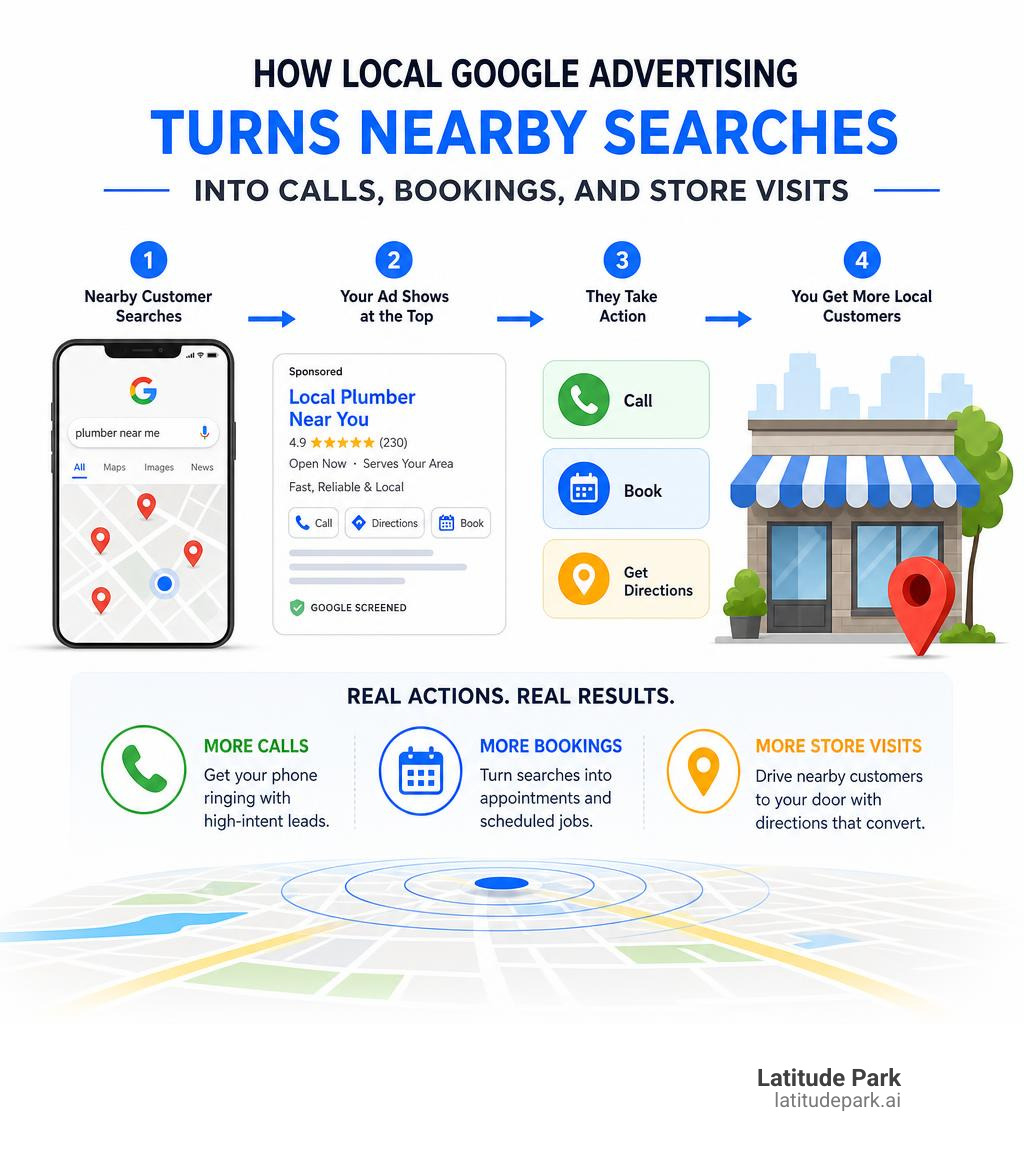
Quick look at google ads for local business:
Why google ads for local business Is the Fastest Path from Invisible to Found
Local advertising works because it meets people at the moment they are ready to act.
Nobody searches “emergency HVAC repair near me” for light bedtime reading. Nobody asks their phone for the “best auto repair shop open now” because they are casually building a spreadsheet. These are high-intent moments.
That is what makes google ads for local business so powerful. Instead of interrupting people while they are doing something else, local Google advertising places your business in front of people who already have a need.
For more on the foundation of local campaign strategy, see our guide to Google Ads for Local Businesses.
How Local Customers Search Before They Buy
Local customers usually follow a simple pattern:
- They realize they need help.
- They search Google.
- They compare a few nearby options.
- They call, book, request directions, or visit.
The search itself may look different depending on the person and the device. Some type short phrases like:
- “roof repair near me”
- “family dentist open today”
- “auto service nearby”
- “best tax advisor right now”
Others use voice search with longer, more conversational questions:
- “Who is the best electrician near me that is open today?”
- “Where can I get my brakes checked close by?”
- “Find a dog groomer with appointments this week.”
Voice search on mobile has grown significantly, and mobile searches containing urgency terms like “best” and “right now” have grown more than 125% in recent years. That means local buyers are not just searching. They are searching with intent, urgency, and a tiny computer in their pocket.
Research also shows rapid growth in specific “near me” categories, including financial advisors, legal services, home improvement, and automotive services. The lesson is simple: when your ads appear at the right local decision moment, you are no longer hoping people remember you. You are showing up exactly when they need you.
Where Local Google Ads Can Appear
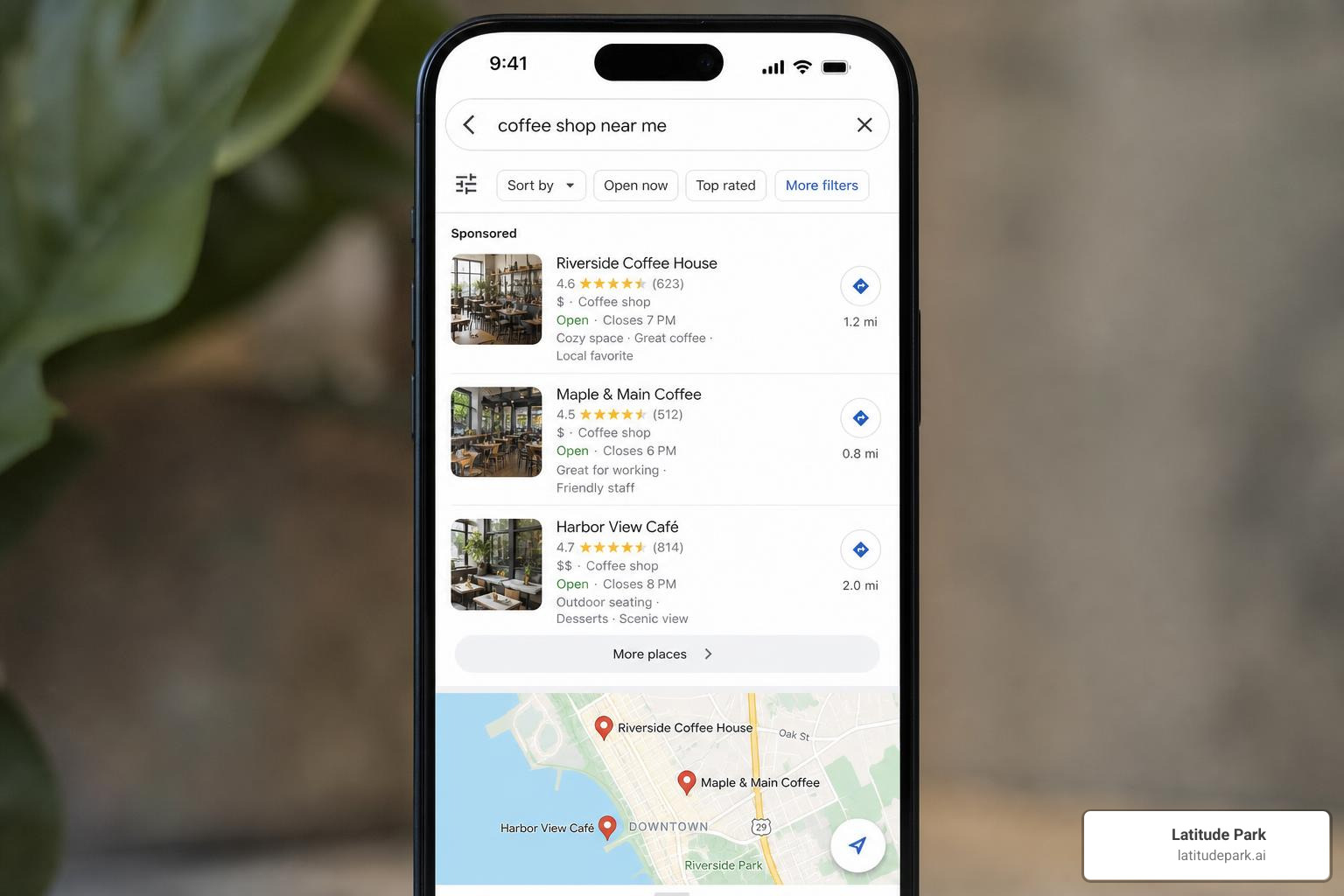
Local Google advertising is not limited to one blue link on a search page. Depending on campaign type, eligibility, and setup, your business can appear across several high-visibility places, including:
- Google Search results
- Google Maps
- The local pack
- Google Business Profile placements
- Local Services Ads placements
- Performance Max inventory
- Waze placements where available
- Call buttons and direction buttons
- Rich ad formats with photos, reviews, hours, and location details
Google explains these placements in its guide to About Local Ads on Google. Local Ads can help physical locations and service-area businesses drive calls, store visits, direction requests, and website actions.
For example, a local ad on Maps may show your business pin, hours, reviews, and a directions button. A Search ad may include your phone number, location, service offer, and call extension. A Local Services Ad may appear near the top of results with verification signals and a direct call or message option.
In plain English: Google gives local businesses several ways to be visible before a customer even reaches the organic results.
The Core Benefits for Local Businesses
Local Google advertising can help solve the “nobody knows we exist” problem quickly. The biggest benefits include:
- Faster visibility than SEO alone
- Placement in high-intent local searches
- Strong control over budget and targeting
- Direct lead generation from calls, forms, messages, and bookings
- Store visit and direction request opportunities
- Trust signals such as reviews and verification badges
- Rich ad formats using Google Business Profile information
- Measurable performance data
SEO is still important. We love SEO. But SEO often takes time, and local businesses frequently need leads now. Google Ads can help bridge that gap by capturing demand immediately while your organic presence grows in the background.
If you want a deeper tactical breakdown, read A Practical Guide to Google Ads for Local Business.
Local Services Ads vs Traditional Google Ads: What Local Businesses Need to Know
Local businesses often hear “Google Ads” and think it means one thing. It does not.
Two of the most important options are:
- Local Services Ads, often called LSAs
- Traditional Google Ads, such as Search campaigns and Performance Max
Both can work. They simply work differently.
| Feature | Local Services Ads | Traditional Google Ads |
|---|---|---|
| Main pricing model | Pay per lead | Usually pay per click |
| Best for | Local service leads, calls, messages, bookings | Search traffic, landing pages, ecommerce, lead forms, store visits |
| Keyword control | Limited | High |
| Ad copy control | Limited | High |
| Website required | Often not required | Usually recommended |
| Verification | Required for eligible categories | Not always required |
| Trust badge | Can show Google verification signals | Can show reviews, assets, and Business Profile details |
| Targeting | Service area and job categories | Keywords, audiences, devices, locations, schedules, and more |
| Setup complexity | Simpler, but verification can take time | More flexible, but more moving parts |
The best answer is rarely “pick one forever.” For many local businesses, the strongest strategy is to use Local Services Ads for high-intent lead capture and traditional Google Ads for control, scale, remarketing, and specific keyword opportunities.
What Local Services Ads Are
Local Services Ads are Google ads built specifically for eligible local service businesses. They are designed to generate leads directly from Google through:
- Phone calls
- Messages
- Booking requests, where available
They often appear above traditional paid search ads and organic results for local service queries. Instead of sending every visitor to a website, LSAs let customers contact the business directly from the ad.
Google’s official page on Local Services Ads explains the basic promise: help local customers find you and pay for results rather than clicks.
A few important LSA characteristics:
- They are built around your service category and service area.
- They usually require a Google Business Profile.
- They require screening and verification.
- A website may not be required.
- Your reviews, hours, services, and responsiveness can influence performance.
- You only pay when a valid lead contacts you through the ad.
For home service companies, we also cover this in more detail in Google Local Services Ads for Home Services.
How google ads for local business Pricing Works: Pay Per Lead vs Pay Per Click
This is one of the biggest differences.
With traditional PPC campaigns, you usually pay when someone clicks your ad. That click may turn into a lead, or it may not. A person could click, browse for five seconds, get distracted by lunch, and disappear forever. You still paid for the click. Rude? A little. Normal? Very.
With Local Services Ads, the core model is pay per lead. You are typically charged when a potential customer contacts your business through the ad by calling, messaging, or booking.
Here is the simple comparison:
| Pricing Model | What You Pay For | Example |
|---|---|---|
| Pay per click | A click on your ad | Someone clicks your search ad and visits your landing page |
| Pay per lead | A contact through the ad | Someone calls, messages, or books through your Local Services Ad |
LSA costs vary by market, category, service type, competition, and bidding settings. Businesses can set weekly budgets, and Google uses those budgets to estimate lead volume. Monthly maximums are generally based on the weekly budget multiplied across the average number of weeks in a month.
Depending on account settings and availability, LSA bidding options may include:
- Maximize leads
- Target cost per lead
- Maximum bid per lead
Important: not every lead is equally valuable. A call about a service you do not offer should be reviewed. A spam call should be reviewed. Local Services Ads may allow lead disputes or credit requests when leads are invalid under Google’s policies, so checking lead quality is part of managing ROI.
What the Google Verified Badge Means for Trust
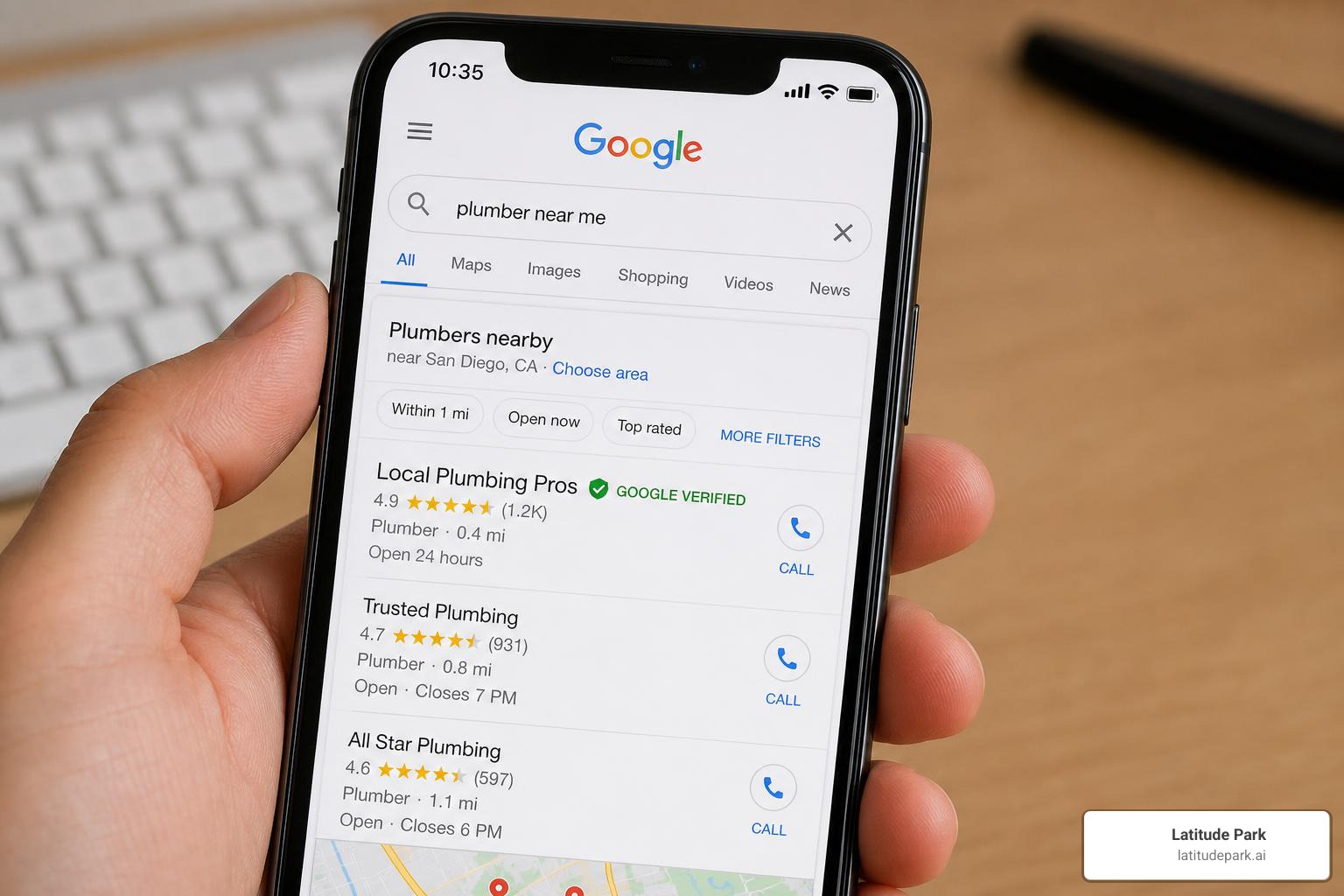
Trust is a huge part of local buying. People want to know: “Can I let this person into my home?” “Is this business legitimate?” “Will they actually show up?”
Google verification badges help reduce that friction.
Depending on the business category and Google’s current program requirements, local ads may display trust signals such as:
- Google Verified
- Google Guaranteed
- Google Screened
- License verification indicators
These signals generally mean the business has completed Google’s required screening steps for that category. Screening may include license checks, insurance verification, background checks, identity verification, or business registration review.
The badge does not mean every customer will automatically choose you. It does mean your business has cleared a trust hurdle before the customer even calls. When paired with strong reviews, accurate hours, good photos, and fast response times, that trust signal can make a real difference.
Which Local Businesses Are Eligible for Local Services Ads
Eligibility varies by country, category, and Google’s current program availability, so every business should confirm eligibility directly in the Local Services Ads setup flow. In general, Local Services Ads are available across many local service categories, including:
- Home services
- Business services
- Healthcare services
- Learning services
- Care services
- Wellness services
- Beauty services
- Automotive services
Common eligible or commonly supported categories may include:
- Plumbers
- Electricians
- HVAC contractors
- Roofers
- Locksmiths
- Garage door services
- Cleaning services
- Pest control
- Lawn care
- Lawyers
- Real estate professionals
- Financial professionals
- Dentists
- Tutors
- Child care providers
- Pet care providers
- Massage therapists
- Salons
- Auto repair shops
Again, do not assume eligibility based only on a list. Google changes category availability and requirements over time. The safest move is to check inside Google’s Local Services Ads setup process.
How to Set Up Local Google Advertising Without Wasting Budget
Good setup prevents expensive lessons. And in advertising, “expensive lessons” is just a fancy way of saying “we paid Google to teach us what not to do.”
If you want a more detailed walkthrough, see our Local Service Google Ads Complete Guide.
Step 1: Connect Google Business Profile and Location Assets
Your Google Business Profile is the foundation of local visibility. It should be complete, accurate, and consistent.
At minimum, review:
- Business name
- Address or service area
- Phone number
- Website
- Hours
- Holiday hours
- Services
- Categories
- Photos
- Reviews
- Booking links, if applicable
For traditional Google Ads, location assets can connect your Business Profile to your ads. This helps Google show your address, map pin, directions, and local details in eligible placements.
For multi-location brands and franchises, location groups become especially important. They let you organize which locations belong to which campaigns. Google provides instructions to create and manage location groups.
For franchise systems, structure matters even more. You need location-level control without losing brand-level consistency. We explain that approach in Mastering Google Ads for Every Single Franchise Location.
Step 2: Choose Goals, Service Areas, and Campaign Type
Before launching anything, define the business goal. Not the ad goal. The business goal.
Examples:
- More phone calls
- More booked appointments
- More form fills
- More direction requests
- More store visits
- More quote requests
- More high-value jobs
Then choose the campaign type that fits.
Common local campaign options include:
- Local Services Ads for verified local service lead generation
- Search campaigns for keyword-level control
- Performance Max for broader reach across Google inventory
- Maps-focused local formats using Business Profile assets
Google’s campaign setup guide, Step 1: Create a campaign and choose a goal, explains how campaign objectives connect to formats such as store visits, contacts, and directions.
For location targeting, be careful. One common budget leak is targeting people who show interest in your location rather than people actually in your location. For most local businesses, you usually want to focus on people physically located in your service area.
Also define exclusions:
- Services you do not offer
- Areas you do not serve
- Job types you do not want
- Low-value or unprofitable requests
A good local campaign should attract the right customers and politely repel the wrong ones.
Step 3: Complete Verification and Launch
For Local Services Ads, verification is not optional. Depending on your category, Google may ask for:
- Business registration details
- Proof of insurance
- Professional licenses
- Background checks
- Owner or employee information
- Service category selection
- Service area confirmation
- Business Profile connection
You will also set lead preferences, weekly budget, call or message settings, and possibly booking integrations.
Before going live, confirm:
- Your phone number works.
- Your team can answer calls quickly.
- Business hours are accurate.
- Services are correctly selected.
- Your profile has recent reviews.
- Your photos look professional.
- Your budget matches your ability to handle leads.
This last one matters. If your ads generate calls but nobody answers, you are buying missed opportunities. That is like opening a restaurant and locking the front door during lunch.
Step 4: Understand Costs and Billing Before You Scale
Costs depend on the campaign type.
For traditional Google Ads:
- Search campaigns commonly charge per click.
- Some local formats may use cost per click or other models depending on placement and campaign type.
- Performance Max can optimize toward store visits, calls, directions, or other conversion goals.
- Billing runs through your Google Ads account.
For Local Services Ads:
- You are generally charged for valid leads.
- Lead price varies by category and market.
- Weekly budgets help control volume.
- Monthly spend can fluctuate but is governed by Google’s budget rules.
- Invalid leads may be eligible for review or dispute.
Focus less on the raw cost of a click or lead and more on cost per booked job, cost per acquired customer, and revenue per lead. A $75 lead that turns into a $4,000 job is very different from a $20 lead that never answers the phone again.
Optimization Playbook: Turn Local Leads Into Measurable ROI
Launching ads is step one. Improving them is where profit happens.
The local businesses that win are not always the ones with the biggest budgets. They are the ones that track better, respond faster, and make smarter adjustments.
For deeper reporting ideas, see our Google Ads Data Analysis Ultimate Guide.
How google ads for local business Campaigns Should Be Measured
Clicks are not enough. Impressions are not enough. Even leads are not enough if they do not become revenue.
Track metrics such as:
- Cost per lead
- Cost per qualified lead
- Cost per booked appointment
- Cost per acquisition
- Call duration
- Missed calls
- Form submissions
- Direction requests
- Store visits, where available
- Close rate
- Revenue per lead
- Lifetime customer value
The biggest upgrade for many local businesses is connecting ad leads to real sales outcomes. A CRM can help track which calls became appointments, which appointments became customers, and which customers produced the most revenue.
Offline conversion import can then send that data back into Google Ads, helping bidding systems optimize toward better customers, not just more form fills.
Best Practices for Local Services Ads Optimization
Local Services Ads are simpler than traditional campaigns, but they are not “set it and forget it.”
Use this checklist:
- Respond to leads quickly.
- Keep business hours accurate.
- Add and maintain strong reviews.
- Monitor review score.
- Select only services you actually want.
- Review lead quality regularly.
- Dispute invalid leads when appropriate.
- Keep licenses and insurance current.
- Use clear photos.
- Make sure your Google Business Profile is complete.
- Set a budget high enough to get meaningful lead volume.
- Watch proximity and service area performance.
- Enable messages if they fit your sales process.
Responsiveness matters. If two businesses look similar but one answers immediately and the other replies next Tuesday, the faster business usually wins. Shocking, we know.
Best Practices for Search and Local PPC Campaigns
Traditional Search campaigns give you more control, which is great, but it also means there are more ways to waste money.
A strong local PPC campaign should include:
- Commercial-intent keywords
- Phrase match and exact match keywords for tighter control
- Carefully tested broad match only when conversion data supports it
- Negative keywords from day one
- City, neighborhood, and service-area terms
- “Near me” keyword variations
- Call assets
- Location assets
- Sitelinks
- Callouts
- Structured snippets
- Landing pages that match the search
- Clear trust signals
- Strong calls to action
Good local ad copy should qualify the customer before the click. For example:
- “Serving local homeowners”
- “Emergency appointments available”
- “No residential work”
- “Same-day estimates”
- “Licensed and insured”
- “Book online today”
Specific copy helps filter out bad-fit clicks. Generic copy attracts generic traffic.
For a deeper dive, read The Pro Guide to Effective Local PPC Strategies.
Integrating Local Services Ads with Maps, Performance Max, and Remarketing
The strongest local advertising systems usually combine several tools:
- Local Services Ads for high-intent service leads
- Search campaigns for keyword control
- Maps placements for nearby discovery
- Performance Max for broader local reach and store goals
- Remarketing to re-engage website visitors
- YouTube and Demand Gen for awareness and follow-up
- Google Business Profile assets for location trust
This full-funnel approach matters because not every buyer converts on the first visit. Some compare reviews. Some ask a spouse. Some bookmark your site and forget your name. Remarketing helps bring those people back before they choose someone else.
Google Business Profile also feeds many local ad experiences with photos, reviews, hours, and location details. That means your organic local presence and paid advertising should not be managed in separate silos.
For more on follow-up strategy, see our guide to Google Ads retargeting techniques for local business clients.
Frequently Asked Questions About Local Google Advertising
Are Local Services Ads Better Than Traditional Google Ads?
Sometimes. Not always.
Local Services Ads are often excellent for urgent, service-based searches where the customer wants to call or message quickly. They are simpler to manage, use pay-per-lead pricing, and include verification signals that can build trust.
Traditional Google Ads are better when you need more control over:
- Keywords
- Ad copy
- Landing pages
- Audiences
- Offers
- Scheduling
- Testing
- Remarketing
- Multi-step sales funnels
For many businesses, the best answer is both. Use LSAs to capture ready-to-contact leads and traditional Google Ads to control search demand, educate buyers, retarget visitors, and scale.
You can learn more in our guide to Google Local Service Ad.
How Much Should a Local Business Budget for Google Ads?
There is no universal number because cost depends on your industry, geography, competition, close rate, and average customer value.
A practical starting point is to build the budget backward:
- Decide how many new customers you want.
- Estimate your lead-to-customer close rate.
- Estimate cost per lead or cost per click.
- Set a test budget that can generate enough data.
- Run the test long enough to see patterns.
- Scale only when cost per acquisition makes sense.
For example, if you need 10 new customers and close 25% of qualified leads, you need around 40 qualified leads. If your average qualified lead costs $50, that suggests a $2,000 lead budget before management, creative, or landing page costs.
For smaller local markets, a lower test may be possible. For competitive categories, you may need a larger monthly budget to collect useful data. The key is not just spending more. The key is spending enough to learn, then scaling what works.
Do Local Services Ads Integrate with Google Business Profile?
Yes. Google Business Profile is central to Local Services Ads and local ad visibility.
Your Business Profile can influence or support:
- Business identity
- Reviews
- Hours
- Service categories
- Photos
- Location information
- Phone number
- Map presence
- Trust signals
- Local ad formats
Traditional Google Ads also use Business Profile through location assets. This can help your ads show address details, directions, map pins, and local context.
A neglected Business Profile can weaken your local advertising. An optimized one can make every paid click or lead more trustworthy.
Conclusion
Local customers are already searching. The real question is whether they find you.
Google Ads for local business helps close the visibility gap by putting your company in front of nearby customers at the moment they are ready to call, book, visit, or buy. Local Services Ads add pay-per-lead efficiency and verification-based trust. Traditional Google Ads add control, targeting, landing pages, and scale. Google Maps and Business Profile integration help turn search intent into real-world action.
The winning formula is simple:
- Be visible where local customers search.
- Build trust before they contact you.
- Track calls, bookings, and sales.
- Improve campaigns based on revenue, not vanity metrics.
- Structure campaigns properly for each location.
At Latitude Park, we specialize in franchise and local marketing systems built for real-world complexity: multiple locations, different service areas, shared brand standards, and location-level performance goals.
If your business is tired of being invisible on Google, we can help you build a smarter, measurable local advertising system. Start with our Google and YouTube Ads management services.