Local Facebook Marketing: How to Turn Clicks into Foot Traffic
Why Most Local Businesses Waste Money on Facebook Ads (And How to Fix It)
Learning how to run Facebook ads for a local business is one of the highest-leverage skills you can develop as a franchise or multi-location marketer. Here’s the short version if you need it fast:
How to run Facebook ads for a local business — quick steps:
- Set up a Meta Business Manager account and install the Meta Pixel on your website
- Choose the right campaign objective — Store Traffic, Leads, or Reach — based on your goal
- Set radius targeting around each location (typically 5–25 km depending on business type)
- Build 3–5 ad creatives using real photos, customer reviews, or short authentic videos
- Start with a daily budget of $20–$50 and run for 7–14 days before making changes
- Track cost per lead, calls, and direction requests — not just likes and impressions
- Retarget warm audiences and scale winning ad sets by 20–30% at a time
Most local businesses don’t fail on Facebook because the platform doesn’t work. They fail because they boost posts instead of running real campaigns, send traffic to slow homepages, or target audiences that are too broad or too narrow.
The numbers back this up. CPMs in competitive local markets have climbed from around $6 in 2021 to $14–18 in 2025–2026 for categories like health and fitness. With rising ad costs, guesswork is no longer affordable. You need a repeatable system — the kind that can scale across multiple locations without the wheels falling off.
I’m Rusty Rich, President and founder of Latitude Park, a full-service digital advertising agency based in St. Petersburg, Florida, where I’ve spent over 15 years helping small businesses and growing franchises figure out how to run Facebook ads for local business in ways that drive real foot traffic and measurable leads. In the guide below, I’ll walk you through exactly how we build and manage these campaigns for multi-location brands.
Simple how to run facebook ads for local business glossary:
- Facebook ad campaign optimization
- ads for local
- effective local ppc ad strategies for professional services
How to Run Facebook Ads for Local Business: Step-by-Step Campaign Setup
When you are learning how to run facebook ads for local business, the very first rule is to stay away from the “Boost Post” button. While boosting is incredibly profitable for Meta, it is highly unprofitable for you. It offers limited targeting options, no real objective optimization, and almost zero control over where and how your ad is shown.
Instead, you need to use Meta Ads Manager. This is the control center where you can build structured, multi-layered campaigns that actually convert.
To get started, log into your Meta Business Suite, navigate to Ads Manager, and create a new campaign. If you are managing multiple locations or a franchise, you will want a clean, unified structure. We always recommend setting up a single, well-organized Business Manager account to house your local assets.
For a deeper dive into geographic structures, check out our guide on Geo-Targeted Facebook Ads.
Selecting the Best Campaign Objective when Learning How to Run Facebook Ads for Local Business
Choosing the correct campaign objective is the foundation of your entire campaign. Meta’s algorithm optimizes delivery based on what you tell it you want. If you choose “Engagement,” Meta will find people who love to double-tap and comment but might never buy from you.
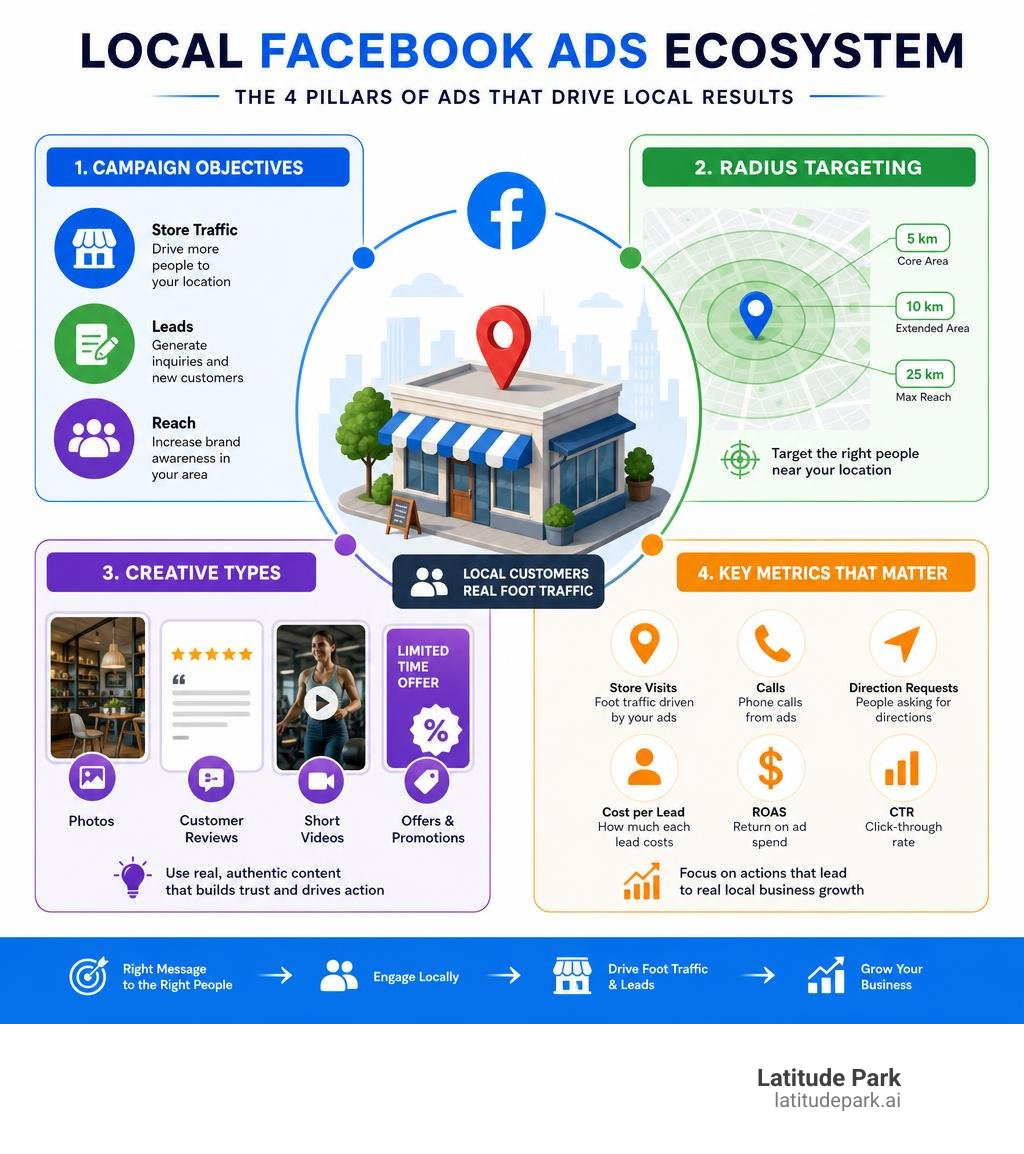
When figuring out how to run facebook ads for local business, you will primarily choose between three core objectives:
- Leads: This is the gold standard for local service businesses (like dentists, plumbers, or chiropractors). You can use Meta’s built-in Instant Forms to collect names, phone numbers, and emails directly inside the app. This drastically reduces friction and lowers your Cost Per Lead (CPL).
- Store Traffic: Ideal for brick-and-mortar retail, restaurants, and showrooms. This objective allows you to target people near your physical locations and serves ads with unique call-to-actions (CTAs) like “Get Directions” or “Call Now.” It can even generate a dynamic map card in carousel ads showing how close the user is to your storefront.
- Reach / Brand Awareness: Use this when you want to saturate a local market with a new location opening or a major community event. It maximizes the number of unique eyes on your ad within a tight geographic radius.
For service-oriented businesses, matching your objective to your business model is critical. Learn more about this in our Facebook Ads for Local Services Guide.
Radius and Location Targeting: Reaching the Right Local Audience
The magic of local advertising is geographic precision. In Ads Manager, you can drop a pin directly on your physical address and set a radius around it.

But what radius size actually works? Here is a quick guide by business type:
- High-Frequency Retail / Cafés / Casual Dining: 1 to 3 miles (3–5 km). People will not drive 15 miles for a cup of coffee or a quick lunch.
- Gyms / Personal Training / Salons: 3 to 5 miles (5–8 km). Convenience is the number one driver of gym memberships; target the average commute.
- Medical / Dental / Professional Services: 5 to 10 miles (8–15 km). Patients are willing to travel slightly further for trusted healthcare.
- Home Services (HVAC, Plumbing, Roofing): 15 to 25 miles (25–40 km). This should reflect your actual service area.
Crucial Setting: When configuring your location, always change the default setting from “People living in or recently in this location” to “People living in this location.” Otherwise, you will waste your budget on tourists, commuters, and people just passing through.
In 2026, Meta’s Advantage+ audience targeting has become the default. It treats your selected radius as a “soft signal” rather than a hard wall. This means Meta might serve your ad slightly outside your boundary if it finds a high-probability buyer. To keep this in check, your ad creative must do the heavy lifting of filtering out irrelevant users.
For more tactics on localized awareness, read about How to Use Facebook Local Awareness Ads to Drive Foot Traffic.
Crafting High-Converting Local Ad Creatives and Offers
Over 95% of Facebook users access the platform on mobile devices. If your landing pages aren’t mobile-friendly, or if your ad creatives look like boring desktop banners, your campaign will tank.
To stop the scroll on a busy mobile feed, your creative needs to feel native, authentic, and hyper-local.

For a step-by-step strategy on capturing local attention, reference our Facebook Lead Generation Strategies Guide.
The Local Creative Stack: UGC, Reviews, and Walkthrough Videos
Polished, corporate stock photography does not work for local ads. It looks like an ad, and people are trained to swipe past ads. Instead, use what we call the “Local Creative Stack”:
- The UGC-4 (Google Review Screenshot): Take a screenshot of a glowing 5-star Google Business Profile review. Crop it, overlay it on a simple photo of your team or storefront, and call out your neighborhood in the headline (e.g., “Why St. Pete homeowners trust us…”). This raw, peer-to-peer recommendation style consistently outperforms expensive brand assets.
- The Staff Walkthrough: Grab an iPhone, shoot in vertical 9:16 format, and have the business owner or a friendly staff member walk through the front door, introducing the business and showing what a customer experiences. Keep it under 30 seconds, use captions, and lead with your offer in the first 3 seconds.
- Before-and-After Visuals: If you run a home service or beauty business, visual proof is your best friend. Show the dirty driveway next to the pressure-washed masterpiece.
Every winning ad needs three elements in the first 1.5 seconds: a pattern interrupt (visual contrast or movement), burning intrigue (a compelling hook), and a specific big benefit.
To master these creative principles, read Mastering the Art of Facebook Advertising.
Offer Architecture: Structuring Irresistible Local Deals
Your creative gets people to stop scrolling, but your offer is what gets them to take action. A weak offer like “10% off your first visit” rarely moves the needle because the perceived value is too low.
Instead, structure your offers using these high-converting formats:
- The Fixed-Price Starter: Instead of “discounted dental cleanings,” offer a “$99 New Patient Exam, X-Rays, and Cleaning (Value $350).” This gives the consumer an absolute, predictable value.
- The Time-Gated Event: “Free Water Heater Inspection for the first 15 homeowners who book this week.” Urgency and scarcity drive immediate action.
- The Low-Friction Entry: For gyms or studios, a “Free 3-Day Pass” or “21-Day Transformation Challenge” beats a generic “Join Now” button every single time.
The Landing Page Rule: Never send paid traffic to your homepage. A homepage has too many distractions (About Us, Blog, Contact, Services). A dedicated landing page with one clear offer and one CTA converts at 12–18%, whereas a standard homepage converts at a meager 2–4%.
For comprehensive marketing solutions, consult our Facebook Marketing Solutions Ultimate Guide.
Campaign Structure, Budgeting, and Scaling Strategies
To keep your campaigns organized and prevent ad fatigue, you need a clean, sustainable campaign architecture. We recommend a simple two-campaign structure: one for Prospecting (cold traffic) and one for Retargeting (warm traffic).
| Campaign Type | Target Audience | Budget Allocation | Primary Goal |
|---|---|---|---|
| Prospecting (Cold) | Lookalikes, Broad Radius, Neighborhood Copy | 70% – 80% | Lead Generation / First-Time Visits |
| Retargeting (Warm) | Website Visitors, Video Viewers, Page Engagers | 20% – 30% | Nurture & Close / Repeat Purchases |
This clean split ensures you are constantly filling the top of your funnel while capturing the low-hanging fruit. For more on campaign organization, check out our resource on Facebook Ad Campaigns.
Budgeting and Scaling: What It Costs to Run Facebook Ads for Local Business
A functional budget floor for local Facebook ads is around $600/month (approx. $20/day). If you spend less than this, Meta’s algorithm won’t gather enough conversion data to exit the “learning phase” (which requires roughly 50 conversion events per week).
For most local service and multi-location businesses, a starting budget of $800 to $1,200 per month per location is the sweet spot to generate a reliable flow of leads.
When you find a winning ad set, do not double the budget overnight. This will shock the algorithm and push your campaign back into the learning phase, spiking your costs. Instead, scale incrementally by increasing the budget by 20% to 30% every 3 to 5 days, or duplicate the winning ad set into a new campaign with a higher budget.
To optimize your spend effectively, read our guide on Facebook Ad Campaign Optimization.
Campaign Architecture: Prospecting vs. Retargeting
Your prospecting campaign should target a broad local audience. Use a 1% Lookalike Audience built from your existing customer email list (aim for at least 1,000 emails for a strong seed list).
Pro-Tip: Always upload your current customer list to Meta and exclude them from your prospecting campaigns. There is no point in paying to show a “New Customer Special” to someone who has been buying from you for five years!
In your retargeting campaign, group together:
- Website visitors from the last 30 days (tracked via the Meta Pixel)
- People who watched 25% or more of your local videos
- Facebook and Instagram page engagers from the last 180 days
Retargeting audiences are already familiar with your brand, making them 5 to 10 times more likely to convert. Keep your frequency caps in check (around 2–3 impressions per person per week) so you don’t annoy your local community.
For multi-location home services or franchise structures, scaling these campaigns across territories requires specialized frameworks. See our insights on Facebook Ads for Home Service Franchises and Facebook Ads for Franchisors.
Tracking, Offline Attribution, and Weekly Optimization
You cannot manage what you do not measure. If you are running ads without proper tracking, you are essentially throwing money into a dark room and hoping some of it lands in your cash register.
To build a bulletproof tracking setup, you need to install both the Meta Pixel and the Conversions API (CAPI) on your website. This ensures that even with modern browser privacy updates, your conversion data remains highly accurate.
Learn how to manage this setup in Facebook Ad Campaign Management The Ultimate Survival Guide.
Measuring Success: Key Metrics and Call Attribution
According to research, fewer than 30% of local service businesses use any form of call attribution. This is a massive mistake. For many local businesses, 50% or more of their leads come through phone calls rather than contact forms.
Without call tracking (using tools like CallRail to generate unique numbers for your Facebook ads), you are missing half of your conversion data, making your return on ad spend (ROAS) look much worse than it actually is.
To truly understand your performance, compare your Facebook metrics with your search campaigns. See our guide on Google Ads for Local Businesses and learn about Local SEO Optimizing Website for Local Search Results to see how these channels work together.
The Weekly Ad Ops Rhythm for Local Campaigns
To keep your local campaigns compounding in performance, establish a simple weekly operational rhythm:
- Monday (Report): Pull your key metrics (CPL, Cost Per Booked Appointment, and ROAS). Look at the trend lines.
- Tuesday (Review Analysis): Check your latest customer reviews. Screenshot the best ones to prepare for next week’s UGC creatives.
- Wednesday (Creative Assessment): Check your ad frequencies. If your prospecting frequency is above 3–4 and click-through rates are dropping, your creative is fatiguing. It’s time to swap in a new variation.
- Thursday (Offer Updates): Adjust any seasonal offers or promotional copy.
- Friday (Monthly Prep): Review the overall budget and plan next month’s creative assets.
Consistency is key. For more local marketing frameworks, check out Local Marketing for Small Business and follow the latest trends on Local SEO Buzz
Frequently Asked Questions about Local Facebook Ads
What is the minimum budget for local Facebook ads?
The functional floor to get stable data is $20 per day (about $600 per month). This gives Meta’s algorithm enough room to find leads and exit the learning phase. For most competitive local businesses, starting with a budget of $800 to $1,200 per month yields the best results.
To compare local ad strategies across platforms, take a look at our resources on Search Local Ads and Local Business Google Ads.
Does radius targeting still work with Meta’s 2026 algorithm?
Yes, but it works differently now. Meta’s Advantage+ targeting treats your radius as a soft signal. To prevent your budget from being spent too far away, use “neighborhood-named copy” (e.g., “Calling all St. Pete residents!”). The creative and copy will act as a natural filter, catching the eyes of the right local prospects.
For multi-location and franchise brands, aligning this with your organic presence is critical. Read more in our Local SEO Strategy Franchise Guide and our guide on Local SEO for Franchises.
How do I track offline conversions like phone calls and store visits?
You should use three layers of tracking:
- Meta Pixel & Conversions API for online form submissions.
- Call Tracking (e.g., CallRail) with a dedicated phone number displayed only to Facebook ad traffic.
- Offline Event Uploads: Regularly export your CRM lists of new customers (with emails and phone numbers) and upload them back into Meta to match offline sales directly to the ads that generated them.
Conclusion
Mastering how to run facebook ads for local business isn’t about having the biggest budget; it’s about having the smartest system. By setting up proper campaigns in Ads Manager, using tight radius targeting, leveraging authentic UGC creatives, and implementing call tracking, you can turn social media clicks into consistent local foot traffic.
For franchise networks and multi-location brands, managing these variables across dozens or hundreds of locations can quickly become overwhelming. That’s where we come in. At Latitude Park, we specialize in building, scaling, and optimizing localized digital ad campaigns that respect territory boundaries and maximize local ROI.
Ready to stop guessing and start scaling? Let’s build a high-converting campaign structure for your locations. Reach out to our team at Latitude Park Digital Ads Management today for a custom strategy session.