Yes, YouTube ads are a practical, cost-effective way for small businesses to reach intent-driven customers instead of just donating money to the algorithm. The move is simple: pick one campaign objective, set a modest test budget, and let the data tell you what to scale. Done right, you get real reach and measurable conversions within weeks, not a mystery bill and a shrug.
Table of Contents
- Quick-start checklist: launch a basic YouTube ad test today
- Match your goals to the right campaign objective and ad format
- Start with high-value audiences, then scale with intent signals
- Set a test budget, pick smart bids, and forecast with Reach Planner
- Creative rules that work without a big production budget
- Which metrics matter and how to test before you scale
- Step-by-step essentials to get your first campaign live
- Common challenges and pitfalls specific to small businesses using YouTube ads
- Integration of YouTube ads with other digital marketing channels
- Legal and copyright considerations for your ad content
- Latitude Park perspective: DIY vs. hiring an agency for YouTube ads
- How Latitude Park helps small businesses run, test, and scale YouTube ads
- Sources
- FAQ
Quick-start checklist: launch a basic YouTube ad test today
You do not need a production studio or a media-buying degree to get a test live. You need a clear objective, a linked account, and the discipline to stop overthinking the targeting before you have any data.
- Decide your single objective and the one KPI that proves success (leads, sales, or website traffic).
- Link your YouTube channel to Google Ads and enable conversion tracking before you spend a dollar.
- Choose one or two formats to start, typically skippable in-stream paired with a bumper or Shorts ad.
- Pick a single audience, not five, so you can actually read the results.
- Set a small daily test budget and choose a bidding strategy that matches your objective.
- Upload two creative variations and point both at a landing page that matches the ad’s promise.
- Set a reporting cadence, check in at 72 hours and again at 14 days.
- Resist the urge to touch anything in between those two check-ins.
Match your goals to the right campaign objective and ad format
Google Ads builds Video campaigns around an objective you choose first, and that choice determines which subtypes and formats are even available to you. Sales, leads, and website traffic objectives push you toward conversion-focused subtypes, while a YouTube reach, views, or engagement objective is built for awareness and consideration instead.
- Use Drive conversions when you have a landing page and a clear offer; the system optimizes toward actions, not views.
- Use Video views when you are testing creative or building an audience pool before you ask for a sale.
- Use Video reach when the goal is getting a new product or location in front of as many relevant eyes as possible.
- Match format to intent: skippable in-stream for storytelling, non-skippable and bumper for quick branding, in-feed for browsing moments, and Shorts or CTV placements where your audience actually watches.
Multi-format Video reach campaigns now combine in-stream, in-feed, and Shorts automatically, and Google has started upgrading in-stream-only reach campaigns to this multi-format setup, so it pays to supply headlines and descriptions for the responsive assets rather than relying on one static version.
Start with high-value audiences, then scale with intent signals
The biggest mistake small advertisers make is targeting broad demographics on day one, as if “women 25 to 54” tells you anything useful about buying intent. Think With Google’s effectiveness research found that relevant ads capture roughly three times the attention of an average video ad, and campaigns built on intent signals drive stronger lifts in awareness and consideration than demographic-only targeting ever does.
- Start with remarketing and Customer Match lists, since these are warm audiences who already know your brand.
- Layer in custom intent audiences built from search terms your buyers actually use.
- Add in-market and life-event audiences once you have a baseline to compare against.
- Create your own YouTube data segments after linking your channel; lists need a minimum size before they’re usable, and you can pre-fill them to speed eligibility.
Pro Tip: Run one audience per campaign at first. Mixing audiences in a single ad group makes it impossible to know which one actually drove the result.
Set a test budget, pick smart bids, and forecast with Reach Planner
Small business owners tend to either underfund a test into statistical meaninglessness or overfund it out of nerves. Neither helps. A better rule: if you’re optimizing for conversions, your daily budget should be large enough to support a reasonable number of conversions per day to allow Google’s bidding algorithms to learn efficiently, per Think With Google’s measurement guidance.
- Use Max CPV when you’re paying for attention and views during an early test phase.
- Switch to Maximize conversions or target CPA once you have enough conversion data to trust the algorithm.
- Use target CPM for pure reach and awareness plays where a view is not the point.
- Split budget across formats based on which one is actually converting, not which one you like creatively.
Before committing real money, run your numbers through Reach Planner to get a realistic forecast of reach, impressions, and expected conversions across formats.
Creative rules that work without a big production budget
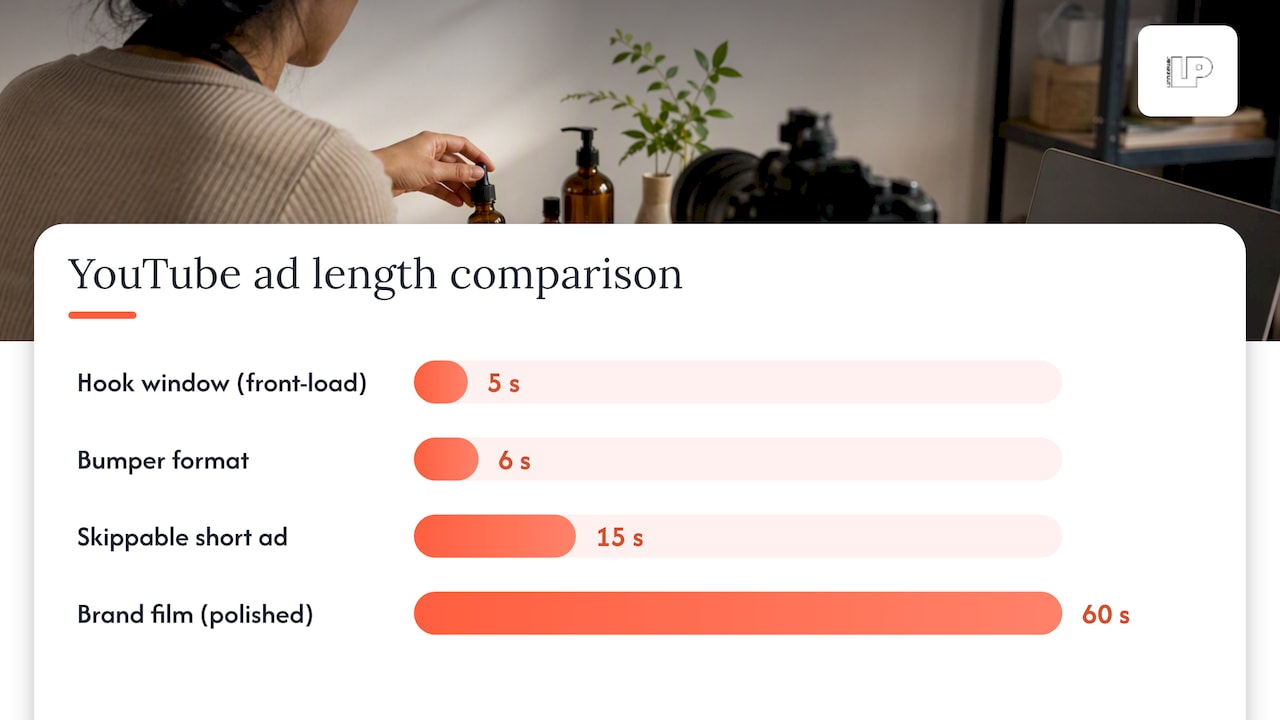
Attention on YouTube evaporates fast, so your first five seconds carry more weight than the rest of the ad combined. Front-load your offer and your brand name immediately, because nobody is waiting around for a slow reveal.
- Put the offer and your logo in the first five seconds, before anyone can hit skip.
- Show the actual product in use rather than talking about it in the abstract.
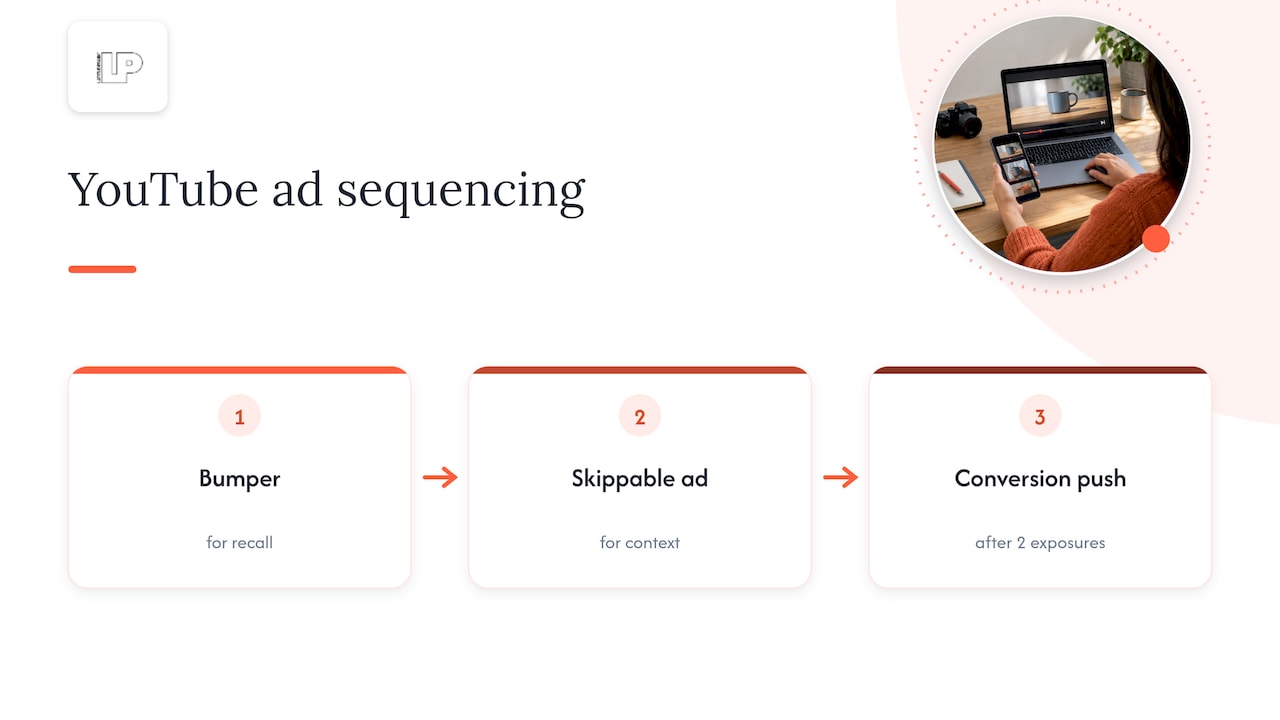
- Build a short sequence: a six-second bumper for recall, a fifteen-second skippable ad for context, and a vertical cut for Shorts.
- Match your CTA language word-for-word to the landing page headline, so there’s no disconnect at the click.
- Caption every asset, since a meaningful share of viewers watch with sound off.
- Change one variable at a time, swap only the hook or only the CTA, so you know what actually moved the metric.
Pro Tip: A fifteen-second ad with a clean hook usually outperforms a polished sixty-second brand film on a small budget. Clarity beats production value here.
If you want more tactical detail on placement strategy, our breakdown of winning YouTube ad strategies goes deeper into sequencing creative across formats.
Which metrics matter and how to test before you scale
Your KPI should match your objective, not some generic dashboard default. Reach campaigns live and die by unique reach and CPM, consideration campaigns live by view-through rate and watch time, and conversion campaigns answer to cost per acquisition and ROAS.
- Check view-through rate (VTR) and watch time within the first 72 hours to judge creative relevance.
- Let bidding algorithms run roughly 14 days before trusting tCPA or tROAS numbers, giving the system time to learn.
- Use Brand Lift to measure ad recall and awareness shifts, and Video Experiments to test creative hypotheses against each other.
- Set up conversion tracking through the Google tag, Google Analytics, or enhanced conversions before launch, not after.
Relevant, intent-targeted video ads capture roughly three times the attention of an average video ad, according to Think With Google, which is exactly why audience selection matters more than creative polish in the early going.
Step-by-step essentials to get your first campaign live
Setup mistakes are the single biggest reason small business test budgets get wasted on nothing measurable. Follow the sequence in order and don’t skip the tracking step because it feels tedious.
- Link your YouTube channel to Google Ads and enable personalized ads and data collection.
- Choose your campaign objective, which determines your available networks and formats.
- Select your ad formats based on the objective you picked, not the other way around.
- Set your daily and campaign budgets along with your bidding strategy.
- Add your audiences and any placement exclusions before launch.
- Upload creative assets and confirm conversion tracking is firing correctly.
- Launch, then leave the learning phase alone for the first 48 to 72 hours.
- Do your first real review at the 72-hour mark, checking VTR and early conversion signals.
Our guide to structuring Google Ads accounts for local businesses covers conversion tracking setup in more detail if you want a second pass before launch.
Common challenges and pitfalls specific to small businesses using YouTube ads
The most common failure mode is spreading a tiny budget across too many audiences, formats, and ad groups at once, which guarantees every segment stays underfunded and unreadable. A single campaign with one audience and two creatives will teach you more in two weeks than five scattered campaigns will teach you in two months.
The second failure mode is treating YouTube like a direct-response channel from minute one. Viewers on YouTube are often mid-scroll, not mid-purchase decision, so demanding an immediate sale from a cold audience tends to disappoint. Sequencing matters: a bumper for recall, a skippable ad for context, then a conversion push once someone has seen your brand twice.
Small businesses also underestimate how much a mismatched landing page tanks results. An ad that promises a discount and lands on a generic homepage loses the viewer in seconds, no matter how good the video was.
Finally, many owners pull the plug too early, judging a campaign at day three instead of letting the bidding algorithm reach its learning threshold. Patience paired with a genuinely small test budget beats panic paired with a bigger one.
Integration of YouTube ads with other digital marketing channels
YouTube ads work best as one piece of a sequence, not a standalone bet. Someone who watches your skippable ad but doesn’t convert is a prime candidate for a retargeting ad on Facebook or Instagram a few days later, reinforcing the same offer in a different feed.
Search campaigns and YouTube ads also reinforce each other well: a viewer who sees your video ad is more likely to search your brand name later, and your Search campaigns should be ready to catch that intent with a matching landing page. Email and SMS lists built from YouTube-driven leads let you keep nurturing people who weren’t ready to buy on the first view.
If you’re already running paid social, your Facebook and Instagram advertising audiences and your YouTube remarketing lists can share the same creative concepts, cutting production work roughly in half while keeping messaging consistent across channels. Treating each platform as an isolated silo is how small budgets get wasted; treating them as stages in one funnel is how small budgets get results.
Legal and copyright considerations for your ad content
Every clip, song, and image in your ad needs a license you can actually prove, not a vague assumption that “it’s probably fine.” YouTube and Google Ads both scan for copyrighted music and footage, and a claim against your ad can get it pulled mid-campaign, wasting whatever budget was riding on it.
Stick to music you’ve licensed directly, royalty-free libraries with commercial terms, or audio you created yourself. The same goes for stock footage and photos: a free download from a random site often comes with restrictions that don’t cover advertising use.
If your ad includes testimonials, before-and-after claims, or specific results, those claims need to be honest and supportable, since misleading advertising rules apply to video the same way they apply to a flyer. Comparative claims about competitors require particular care, and any health, financial, or safety claim should be checked against the rules for your industry before it goes live. When in doubt, a quick legal review of the script before production saves far more money than it costs.
Latitude Park perspective: DIY vs. hiring an agency for YouTube ads
Running one small test campaign yourself is fine. Managing budget scaling, cross-channel sequencing, and ongoing creative testing is where most owners run out of hours in the week, and that’s exactly where a managed partner starts paying for itself.
— Rusty
How Latitude Park helps small businesses run, test, and scale YouTube ads
Running a YouTube test campaign yourself teaches you the basics, but scaling one profitably across formats, audiences, and budgets while also managing Search, Meta, and your landing pages is a full-time job most small business owners don’t have time for. That’s the gap Latitude Park fills: Google Ads management built around transparent reporting that ties straight back to revenue, not vanity view counts.
A typical starter engagement looks like a focused pilot test campaign, one objective, one or two audiences, creative built around the rules above, measured honestly at the 72-hour and 14-day marks. Once we see what’s actually converting, we scale the budget into the formats and audiences that earned it, while cutting the ones that didn’t.
Regular check-ins mean you’re never guessing what’s happening with your ad spend, and an AI-driven approach can help catch missed opportunities in your targeting before they cost you another test budget’s worth of learning. If you want a second set of eyes on your YouTube strategy or a managed campaign built from scratch, visit Latitude Park to start the conversation.
Sources
FAQ
How many views do I need to make $10,000 a month on YouTube?
There’s no fixed view count tied to that figure, since YouTube ad revenue depends on niche, audience location, and seasonal ad rates rather than views alone. For advertisers rather than creators, the more useful number is cost per acquisition, which you set yourself through bidding strategy.
How much do 1,000 YouTube ads cost?
Cost depends entirely on your bidding strategy, targeting, and format, since YouTube ads are sold through an auction rather than a fixed rate. Rather than a per-thousand-ads price, focus on setting a daily test budget using Reach Planner to forecast realistic costs for your specific audience and format mix.
Is $20 a day good for Google Ads?
A $20 daily budget can work as a learning-phase test if you’re optimizing for views or reach, but it’s tight for a conversion-focused campaign that needs volume to let the bidding algorithm learn. If you’re optimizing toward conversions, aim for a budget that supports roughly five conversions a day, per Think With Google’s measurement guidance, and scale from there.
How many YouTube views do I need to make $3,000 per month?
This question applies to creator ad revenue, not advertiser spend, and view-to-revenue ratios vary too widely by niche and region to state a single number. If you’re running YouTube ads to promote a business instead, your target metric should be conversions and cost per acquisition rather than total views.
What’s the best starting budget for a small business testing YouTube ads?
Start small enough to limit risk but large enough to generate a real signal, typically enough daily spend to approach five conversions a day if conversions are your goal. Running the numbers through Reach Planner before launch helps set a realistic figure for your specific audience size and format choice.