Responsive search ads are Google text ads that automatically assemble up to 15 headlines and 4 descriptions into combinations to match more searches, which means the format rewards advertisers who feed it plenty of unique material. The immediate move: build RSAs with diverse, non-repetitive assets and aim for a Good or Excellent Ad Strength rating, since that correlates with stronger results. Here’s what drives the mechanics, the pitfalls, and the setup.
Table of Contents
- What Responsive Search Ads Are and Why the Format Matters
- How RSAs Learn: Rotation, Testing, and Reporting
- How to Create and Edit a Responsive Search Ad
- Ad Strength and Basic Optimization: What It Measures and Practical Fixes
- Pinning Headlines and Descriptions: Rules, Risks, and Safer Tactics
- Scaling RSA Copy with Customizers, Insertion, and API Options
- A Practical RSA Checklist and Testing Roadmap
- Why We Treat RSAs as a Living Campaign, Not a One-Time Setup
- Get Your RSA Campaigns Managed by People Who Review Them Weekly
- FAQ
- Sources
What Responsive Search Ads Are and Why the Format Matters
A responsive search ad holds up to 15 headlines, each capped at 30 characters, and 4 descriptions, each capped at 90 characters. Google’s system doesn’t just display all of them at once. It mixes and matches that pool into combinations, testing which pairings pull the best response for a given search.
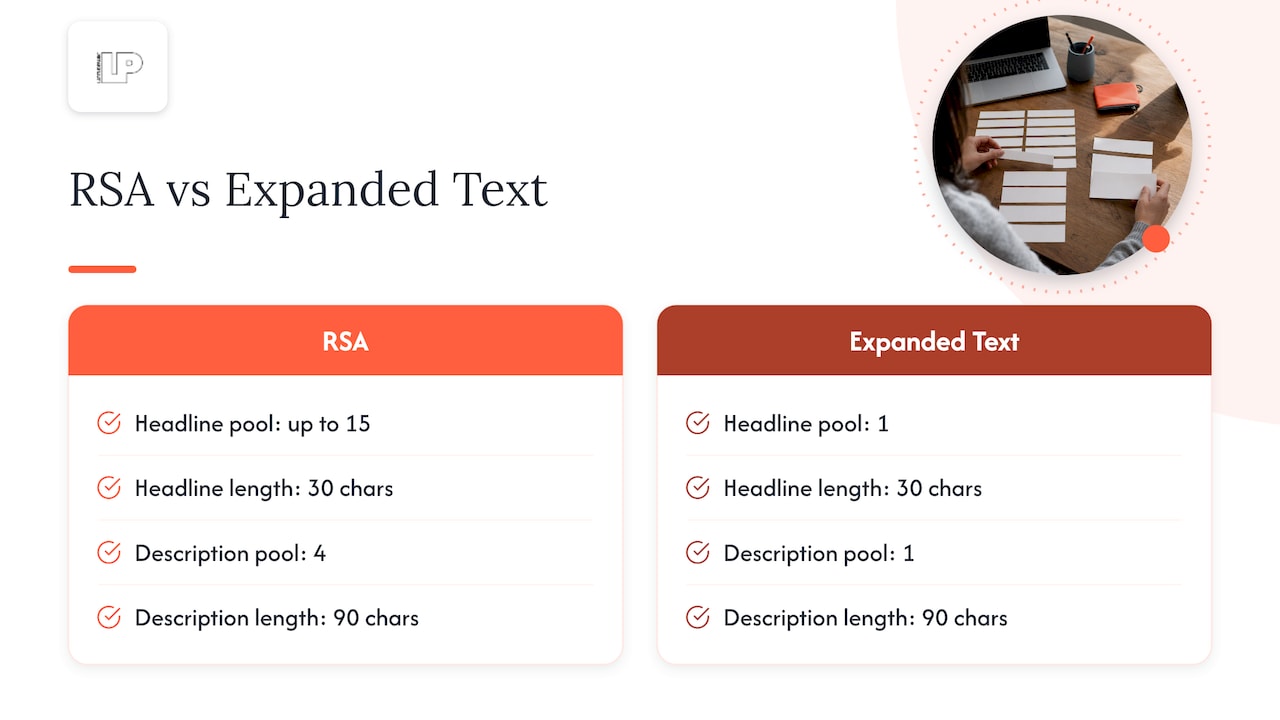
At serve time, a typical ad shows up to three headlines and two descriptions, stitched together on the fly. That’s a fundamentally different animal from the old expanded text ad, which locked you into one fixed headline and description combination no matter who was searching or what device they used. RSAs replaced that rigidity, and Google’s own ad type documentation confirms expanded text ads are deprecated in favor of this dynamic format.
The copywriting implications are real. Each headline needs to stand on its own, since Google might pair headline 3 with description 4 for one searcher and headline 7 with description 1 for another. Writing ten near-identical headlines (“Best Shoes Online,” “Great Shoes Online,” “Top Shoes Online”) wastes slots the algorithm could use to test genuinely different angles: price, urgency, product specifics, brand trust. Give the machine range, not repetition, and it has more combinations worth testing.
How RSAs Learn: Rotation, Testing, and Reporting
Once an RSA goes live, Google’s system starts cycling through headline and description combinations, watching how each performs against different queries, devices, and audience segments. Over time, it leans toward the permutations that generate clicks and conversions for a given context, effectively running a continuous, automated test across your asset pool.
That testing produces data worth watching. The combination report shows which headline and description pairings actually served together and how they performed, while asset-level metrics (labeled Low, Good, Best under “performance”) tell you which individual headlines and descriptions are pulling weight versus which ones Google rarely bothers to use.
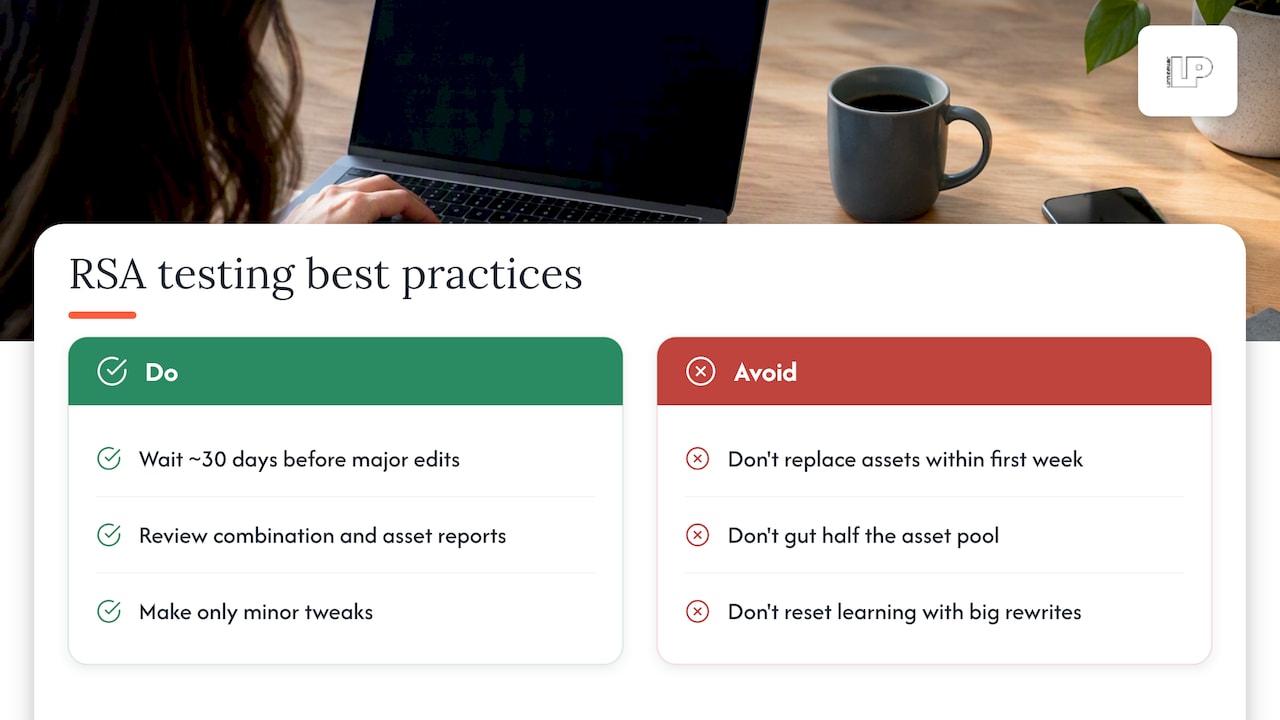
The mistake we see constantly: advertisers panic after four days, swap out “underperforming” assets, and reset the learning process before it ever had a chance to stabilize. Google’s system needs real volume to distinguish signal from noise, and a background best practice worth internalizing is giving a new RSA roughly 30 days before making major copy changes. Pull reports, note patterns, but hold off on wholesale rewrites until the data has had room to breathe. Minor tweaks (adding a missing headline, fixing a typo) are fine along the way. Gutting half the asset pool after a week is not.
How to Create and Edit a Responsive Search Ad
Setting one up is straightforward once you know the minimums: at least 3 headlines, 2 descriptions, and 1 final URL, though Google recommends filling all 15 headline slots and all 4 description slots for maximum combination potential.
- Open your campaign, select the relevant ad group, and click Ads.
- Click the + button and choose Responsive search ad.
- Enter your final URL first, since the UI builds around it.
- Add headlines one at a time, watching the character counter (30 max per headline).
- Add descriptions (90 characters max per description).
- Fill optional display path fields if you want a custom URL appearance.
- Check the ad strength indicator and preview pane on the right before saving.
- Click Save.
The mobile app follows the same sequence: Campaigns, ad group, Ads, then the plus icon for a new responsive search ad. Both interfaces surface asset suggestions as you type, pulling phrasing from your landing page or existing ads. Use them as a starting point, not a final answer. Review every suggestion against your actual offer before saving, since auto-generated text can drift from what you actually sell.
Ad Strength and Basic Optimization: What It Measures and Practical Fixes
Ad Strength is a diagnostic score (Poor, Average, Good, or Excellent) that evaluates asset relevance, uniqueness, and quantity inside a single RSA. It is not an eligibility gate. A Poor-rated ad still runs, but it’s leaving performance on the table.
Advertisers who raise Ad Strength from Poor to Excellent tend to see a notable increase in clicks and conversions, according to Google’s best practices guidance, which also recommends having at least one Good or Excellent RSA in every ad group.
What actually moves the needle:
- Add more headlines and descriptions rather than stopping at the minimum three and two.
- Write each asset to cover a distinct angle: price, benefit, urgency, social proof, or a direct call to action.
- Opt into text customization so Google can adjust grammar and casing automatically across combinations.
- Add sitelinks and image assets, since Google’s guide to responsive search ads lists these as reach multipliers alongside Smart Bidding and broad match.
- Avoid keyword stuffing; relevance beats repetition every time.
Think of Ad Strength the way you’d think of a spell-checker: a useful nudge, not the final word on whether your copy actually sells.
Pinning Headlines and Descriptions: Rules, Risks, and Safer Tactics
Pinning locks a specific headline or description to a specific position so it always appears in that slot. Pin something to Headline 1, Headline 2, or Description 1 and that asset is guaranteed to display there every time the ad serves.
Here’s the catch most advertisers miss:
- Pinning shrinks the combination pool Google can test, since a locked position can’t rotate with alternatives.
- Google’s own guidance advises against pinning except when specific text legally or operationally must appear, such as a brand name or a required disclaimer.
- Pinning everything defeats the purpose of a dynamic ad format; you’ve essentially rebuilt an expanded text ad with extra steps.
If a legal disclaimer or regulated phrase has to appear on every impression, that’s a legitimate case for pinning, and it’s worth checking resources like TCPA SMS compliance guidance when mandatory text requirements are in play for your industry. The safer workaround: pin two or three variant phrasings to the same position instead of a single line. You preserve mandatory presence while still giving the algorithm something to test within that slot.
Pro Tip: When you must pin, pin a rotating set of 2-3 variants to the same slot rather than one static line, so you keep some testing alive.
Scaling RSA Copy with Customizers, Insertion, and API Options
Once the basics are running, a few technical levers help you scale creative without rewriting every ad by hand. Ad customizers pull from a feed (price, inventory count, countdown timers) and insert that data directly into live headlines and descriptions, so one template can serve hundreds of product variations automatically. Google’s customization documentation covers the syntax for these tags, including built-in options like location and countdown insertion.
Keyword insertion drops the searcher’s actual query term into your headline, which boosts relevance at a glance, though it’s riskier for long or awkward keyword phrases that might not read naturally. For those, put the flexible insertion in a description instead, where extra words have more room to breathe.
On the technical side, the display path fields (path1 and path2) let you append two custom segments to your visible URL without changing the destination link. In the Google Ads API, headlines and descriptions are each represented as AdTextAsset arrays, with optional pinning fields attached per asset, which is how developers programmatically manage the same structure you’d otherwise build by hand in the UI.
A Practical RSA Checklist and Testing Roadmap
Before you publish, run through this:
- Fill all 15 headline slots and all 4 description slots with genuinely different angles, not rewordings.
- Include at least one clear call to action and one promotional or price-based headline.
- Vary keyword phrasing across headlines instead of repeating the same term verbatim.
- Confirm Ad Strength shows Good or Excellent before publishing.
- Add sitelinks and image assets for extra real estate.
For testing, start with two RSAs per ad group, let them run for roughly 30 days, then pull the combination report and asset performance view before touching anything. Keep what’s labeled Best or Good, swap only what’s consistently Low.
A few non-branded starting points: headlines built around urgency (“Limited Spots This Month”), proof (“Trusted by Thousands of Shoppers”), and specificity (“Same-Day Quotes, No Obligation”). Pair those with descriptions that answer the obvious follow-up question a searcher would have.
Why We Treat RSAs as a Living Campaign, Not a One-Time Setup
Most advertisers write ten headlines, hit publish, and walk away. We don’t. Our process runs on AI-driven creative generation that produces dozens of headline and description variants per ad group, far more raw material than a manual process typically allows, so the algorithm has genuine range to test against.
We review live RSA performance regularly, swapping low-performing assets while leaving active learning periods intact. We focus on ad performance tied to meaningful results like leads and revenue, not just clicks, because a headline that gets clicks but never converts is noise dressed up as a metric.
That combination (high asset volume, frequent review, revenue-linked reporting) is what separates an RSA that quietly underperforms for months from one that keeps improving on its own data.
— Rusty
Get Your RSA Campaigns Managed by People Who Review Them Weekly
Writing fifteen genuinely distinct headlines takes longer than most business owners have in a week, and that’s exactly where an RSA campaign tends to stall. We handle the full build: creative generation, Smart Bidding pairing, sitelinks and image assets, and testing cadence to optimize your ad group’s performance.

Our Google Ads management service includes weekly review and reporting tied directly to the leads and revenue your campaigns actually generate, not vanity click counts. If you want a second set of eyes on an existing RSA setup or want one built from scratch, reach out through our services page and tell us what you’re running now.
FAQ
Can you provide some examples of responsive search ads?
A typical RSA might pair a headline like “Same-Day Appointments Available” with a description such as “Book online in under two minutes. No hidden fees.” Google then tests that pairing against others built from your full asset pool, serving whichever combination performs best for each search.
How many responsive search ads can I have?
Google’s own best practices guidance recommends at least one Good or Excellent RSA per ad group, and most advertisers run two or three RSAs per ad group to compare performance. There’s no hard cap on RSAs per ad group beyond Google’s general ad limits, but quality and asset diversity matter more than quantity.
How do I make a responsive search ad?
In Google Ads, go to your ad group, click Ads, select the plus icon, and choose Responsive search ad. Enter your final URL, then add at least 3 headlines and 2 descriptions, though filling all 15 headline and 4 description slots gives Google more combinations to test.
What is a benefit of responsive search ads?
The core benefit is reach: because Google assembles headlines and descriptions into multiple combinations, one RSA can match a wider range of search queries than a single fixed-text ad ever could. That flexibility tends to translate into more relevant impressions without requiring a separate ad for every phrasing variant.
Should I pin headlines in my responsive search ads?
Pin only when specific text must legally or operationally appear every time, such as a brand name or disclaimer, since pinning otherwise limits the combinations Google can test. When you do need to pin, rotating two or three variants into that same position keeps some testing alive while meeting the requirement.
Sources
- Best practices for creating effective responsive search ads – Google Ads Help
- Responsive Search Ads | Google Ads API