Multi location SEO is the discipline of making every branch, franchise, or storefront rank on its own merits in local search, rather than letting the flagship location hog all the visibility. The first move, before anything fancy, is publishing accurate, unique landing pages for each location and linking them from the matching Google Business Profile with UTM parameters attached. Google allows bulk verification once a chain hits 10 or more locations, but none of that data means anything without UTM tracking to show which branch actually drove the click.
Table of Contents
- Why multi location SEO matters and the local ranking pillars
- Choosing site architecture: subfolders vs subdomains vs separate domains
- Location landing pages: essentials and advanced content strategies
- Google Business Profile at scale: bulk verification and management best practices
- Structured data and Google local link policies
- Citations, reviews, and reputation management for multi-location brands
- Tracking and attribution: UTM conventions and GA4 reporting for location-level measurement
- Governance, processes, and tooling to operate multi-location SEO
- Measurement and reporting: KPIs, dashboards, and how to show location ROI
- Latitude Park perspective and proof points
- Local keyword research tailored to each location
- Handling duplicate content issues across multiple location pages
- Optimizing for mobile users in different locations
- Managing localized content and language variations
- Link-building strategies for multi-location SEO
- Competitor analysis for each target location
- Author perspective: three practical lessons from real rollouts
- How Latitude Park helps multi-location brands
- Sources
- FAQ
Why multi location SEO matters and the local ranking pillars
Here’s the uncomfortable truth: a single-location SEO mindset applied to twenty branches just multiplies your mistakes by twenty. Google evaluates local results on relevance, proximity, and prominence, and each of those pillars behaves differently once you’re managing a fleet of locations instead of one storefront.
Relevance means your content has to match what someone in that specific neighborhood is searching for, not a generic corporate description copied and pasted across every branch page. Proximity is largely out of your control, but you can influence how Google interprets it by making sure your address, service area, and map pin are dead accurate at every location. Prominence is the one you build over time through reviews, citations, and links, and it compounds unevenly. A flagship store with ten years of reviews will outrank a new branch with zero, no matter how good the copy is.
Each pillar maps to a concrete operational task:
- Relevance comes from unique location landing pages with local service details and neighborhood-specific language.
- Proximity is supported by accurate NAP data (name, address, phone) synced across your website and Google Business Profile.
- Prominence builds through consistent citations, first-party reviews, and local link signals over time.
The business outcomes you’re chasing are concrete and countable: phone calls, direction requests, booked appointments, and walk-ins, tracked location by location rather than as one blurry company-wide number.
Choosing site architecture: subfolders vs subdomains vs separate domains
This decision gets made once and then haunts every migration for the next decade, so get it right the first time. You have three real options, and two of them are traps for most brands.
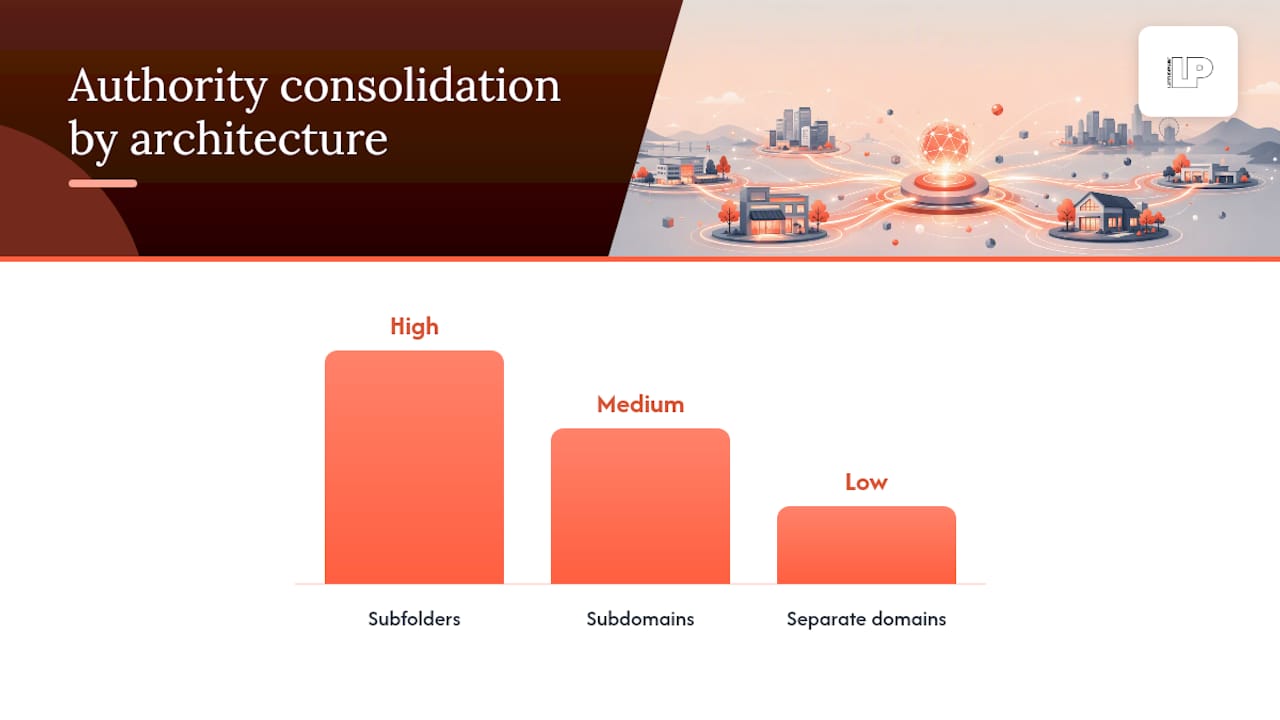
Subfolders (yoursite.com/locations/city-name) keep all your domain authority in one bucket. Every location page benefits from links pointing anywhere else on the site, and Google treats the whole thing as a single trusted entity. This is the default for a reason.
Subdomains (city.yoursite.com) split your authority into separate silos in the eyes of many crawlers, which means each location page effectively starts its own reputation from scratch. Occasionally justified for a distinct regional brand with its own identity, rarely justified otherwise.
Separate domains are the nuclear option, usually reserved for genuinely distinct brands operating under one parent company, or for legal or franchise-ownership reasons where each location is a separately incorporated business. This path means building authority from zero for every single property.
- Subfolders: best default, consolidated authority, easiest to template and maintain.
- Subdomains: use only when a location or region needs true brand separation.
- Separate domains: reserved for legally distinct entities or acquired brands you’re not merging.
Migrating from subdomains to subfolders (or vice versa) carries real risk: broken redirects, lost link equity, and temporary ranking dips. Map every URL one to one, use 301 redirects, and stagger the rollout by region so you can catch problems before they hit every location at once.
Pro Tip: Before migrating architecture, export your current top-performing pages by organic traffic so you can verify each one still ranks within 30 days of the switch.
Location landing pages: essentials and advanced content strategies
A location landing page that just repeats the homepage with a different city name in the title is doing nothing for you. Search Engine Land’s guidance on location pages is clear that these pages need to carry complete contact information, content unique to that specific branch, and a direct link to that branch’s Google Business Profile to support both organic rankings and local pack visibility.
The essentials, non-negotiable for every location:
- NAP data: name, address, and phone number matching your Google Business Profile exactly.
- Hours of operation, including holiday exceptions if they vary by branch.
- Embedded map showing the exact location, not a zoomed-out regional view.
- Click-to-call phone number, tagged so you know it came from that page.
- Services offered at that specific branch, since inventory or service menus can vary by location.
- A unique URL dedicated to that location, never a shared page with a dropdown selector.
Once the basics are covered, conversion elements matter just as much as visibility. A booking widget, a clear call-to-action above the fold, and a link back to the Google Business Profile with UTM tagging attached turn a page that ranks into a page that actually produces leads. That GBP link matters twice over, since Google’s own local link policy now requires action links to point to a page for that specific location rather than a generic landing page or, worse, a different branch’s page entirely.
For brands ready to go further, local content is where the real separation happens: community event coverage, staff spotlights, first-party review displays, and location-specific photography all feed relevance signals that generic template pages can’t touch. Our guide on effective local SEO for multiple locations walks through how these elements connect to Google Business Profile management.
Pro Tip: Rotate at least one piece of location-specific content, a photo, a review highlight, an event mention, every quarter so Google sees the page as actively maintained rather than static.
Google Business Profile at scale: bulk verification and management best practices
Managing many Google Business Profiles by hand quickly becomes impractical, which is why Google built a bulk verification process for qualifying chains.
Bulk verification becomes available once your business operates 10 or more locations under the same brand, and the eligibility bar depends entirely on data accuracy: incomplete or duplicate location records, or profiles that are already suspended, don’t count toward that threshold and will stall the whole request. The process itself runs through Business Profile Manager, where you create a business group, upload a complete spreadsheet covering every location, and submit it for verification as a batch rather than one painstaking profile at a time.
- Create a business group in Business Profile Manager before attempting any bulk action.
- Prepare a single spreadsheet with every location’s name, address, phone, and category filled in completely.
- Double check for duplicate listings, since Google will not verify a location that already has an active or suspended profile elsewhere.
- Note that agencies managing multiple separate client businesses cannot bulk verify them under one shared account; bulk verification is for a single brand’s own multi-location footprint.
A single missing field on one row of your spreadsheet can delay verification for every location in the batch, according to Google’s own guidance on bulk verification, which is reason enough to audit the file twice before submitting.
The most common pitfalls are mundane: mismatched suite numbers, phone numbers formatted inconsistently across rows, and category selections that don’t match what’s listed on the actual storefront signage. Fix those before uploading, not after Google flags them. For a deeper walkthrough of GBP management day to day, our guide to optimizing Google Business Profile covers ongoing upkeep beyond the initial verification.
Structured data and Google local link policies
Schema markup won’t make a bad page rank, but it removes ambiguity from a good one, and for multi-location brands that ambiguity is exactly what causes Google to serve the wrong branch to the wrong searcher.
Every location page should carry LocalBusiness schema (or a more specific subtype where one exists, such as Restaurant or Dentist) with these properties filled accurately:
- address, matching the visible NAP data on the page exactly.
- geo coordinates, pinned to the actual storefront, not a regional centroid.
- openingHours, including seasonal or holiday variations where relevant.
- url, pointing to that location’s own canonical page and nowhere else.
- telephone, unique to the branch, not a shared corporate switchboard number.
The cardinal rule here is that markup must match what a visitor actually sees on the page. Schema claiming hours or services that contradict the visible content is the kind of mismatch that erodes trust with both users and crawlers. Each location also needs exactly one canonical URL: no duplicate versions floating around from old campaigns or regional subfolders that never got cleaned up.
Google’s link policy update reinforces this at the profile level too. Action links inside a Google Business Profile, the “visit website” or “book now” buttons, are required to lead to a page representing that specific location, not a homepage, not a different branch, and not a generic contact form. A profile that violates this risks the kind of enforcement action that quietly tanks visibility for that listing.
Citations, reviews, and reputation management for multi-location brands
Reputation at scale is a data consistency problem wearing a marketing costume. If your Chicago branch shows a different phone number on Yelp than it does on your own site, you’re actively confusing the algorithm that’s supposed to be sending you customers.
Start with a citation audit across the major directories, Yelp, Apple Maps, Bing Places, and any industry-specific directories relevant to your category, checking that NAP data matches your Google Business Profile exactly, character for character. Inconsistencies here are one of the more common reasons a location underperforms despite having a solid landing page.
- Collect first-party reviews directly through post-visit or post-service prompts, tied to the specific location that delivered the experience.
- Aggregate third-party reviews from Google, Yelp, and Facebook onto the location page itself where licensing allows.
- Run quarterly citation audits to catch drift before it compounds across dozens of directories.
- Set a response window, ideally within 24 to 48 hours, for both positive and negative reviews at every location.
Pro Tip: Assign review response ownership to whoever actually manages that location day to day, not a corporate social team three states away who has never met a customer there.
Tracking and attribution: UTM conventions and GA4 reporting for location-level measurement
Google Business Profile Insights will tell you how many people viewed a listing, but it won’t tell you which branch that traffic actually converted for once it lands on your site. That gap is exactly why UTM tagging matters for multi-location brands: GBP Insights lack the granularity most chains need to attribute a call or a booking back to a specific location’s listing.
The fix is a consistent UTM structure applied to every GBP link and action link, without exception:
| Parameter | Example value | Purpose |
|---|---|---|
| utm_source | gbp | Identifies Google Business Profile as the traffic source |
| utm_medium | organic | Distinguishes free listing clicks from paid GBP ads |
| utm_campaign | gbp-listing | Groups all GBP-driven traffic for reporting |
| utm_content | location-slug | Isolates which specific branch generated the click |
Once tagged links are live, GA4 can segment traffic by the utm_content value, giving you a clean view of sessions, conversions, and revenue per location rather than one aggregated blob. Build a dashboard filtered by that parameter and you can finally answer the question every regional manager eventually asks: is my branch actually pulling its weight online? Our multi-location advertising guide covers how this same tagging discipline extends to paid campaigns running alongside your organic effort.
Governance, processes, and tooling to operate multi-location SEO
Multi-location SEO falls apart the moment nobody owns it. The technical work is manageable; the organizational chaos of twelve regional managers editing hours independently is what actually kills consistency.
- Assign HQ ownership of the page template, schema structure, and brand-wide content standards, so no local manager can accidentally break the framework.
- Assign local ownership of hours, local promotions, review responses, and any content genuinely specific to that branch’s neighborhood or customer base.
- Standardize the CMS so every location page pulls from one template with clearly defined fields that local teams can edit without touching code.
- Build an onboarding checklist for new locations covering GBP creation, landing page publication, citation seeding, and UTM setup before launch day, not after.
- Run a recurring quarterly audit across NAP consistency, review response times, and page freshness so drift gets caught early rather than discovered by a customer complaint.
Franchise brands in particular need this clarity, since franchisee-run locations often want editorial control that conflicts with brand consistency. Our guide to SEO for franchise websites breaks down how to draw that line without alienating the people actually running each store.
Measurement and reporting: KPIs, dashboards, and how to show location ROI
The KPIs that matter for multi-location SEO are different from the vanity metrics that dominate single-site reporting. Total organic traffic to the domain tells you almost nothing about whether the Tampa branch is actually generating business.
Track these instead, broken out by location:
- Organic sessions to each location’s own landing page.
- Phone calls, tagged through call tracking tied to that specific page.
- Direction requests pulled from Google Business Profile Insights.
- Booking or appointment conversions completed on the location page itself.
- Assisted conversions, where a location page contributed to a conversion that finished elsewhere in the funnel.
Location-level UTM tagging paired with GA4 segmentation is what makes this kind of granular reporting possible in the first place, a workaround made necessary because GBP Insights alone can’t isolate branch performance.
The real reporting win comes from joining three data sources: web analytics for traffic and on-site conversions, GBP Insights for calls and direction requests, and CRM or POS data for whether that lead actually became revenue. A monthly dashboard segmented by location, reviewed on a consistent cadence with regional stakeholders, turns “SEO is working” from a vague feeling into a number someone can defend in a budget meeting.

Latitude Park perspective and proof points
Latitude Park builds multi-location engagements around the same operational discipline this article describes: AI-driven optimization applied to each location’s landing page and Google Business Profile, not a one-size-fits-all template pushed across every branch and called a strategy. Engagements run on a consistent UTM convention from day one, so it is possible to see which location a lead came from.
Reporting happens on a set cadence, with real numbers tied to actual calls, bookings, and revenue rather than impression counts dressed up as progress. That transparency, paired with direct and proactive communication, is how a multi-location rollout stays coordinated across dozens of locations instead of drifting into the kind of inconsistency that quietly erodes local rankings over a year.
Local keyword research tailored to each location
Generic keyword research applied uniformly across every branch misses the actual language customers use in each market. A “best pizza near me” search in one neighborhood might carry completely different modifiers than the identical search three towns over, shaped by local slang, nearby landmarks, or how residents describe their own area.
Start each location’s keyword list with the core service terms, then layer in neighborhood names, nearby landmarks, and any regional phrasing that shows up in your own customer reviews and support conversations. Google’s local search results already personalize heavily by geography, so a page optimized for “plumber Riverside” needs different supporting content than one built for “plumber downtown,” even if the parent brand and service are identical.
Check search volume and competition per market rather than assuming national data applies evenly. A term that’s competitive in a dense metro area might be wide open in a smaller service region, which changes how aggressively you need to build content and links for that specific location. This is exactly the kind of on-page nuance our guide to on-page SEO tactics for multi-location brands digs into further.
Handling duplicate content issues across multiple location pages
The fastest way to sabotage a hundred-location rollout is copying the same three paragraphs onto every page and swapping the city name. Google recognizes template duplication quickly, and thin, near-identical pages tend to suppress each other in rankings rather than each ranking independently.
The fix isn’t complicated, just disciplined: build a template with shared brand elements (logo, core service descriptions, trust signals) alongside dedicated fields that must be filled uniquely per location, staff names, neighborhood references, specific service variations, local testimonials. Treat the unique fields as mandatory, not optional, before a page goes live.
Canonical tags matter here too. If a location genuinely has no unique content to offer yet, it’s better to delay publishing that page than to launch a thin duplicate that drags down the pages around it. One clean, complete page beats five rushed, identical ones every time.
Optimizing for mobile users in different locations
Most local searches happen on a phone, often from someone standing outside deciding where to walk or drive next, which makes mobile performance a local ranking factor in practice even when it’s not labeled that way in any official document.
Location pages need fast load times above almost everything else, since a slow page loses the exact customer who’s ready to act right now. Compress images, avoid heavy scripts that block rendering, and make sure the click-to-call button and map link are immediately visible without scrolling. A tap-to-call phone number that requires three scrolls to reach is a conversion you’re actively throwing away.
Test each location page on an actual phone, not just a browser’s mobile preview mode, since real network conditions and screen sizes expose problems a desktop simulation misses. This matters even more for brands with locations in areas with inconsistent mobile coverage, where a heavy page might simply fail to load in time.
Managing localized content and language variations
Brands operating across regions with different primary languages face a structural choice: separate URLs per language, or a language switcher on a shared page. Separate, properly tagged URLs (using hreflang annotations) generally perform better for search visibility, since Google can index and rank each language version independently rather than guessing which one to serve.
Beyond direct translation, tone and terminology often need local adjustment too. A service described one way in one region might use entirely different terminology in another, even within the same broader language, and forcing a single translated template across every market tends to read as noticeably foreign to local customers.
Keep a centralized glossary of brand terms that must stay consistent (product names, taglines) separate from the flexible fields that local teams or translators can adapt to match regional phrasing. That split prevents both brand drift and the stiff, over-literal translations that make a location page feel disconnected from the community it’s supposed to be serving.
Link-building strategies for multi-location SEO
Links pointed at individual location pages, rather than exclusively at the homepage, are what actually build the prominence signal each branch needs to compete locally. A hundred links to your homepage do very little for the visibility of a branch page three folders deep.
Local sponsorships, chamber of commerce memberships, and community event participation tend to generate the most naturally relevant links, since they connect a specific location to a specific place in a way search engines read as genuine local prominence. Press coverage of a store opening or a local charity partnership works the same way, and it’s far more attainable at the location level than trying to win national press for the whole brand at once.
Internal linking matters just as much here. A regional hub page linking down to each of its branch pages, and those branch pages linking back up to relevant service or resource content, distributes authority through the site in a way that helps newer locations catch up faster than they would sit isolated at the bottom of a sitemap.
Competitor analysis for each target location
The competitor ranking above you in one city is rarely the same one ranking above you three states away, which means a single national competitor analysis misses most of what actually matters at the local level.
Run the local pack and organic results for each target location separately, noting which competitors show up consistently and what their location pages, review counts, and citation profiles look like in that specific market. A competitor with three hundred reviews in one city might have almost none in a market you’re expanding into, which changes how much reputation-building effort that particular launch actually needs.
Pay attention to gaps rather than just rankings: a market where no competitor has invested in a proper location page, strong photos, or recent reviews is a market where modest, consistent effort can move you to the top of the local pack fairly quickly. A saturated market with entrenched, review-heavy competitors calls for a longer timeline and a heavier reputation-building push before ranking gains show up.
Author perspective: three practical lessons from real rollouts
Three lessons show up again and again in multi-location rollouts. First, duplicate profiles are the silent killer: a location that got listed twice years ago, maybe under a slightly different name, will quietly cap that branch’s visibility until someone finds and merges it. Second, a beautiful location page with thin or templated content still underperforms, no matter how clean the schema is. Third, governance beats cleverness: a brand with a boring but enforced content checklist will outlast one relying on a talented individual who eventually moves on. In one rollout, simply merging a duplicate profile and rewriting one paragraph of unique local content moved a stalled listing back into the local pack within weeks.
— Rusty
How Latitude Park helps multi-location brands
Rolling out multi-location SEO in-house means juggling spreadsheets, Google support tickets, and twelve regional managers who all want something slightly different, on top of whatever else your marketing team already has due this quarter. Latitude Park manages operational aspects and builds AI-driven SEO campaigns tailored to location-specific search behavior rather than using a one-size-fits-all template.

Our work for multi-location clients typically includes:
- AI-driven SEO campaigns built around location-specific keyword data and content gaps.
- Google Business Profile optimization, including the setup work bulk verification requires for growing chains.
- Review automation, so reputation signals build consistently across every branch without manual chasing.
- Location landing page templates structured to satisfy both conversion goals and Google’s local link requirements.
This fits best for franchise groups, regional service brands, and multi-store retailers who need this running correctly without adding headcount to manage it. If your locations are competing with each other for visibility instead of the market, start with our AI-driven SEO services built to move revenue and get a clear read on where your current setup is losing ground.
Sources
- Verify Business Profiles in bulk – Google Business Profile Help
- Location pages for SEO – Search Engine Land
FAQ
Is SEO dead or evolving in 2026?
SEO is not dead, it’s evolving toward more structured, location-specific, and verifiable data, which is exactly why multi-location brands now need accurate schema, consistent citations, and dedicated landing pages rather than a single generic homepage. The core mechanics, relevance, proximity, and prominence for local results, still apply, just with higher expectations for data accuracy.
What are the 4 types of SEO?
Definitions vary, but a common breakdown includes on-page SEO (content and page-level optimization), off-page SEO (links and citations), technical SEO (site structure, speed, and crawlability), and local SEO (Google Business Profile, NAP consistency, and location-specific content). Multi-location brands need all four working together, since a weak link in any one category tends to cap performance in the others.
What is the 80/20 rule in SEO?
The rule in SEO generally refers to focusing effort on the small share of pages, keywords, or fixes that drive most of the results, rather than spreading effort evenly across everything. For multi-location brands, that often means prioritizing the location pages and Google Business Profiles serving your highest-traffic markets before polishing every smaller branch equally.
How do you do location-based SEO?
Location-based SEO starts with a unique landing page per branch containing accurate NAP data, local content, and a link to that branch’s Google Business Profile, paired with consistent citations across directories. Add UTM tagging on every GBP link to measure branch-level performance in GA4, since GBP Insights alone won’t show which location actually converted.
How many locations do you need for Google’s bulk verification?
Google’s bulk verification is available once a chain has 10 or more locations under the same brand, managed through Business Profile Manager. Duplicate or suspended profiles do not count toward that threshold, and incomplete spreadsheet data is the most common reason verification gets delayed.