The Future of Efficiency: A Guide to Business Data Automation
Why Business Data Automation Is No Longer Optional
Business data automation is the use of software and technology to handle data collection, processing, and analysis automatically — with little or no human involvement.
Here’s a quick summary of what it means and why it matters:
| Question | Answer |
|---|---|
| What is it? | Automating repetitive data tasks like extraction, transformation, loading, and analysis |
| Who is it for? | Any business that collects, manages, or acts on data — from small teams to large enterprises |
| Why does it matter? | It reduces errors, cuts costs, speeds up decisions, and prepares your data for AI |
| Key technologies | RPA, AI/ML, ETL pipelines, no-code platforms, data connectors |
| Biggest benefit | Turning raw, scattered data into clean, usable insights — automatically |
According to IBM, as much as 68% of organizational data is never analyzed — meaning most businesses are sitting on a goldmine they never touch. At the same time, roughly 402.74 million terabytes of data are generated every single day. Without automation, keeping up with that volume is simply impossible.
The result? Over 40% of employees spend at least a quarter of their week on manual, repetitive data tasks — time that could be spent on work that actually drives growth.
For franchise marketing managers, this problem is even sharper. You’re juggling data from dozens or hundreds of locations — ad performance, customer behavior, sales figures — all flowing in from different systems. Trying to wrangle that manually doesn’t scale.
That’s where data automation changes everything.
I’m Rusty Rich, President and founder of Latitude Park, a full-service digital advertising agency where I’ve spent over 15 years helping small businesses and growing franchises cut through data chaos and turn information into real marketing results using business data automation. In the sections ahead, I’ll walk you through exactly how it works, what tools to consider, and how to implement it without overwhelming your team.
Similar topics to business data automation:
- business automation tools
- business automation workflow knowledge center
- business case for automation
What is Business Data Automation?
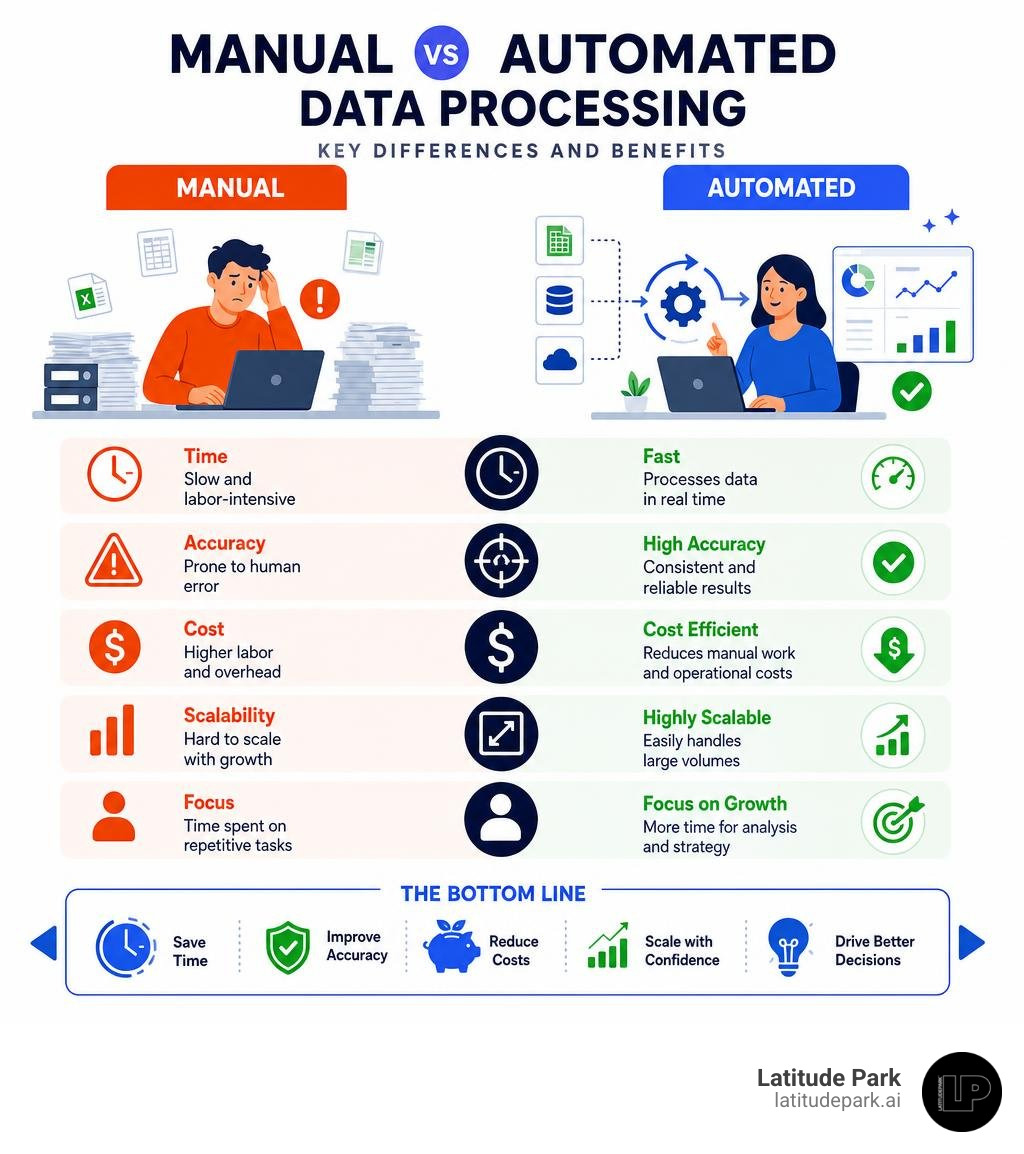
At its core, business data automation is the process of removing human intervention from the data lifecycle. Instead of having an employee manually export a CSV file from Meta Ads, copy-paste it into an Excel sheet, normalize the formatting, and then upload it to your reporting dashboard, a dedicated data pipeline handles the entire sequence in the background.
Traditional manual data processing is slow, prone to human error, and incredibly tedious. In contrast, automated systems operate round-the-clock. They leverage pre-built data connectors, APIs, and rule-based workflows to instantly move and format data the moment it is generated.
For multi-location brands and franchises, this transition is revolutionary. Instead of drowning in spreadsheets from fifty different franchise territories, automated pipelines centralize your operational and marketing data into a single source of truth. By shifting from reactive data wrangling to proactive strategy, organizations can scale their operations without experiencing a proportional increase in administrative overhead. To understand how these automated systems scale and drive growth, explore our thoughts on From Chaos to Control: How Automation Services Fuel Business Growth.
Core Components and Technologies of Data Automation
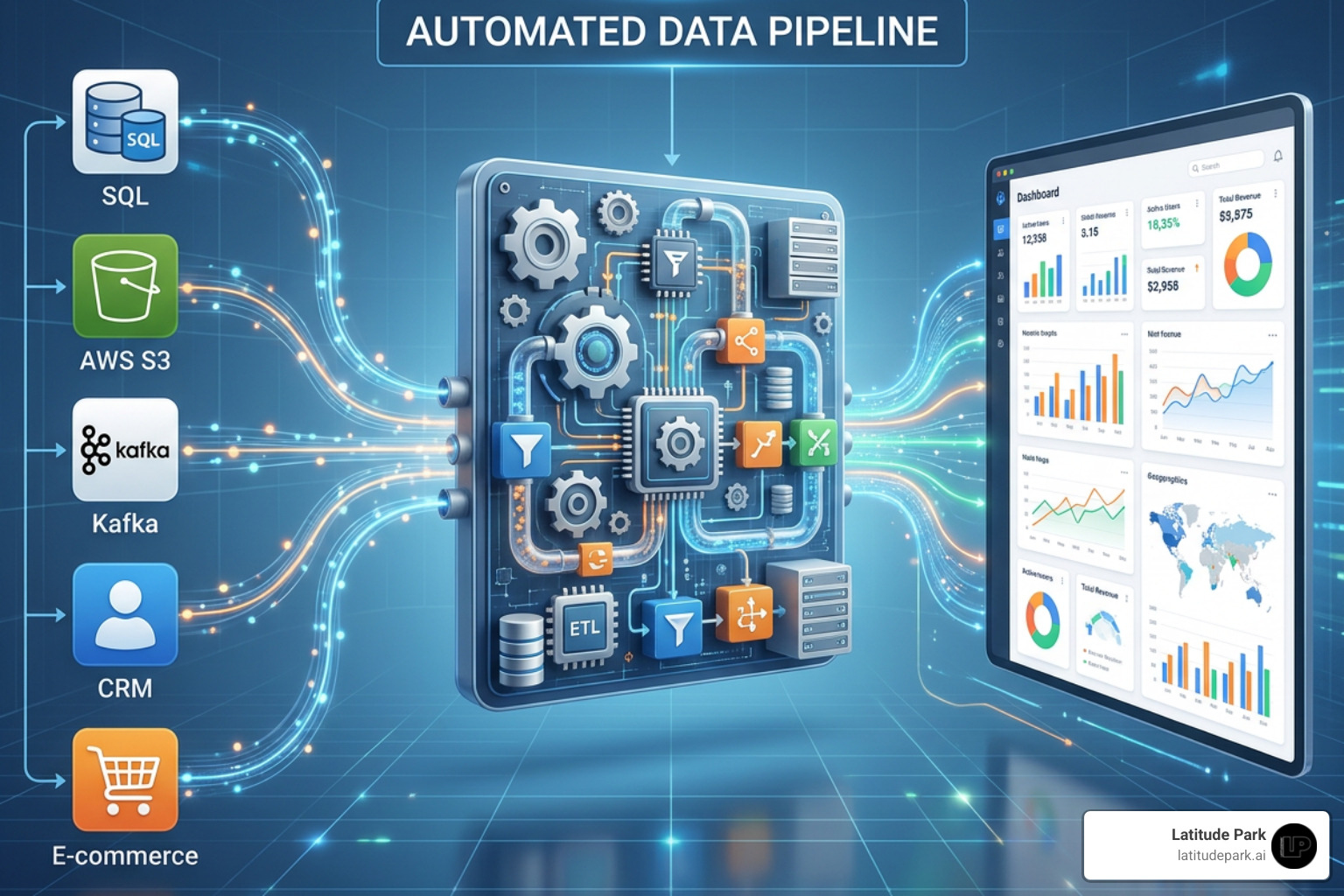
To build an efficient automated system, we must look at the standard data pipeline. Modern pipelines generally rely on one of two frameworks: ETL (Extract, Transform, Load) or ELT (Extract, Load, Transform).
The Data Pipeline Stages
- Extraction (Data Integration): Retrieving raw data from various sources (such as CRMs, advertising networks, billing software, or IoT sensors) using secure data connectors.
- Transformation: Cleaning, deduplicating, standardizing, and structuring the raw data so it conforms to your business rules.
- Loading: Depositing the structured data into a destination, such as a cloud data warehouse, database, or BI tool.
- Automated Analysis: Feeding that clean data into visualization platforms or machine learning models to generate real-time insights.
Here is how the two primary pipeline frameworks compare:
| Feature | ETL (Extract, Transform, Load) | ELT (Extract, Load, Transform) |
|---|---|---|
| Process Order | Transforms data before loading it into the warehouse. | Loads raw data directly, transforming it inside the warehouse. |
| Speed to Load | Slower (transformation stage happens first). | Extremely fast (raw data is ingested immediately). |
| Flexibility | Best for structured, highly predictable legacy systems. | Ideal for massive, unstructured datasets and cloud environments. |
| Maintenance | Higher maintenance; schema changes can break the pipeline. | Lower maintenance; handles schema changes dynamically. |

The Technology Stack
Several key technologies make this seamless flow possible:
- iPaaS & Automation Platforms: Cloud-based integration suites allow different applications to communicate effortlessly. Platforms like eZintegrations Platform | iPaaS, AI Workflows & Agentic AI connect enterprise systems and help businesses transition from basic workflows to agentic AI orchestration without writing custom code.
- No-Code Data Connectors: Tools like Windsor.ai – No-Code Data Integration Platform for BI, Databases & AI Tools eliminate manual CSV exports by automatically syncing data from over 350 platforms directly to your databases, spreadsheets, or AI models in under a minute.
- Robotic Process Automation (RPA): RPA software robots mimic human actions to execute repetitive UI-based tasks, such as logging into legacy portals to download weekly reports. If you are new to this technology, check out The Ultimate Guide to RPA Software for Non-Techies to see how easily it can be deployed.
Key Benefits of Automating Your Data Workflows
When you automate your business data, you unlock massive competitive advantages. Organizations no longer have to waste precious human intellect on typing numbers into boxes. Instead, they can reallocate their teams to high-value strategic initiatives that directly improve the customer experience.
The financial and operational impacts of this shift are clear. For example, a global consumer goods company used automated AI workflows to achieve a 70% reduction in integration delivery time and a 60% reduction in integration maintenance costs.
Before investing in these platforms, it is crucial to map out your expected returns. You can learn how to build a bulletproof projection by reading The Automation Business Case: How to Prove ROI Before Spending a Dime.
Driving Efficiency with Business Data Automation
By eliminating manual data entry, businesses save thousands of hours and millions of dollars. Consider these real-world enterprise achievements:
- Uber saved over 3,400 hours and $30 million annually by automating repetitive workflows.
- CoreLogic saved 50,000 hours annually while securing a 5x cost reduction compared to their previous manual platforms.
For everyday operations, automation keeps your customer records perfectly synchronized. You can eliminate manual typing errors, avoid duplicate entries, and keep your sales pipelines clean by reviewing our guide to Stop Doing Manual Work with CRM Automation. To build these efficient enterprise processes, many organizations rely on low-code tools like Power Automate: Business Process Workflow Automation | Microsoft Power Platform to orchestrate approvals and connect systems of record.
Preparing for AI with Business Data Automation
In 2026, AI is only as good as the data feeding it. If your organization wants to deploy Large Language Models (LLMs) or autonomous agents, you must first establish a clean, automated data foundation.
Roughly 80% of enterprise data is unstructured — trapped in PDFs, emails, images, and audio files. Modern automation platforms use generative AI to extract, structure, and normalize this messy information. Platforms like One Platform for Enterprise AI Agents | Dataworkz make this data usable by AI agents, allowing teams to build governed, auditable AI applications that run on real-time business data. To discover how you can leverage these advanced capabilities for your own workflows, read From Mundane to Magical: How AI Tools Can Automate Your Business Tasks.
Overcoming Challenges and Implementing a Successful Strategy
While the benefits are clear, implementing business data automation comes with its own set of challenges. Legacy systems often lack modern APIs, and overnight batch-processing limitations can prevent real-time data access. Additionally, organizations must actively guard against security vulnerabilities, data privacy violations, and algorithmic bias in automated decision-making.
To successfully navigate these hurdles, we recommend a structured, five-step implementation strategy:
- Identify Repetitive Tasks: Audit your current workflows. Look for processes where employees spend at least a quarter of their week manually moving data. To understand the differences between data and process-level automation, read The DPA Difference: How Digital Process Automation Services Drive Innovation.
- Select the Right Tools: Choose platforms that match your technical expertise and budget. Look for tools that offer robust security, compliance certifications (like SOC 2 and GDPR), and pre-built connectors. For a deeper look at the top options on the market, check out our Business Automation Tools Ultimate Guide.
- Start Small and Gather Feedback: Do not try to automate your entire business overnight. Choose one high-impact, low-complexity workflow—such as syncing multi-location franchise ad spend—and automate that first.
- Train Staff and Manage Change: Shift your team’s mindset from “data entry” to “data analysis.” Provide clear, role-based training to help employees feel supported as their responsibilities evolve.
- Monitor and Optimize: Regularly review your pipelines to ensure data quality remains high and integration errors are addressed promptly.
Frequently Asked Questions about Business Data Automation
How does business data automation differ from business process automation (BPA)?
While they sound similar, they have different operational focuses. Business data automation is strictly data-centric; it focuses on moving, cleaning, and transforming data across pipelines (e.g., extracting Facebook ad metrics and loading them into a data warehouse).
Business process automation (BPA) is broader and process-centric; it orchestrates entire multi-step business workflows (e.g., onboarding a new franchise location, which involves sending contracts, setting up email accounts, and creating billing profiles). For a closer look at these distinctions and how they apply to growing brands, read Beyond CRM: Essential Automation Tools for Every Small Business Owner.
Can data automation tools integrate with legacy enterprise systems?
Yes. Modern middleware, APIs, and secure data gateways allow cloud-based automation tools to communicate with legacy databases. When APIs are completely unavailable, RPA bots can bridge the gap by interacting with the legacy system’s user interface just like a human would.
Enterprises often use robust suites like IBM Cloud Pak for Business Automation to unify legacy applications, process unstructured documents, and manage business decisions at scale. To see how top-tier organizations successfully deploy these technologies, check out The RPA Roll Call: Discovering Leading Companies Embracing Automation.
What metrics should we use to measure the success of data automation?
To measure your ROI, track these key metrics before and after implementation:
- Time Saved: The reduction in hours spent on manual data entry and reporting.
- Processing Speed: How quickly data moves from creation to your dashboards.
- Error Rates: The decline in formatting errors, duplicate entries, and broken reporting fields.
- Cost Reduction: The direct savings in administrative overhead and IT maintenance.
For a complete breakdown of how to track these metrics and optimize your software stack, refer to our Small Business Automation Tools Complete Guide.
Conclusion
The future of business efficiency belongs to organizations that can make fast, data-driven decisions. By replacing manual data wrangling with business data automation, you liberate your team from repetitive tasks and position your brand to leverage the full power of modern AI. Advanced integration platforms like The APIANT Platform | Operated End-to-End by Claude Code are proving that AI can now build, test, and run complex integrations end-to-end, making data automation more accessible than ever before.
At Latitude Park, we specialize in helping multi-location franchises navigate this digital landscape. We design tailored Meta advertising strategies and build highly structured marketing campaigns that address the complex data and reporting needs of multi-location businesses. We ensure your marketing data flows seamlessly from every individual franchise location straight into your central dashboard, giving you absolute clarity on your true return on ad spend.
Ready to eliminate manual reporting and scale your franchise marketing? Explore our Latitude Park Small Business Automation Tools Portal or contact us today to see how we can streamline your campaigns and fuel your business growth.