A Beginner’s Guide to Navigating the Twitter Ad Manager
What Is Twitter Ad Manager — And Why It Matters for Your Campaigns
What is Twitter Ad Manager is one of the most common questions marketers ask when they first explore paid advertising on X (formerly Twitter). Here is a quick answer:
X Ads Manager (Twitter Ad Manager) is a self-serve advertising platform at ads.x.com that lets businesses create, manage, and measure paid campaigns on X. It supports multiple ad formats, audience targeting, budgeting controls, and performance reporting — all from one central dashboard.
At a glance:
- What it is: A self-serve campaign management tool for advertising on X
- Where to access it: ads.x.com
- Who it’s for: Businesses, solo advertisers, and agencies of any size
- What you can do: Build campaigns, target specific audiences, set budgets, run ads, and track results
- Cost to start: No minimum spend — budgets as low as $5–$10 per day are possible
X’s ad revenue is projected to reach $2.46 billion by 2026, and the platform has rebuilt its ads manager from the ground up with AI-powered targeting and new creative formats. For franchise marketers managing campaigns across multiple locations, this means more control and smarter automation than ever before.
I’m Rusty Rich, President of Latitude Park, a full-service digital advertising agency with over 15 years of experience helping businesses run multi-channel ad strategies — including what is Twitter Ad Manager and how to make it work at scale. Whether you’re running one location or fifty, this guide will walk you through everything you need to know.
Discover more about what is twitter ad manager:
What Is Twitter Ad Manager and How Does It Work?

At its core, what is Twitter Ad Manager is a gateway to one of the most conversation-heavy digital spaces on the internet. Following a massive platform rebuild that began on April 30, 2023, the system was fully modernized to prioritize machine learning and real-time conversation-first data.
Rather than relying purely on static profiles or outdated demographics, the modern X Ads Manager uses AI-driven retrieval and ranking. This algorithm analyzes conversations, trending topics, and live user interactions to serve ads at the exact moment a user is most receptive.
This shift is a game-changer for businesses that want to align their paid messages with active, real-time cultural moments. If you want to stop shouting into the void, you can Stop Guessing and Start Managing Your Twitter Ads using these advanced algorithmic upgrades.
Understanding What Is Twitter Ad Manager for Businesses
For businesses, the platform acts as a centralized self-serve portal to buy ad inventory. Whether you are aiming to increase brand awareness, drive traffic to a local storefront, or generate leads for a franchise network, the portal provides complete control over your campaign management.
By using real-time bidding, the platform places your ads in front of users based on their active interests and behaviors. For a comprehensive overview of how to maximize these placements, check out this detailed Mastering X Ad Manager: Your Ultimate Guide to Twitter Ads.
Key Features of What Is Twitter Ad Manager in 2026
The 2026 version of X Ads Manager strikes a balance between automation and manual control. Advertisers can choose how much power they want to hand over to the platform’s AI systems. Key features include:
- Campaign Budget Optimization (CBO): Automatically shifts your spend to the best-performing ad groups in real time.
- AI-Powered Optimized Targeting: This feature has shown a 10% increase in click-through rates and a 16% increase in conversion rates during testing, with 92% of beta testers choosing to keep it enabled.
- Real-Time Analytics: Live reporting dashboards that show exactly how your creative assets are performing.
To make sure you are not missing out on the latest updates, read Your X Ads Manager Just Got an Upgrade Dont Miss These Features.
Setting Up Your Account and Campaign Hierarchy
Getting started requires a verified X account (via X Premium for individuals or Verified Organizations for businesses). Once verified, you can log in to ads.x.com to begin your setup.
First, select your country and time zone. That these settings cannot be changed once your account is created, so choose carefully! Next, configure your billing settings by adding a valid credit card or setting up an insertion order. For a step-by-step walkthrough, refer to the Twitter Ads Manager Login 2026 portal or download the official How to get started with Twitter Ads guide.
Navigating the Campaign Hierarchy
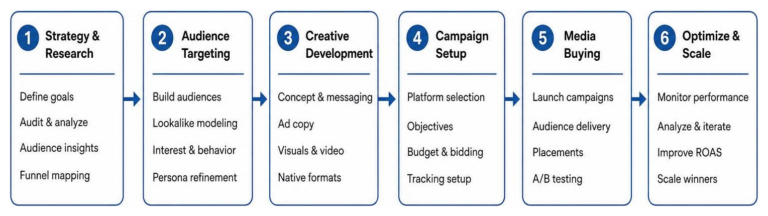
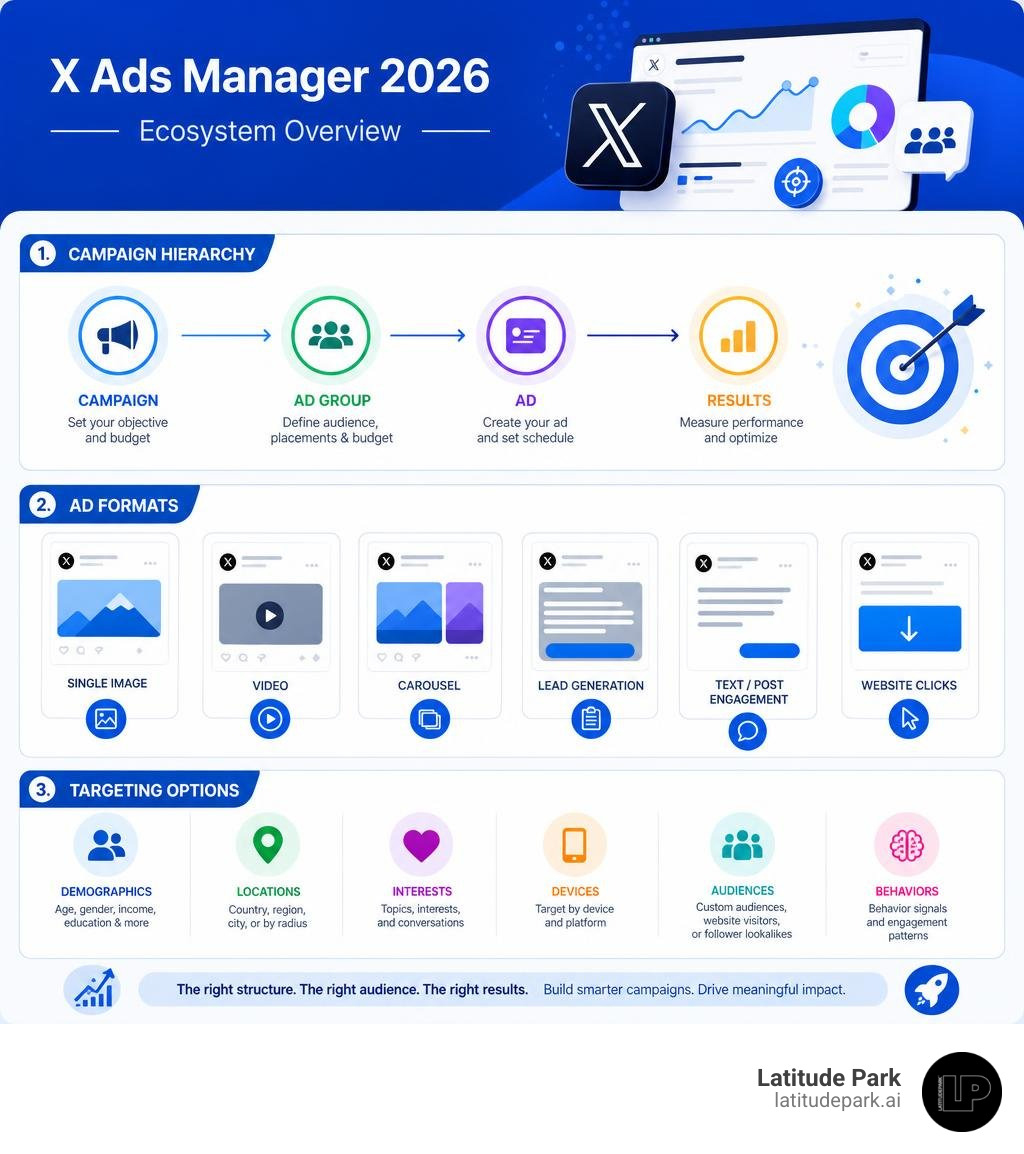
X Ads Manager organizes your marketing efforts into a clear three-tier hierarchy: Campaigns, Ad Groups, and Ads.
- Campaign Level: This is where you define your primary business objective (e.g., Reach, Website Traffic, or App Installs).
- Ad Group Level: Within each campaign, you can create multiple ad groups. This is where you configure targeting, choose specific placements, set budgets, and choose bidding strategies.
- Ad Level (Creatives): This is the actual content your audience sees. We recommend running 3 to 4 creative variants per ad group to give the optimization algorithm enough data to work with.
To help you choose the right structure, here is a breakdown of campaign objectives and their corresponding optimization goals:
| Campaign Objective | Primary Optimization Goal | Best Suited For |
|---|---|---|
| Reach | Maximize impressions | Brand awareness, local franchise grand openings |
| Video Views | Maximize 2-second or 15-second views | High-impact visual storytelling, product demos |
| Website Traffic | Link clicks / Landing page views | E-commerce sales, blog promotion, lead capture |
| App Installs | App store clicks / App installs | Mobile utility apps, franchise loyalty apps |
| Engagements | Post interactions (reposts, likes, replies) | Building community, viral marketing campaigns |
Managing Budgets, Schedules, and Bidding
X Ads Manager gives you flexible budget options to protect your bottom line. You can set daily budgets (the maximum you want to spend per day) and lifetime budgets (the total cap for the campaign’s run).
When it comes to bidding, you have three primary options:
- Automatic Bid: The system automatically optimizes your bid to get the most results at the lowest cost. This is highly recommended for beginners.
- Target Bid: The system aims for an average cost-per-action that matches your target.
- Maximum Bid: You set a hard limit on the absolute most you are willing to pay for a single action.
For a deeper dive into bidding strategies, check out our Twitter Ads Management Guide.
Targeting Options, Ad Formats, and Brand Safety

The real magic of X Ads Manager lies in how precisely you can define your audience. By combining traditional demographic filters with real-time interest data, you can build highly receptive audiences.
Audience Targeting and AI Optimization
X offers a robust suite of targeting tools that go far beyond basic age and location filters:
- Follower Lookalikes: Target users who behave similarly to the followers of specific accounts (such as your competitors or industry leaders).
- Conversation Targeting: Reach users who are actively talking about specific topics, events, or hashtags.
- Custom Audiences: Upload your own customer lists (emails or phone numbers) to run retargeting campaigns.
- AI-Driven Targeting: Let X’s machine learning models automatically find new users based on conversion patterns.
To build and refine these groups, you can use the Twitter Ads Audience Manager to save and organize your Twitter Ads Target Audience segments.
Choosing the Right Ad Formats
Choosing the right format depends heavily on your campaign goals. Here are the most popular options in 2026:
- Promoted Posts: Standard text, image, or video posts that appear directly in the user’s timeline.
- Video Ads: Video is incredibly powerful on X. In fact, tweets with video are 6x more likely to be retweeted than tweets with photos. Additionally, X has seen a 62% year-over-year increase in daily video views and a 72% year-over-year increase in watch time.
- Carousel Ads: Feature up to six swipeable images or videos, perfect for showcasing multiple franchise locations or product features.
- Vertical Video Ads: Designed specifically for mobile-first viewing, vertical videos now account for 20% of daily time spent on the platform.
- Video Website Cards: These combine video with a clear call-to-action button, delivering a 2X higher CTR than standard mobile video ad benchmarks.
Using multiple formats pays off. Research shows that exposure to two video ad formats versus one video ad format improves ad recall by 19 percentage points, brand awareness by 4.7 percentage points, and purchase intent by 3.1 percentage points. For creative specifications, keep the Guide to Twitter Advertising handy.
Brand Safety Controls and Placements
We understand that brand safety is a top priority for modern businesses. X Ads Manager includes robust adjacency controls and brand safety settings, allowing you to choose how close your ads can appear to sensitive or controversial organic content. You can also customize your placements, choosing whether your ads appear in the home timeline, search results, or user profiles.
Frequently Asked Questions About Twitter Ads Manager
What is the minimum budget to run ads on X?
There is no strict minimum budget required to run campaigns on X. You can start with daily budgets as low as $5 to $10. Most small to medium businesses on the platform spend between $101 and $500 monthly, making it highly accessible for testing.
How long does the ad approval process take?
Most ads are reviewed automatically and approved within a few minutes to a few hours. However, if your creative triggers a manual review, it can take up to 24 hours during high-volume periods. We recommend scheduling your campaigns to start a day or two in advance to avoid any launch delays.
Can agencies manage multiple client accounts?
Yes! Agencies can easily manage multiple client accounts without sharing login credentials. By using multi-user access controls, you can request access to client accounts and manage them from a single dashboard. This is especially helpful for multi-location franchises. Learn how to streamline this process in our guide to Managing Multiple Twitter Ad Accounts Without the Headache.
Conclusion
Understanding what is Twitter Ad Manager is the first step toward unlocking a highly receptive, conversational audience for your business. With its rebuilt AI-driven engine, robust video ad formats, and precise targeting capabilities, the platform offers incredible opportunities to scale your digital marketing efforts.
At Latitude Park, we specialize in multi-location digital advertising and franchise marketing. We help complex, multi-unit brands structure their ad campaigns for maximum local impact and corporate brand consistency. If you want to dive deeper into performance strategies, read our guide on How to Master Twitter Ads Lead Generation Without Losing Your Mind.
Ready to scale your paid media performance and maximize your ROI? Let our expert team handle the heavy lifting for you. Explore our tailored services and Maximize Your ROI with Professional Twitter Ads Management today!